

Mugen Camera Non-Stop Cam
Koichiro Kamada Photo & Video iPhoneiPadiPod touch
Mugen Camera Non-Stop Cam is a free Photo & Video app for iPhone and iPad by Koichiro Kamada. Rated 5.0/5 from 7 ratings. Requires iOS 17.0.
- Rating
- 5.0
- 7 ratings
- Price
- Free
- on the App Store
- Size
- 100 MB
- Age 4+
- Updated
- Oct 2
- 2026 · v2.81
Screenshots
About Mugen Camera Non-Stop Cam
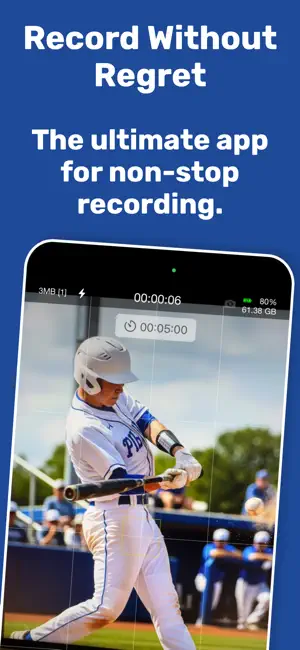
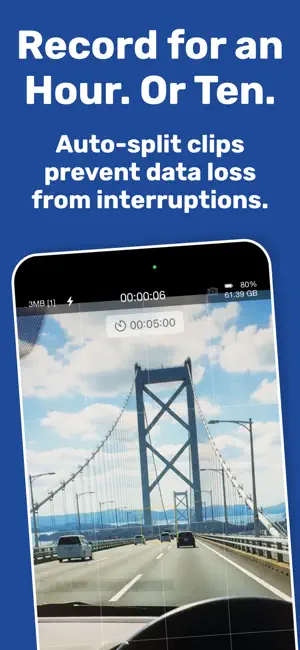
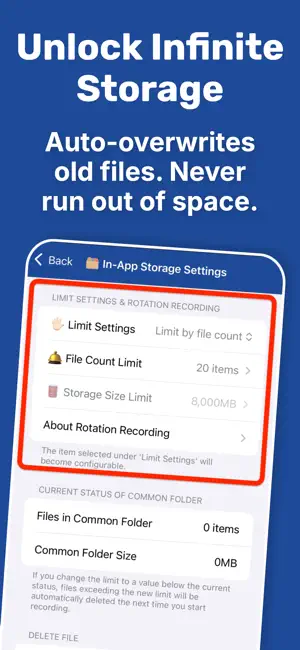
A camera app that keeps recording very long videos. 1. If power is supplied, it keeps recording video endlessly, just as the name suggests. 2. When running on battery, it records and safely saves video for as long as possible. 3. It uses iCloud technology to enable recording beyond the limits of the device. These three points are the purpose of this app. [Features] This app has the following major features. - To prepare for unexpected recording interruptions, it records while saving files in split segments at the recording length you choose in advance. - You can choose from three distinct storage destinations: In-App Storage, iCloud Drive, and Photo Library. [In-App Storage] - When the preset limit is reached, the oldest file is deleted to secure the minimum required space, and recording continues automatically. - When the maximum capacity is reached again, the oldest file is deleted again and recording continues. - By repeatedly securing storage space automatically in this way, the app makes long-duration recording possible. - You can easily export recorded data to other apps. You can also use iTunes File Sharing to import files to your Mac or PC quickly in bulk. - You can strictly manage recorded data using Face ID or Touch ID. - Recordings split across multiple files can be joined quickly into a single file. - Recorded data can also be compressed to reduce storage usage. [iCloud Drive] - Upload to iCloud Drive in real time and view recorded content remotely. - The app monitors upload status. Once upload is complete, the local copy can be deleted automatically to free up space. - Recording files can be rotated automatically so they do not exceed the specified maximum number of files. [Photo Library] - You can use iCloud Photo Library features. Saved data is optimized automatically and can also be viewed seamlessly from other devices. - Photo Library data can be played continuously and smoothly with the free sister app [Continuous Video Player]. - You can choose the destination album, or automatically create an album for each recording. [Premium Features (Paid)] This app provides the following features as paid premium features through in-app purchase. 1. Change recording quality 2. Screen saver 3. Remove ads 4. Protect data and prevent accidental operations with Face ID or Touch ID lock features 5. Zoom (including ultra-wide shooting) 6. Monitor iCloud Drive and automatically delete local copies after upload completes 7. Focus/exposure adjustment 8. Start recording immediately on launch or resume 9. Automatically stop recording while monitoring battery level 10. Lock controls during recording
Ratings & reviews
5.0
7 ratings
What’s new
Version 2.81 · Updated October 2, 2026
The view in front of you. Your reaction to it. Keep recording both. Dual camera recording arrives in a major update to Mugen Camera! 【Introducing Dual Camera Recording】 Record with the main and front cameras at the same time, with each view saved as its own independent video. Capture a new place and your reaction, or time spent with someone special, from two perspectives. A small picture-in-picture preview lets you check both views as you film in portrait or landscape. Mugen Camera’s split and loop recording now work with both cameras, too. Storage limits use their combined file sizes, and older recordings are automatically deleted in matching pairs. Keep both sides of the moment together while recording continues. Save to app storage, iCloud Drive, or your Photo Library. On supported devices, record both cameras in FHD at 30 fps for free. With Premium, choose the resolution and frame rate for each camera from the combinations your device supports. Try a new way to capture more with Mugen Camera. We’d love to hear how you use it—share your feedback and ideas through in-app support.
App privacy
The developer, Koichiro Kamada, reported these privacy practices to Apple.
Data Used to Track You
The following data may be used to track you across apps and websites owned by other companies:
- Usage Data: Advertising Data
Data Not Linked to You
The following data, which may be collected but is not linked to your identity, may be used for the following purposes:
- Usage Data: Product Interaction, Advertising Data
- Purchases: Purchase History
- Diagnostics: Crash Data, Performance Data, Other Diagnostic Data
Used for: Third-Party Advertising, Analytics, App Functionality
Alternatives to Mugen Camera Non-Stop Cam
Looking for apps like Mugen Camera Non-Stop Cam? Here are 6 similar apps on the App Store. The highest rated is M=Camera (4.7/5), and all 6 are free to download.
-
 First Camera
4.4
First Camera
4.4
-
 高画質な画面録画BREMEN〜音楽 動画
4.6
高画質な画面録画BREMEN〜音楽 動画
4.6
-
 M=Camera
4.7
M=Camera
4.7
-
 Muon - Simple Camera
4.0
Muon - Simple Camera
4.0
-
 Video Buffer Pre-Recorder 4K
4.5
Video Buffer Pre-Recorder 4K
4.5
-
 StageCameraHD2 - 48MP with HDR
4.6
StageCameraHD2 - 48MP with HDR
4.6
| App | Rating | Price | Last updated | Compare |
|---|---|---|---|---|
| Mugen Camera Non-Stop Cam | 5.0 / 5 (7 ratings) | Free | October 2, 2026 | |
| First Camera | 4.4 / 5 (13) | Free | Oct 2, 2026 | Compare |
| 高画質な画面録画BREMEN〜音楽 動画 | 4.6 / 5 (30) | Free | Oct 6, 2026 | Compare |
| M=Camera | 4.7 / 5 (19) | Free | Oct 9, 2026 | Compare |
| Muon - Simple Camera | 4.0 / 5 (6) | Free | Sep 30, 2026 | Compare |
| Video Buffer Pre-Recorder 4K | 4.5 / 5 (45) | Free | Oct 11, 2026 | Compare |
| StageCameraHD2 - 48MP with HDR | 4.6 / 5 (140) | Free | Sep 27, 2026 | Compare |