

Harken Lite Offline Music
Ben Thomas Music iPhoneiPadiPod touch
Harken Lite Offline Music is a free Music app for iPhone and iPad by Ben Thomas. Rated 3.9/5 from 12 ratings. Requires iOS 14.0. Updated January 10, 2025.
- Rating
- 3.9
- 12 ratings
- Price
- Free
- on the App Store
- Size
- 6 MB
- Age 4+
- Updated
- Jan 10
- 2025 · v5.0.0
Screenshots


About Harken Lite Offline Music
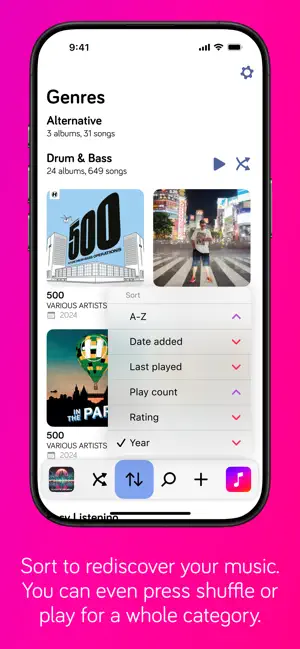
At its heart, Harken has been designed to make it as simple and quick as possible for you to start listening to music in your music collection. Music must be purchased with the Apple Music app or synched from Apple Music first. Quickly find music by typing any part of the album title or album artist. Rediscover your music collection by sorting by play count, date last played, or rating. Listen to your music in random order by shuffling songs, or shuffle the order that albums are played - can be changed in settings. Harken Lite Music Player, in addition to letting you view your music library by Album, also lets you trial all the features of the paid version of Harken For iPhone for 7 days: - view your library by Artist, Compilations, Composers, Genres, Playlists, Podcasts and Songs; - create playlists from any media type - when the trial is over, you can continue choosing music by album Customize Harken to your heart's content with options for colour theme and font, show or hide iTunes Match (cloud) items, and toggle between full-screen or unclipped cover art in the Now Playing mode. Have an iPhone 7, 8 or X, but don't like haptic feedback? That can be disabled too. Have some feedback? Go to the settings and hit the feedback button. If you like Harken Lite, please leave a review or tell your friends on social media. It really helps independent developers like me. *Sync with iTunes or buy music in the iTunes app to download music to your phone first.
Ratings & reviews
3.9
12 ratings
What’s new
Version 5.0.0 · Updated January 10, 2025
This is a huge update with lots of small UI changes that should make Harken easier and more pleasurable to use, but the biggest change is that Harken now fully supports iPad too. 1. Refreshed the UI with more space for albums 2. New library mode menu 3. New sorting menu 4. Sort library by year 5. View the year that the song was released on the Now Playing screen 6. When sorting by anything other than A-Z, see the sort metadata on every album 7. Accessible font sizes on Now Playing screen 8. Did I mention it now supports iPad too? :)
App privacy
The developer, Ben Thomas, reported these privacy practices to Apple.
Data Not Linked to You
The following data, which may be collected but is not linked to your identity, may be used for the following purposes:
- Usage Data: Product Interaction
- Diagnostics: Crash Data, Performance Data, Other Diagnostic Data
Used for: Analytics, App Functionality
Alternatives to Harken Lite Offline Music
Looking for apps like Harken Lite Offline Music? Here are 6 similar apps on the App Store. The highest rated is Meuli Player: Offline Media (5.0/5), and all 6 are free to download.
-
 Meuli Player: Offline Media
5.0
-
 Connect Headphones & Speaker ·
4.2
-
 POPMusic: MP3 Player, Offline
4.0
-
 Your Music: Offline MP3 Player
4.9
-
 Offline Music Player: Play app
4.6
-
 iMusic - Offline Music Player
4.7
| App | Rating | Price | Last updated | Compare |
|---|---|---|---|---|
| Harken Lite Offline Music | 3.9 / 5 (12 ratings) | Free | January 10, 2025 | |
| Meuli Player: Offline Media | 5.0 / 5 (1) | Free | Jul 24, 2024 | Compare |
| Connect Headphones & Speaker · | 4.2 / 5 (44) | Free | Nov 8, 2024 | Compare |
| POPMusic: MP3 Player, Offline | 4.0 / 5 (12) | Free | Jun 5, 2026 | Compare |
| Your Music: Offline MP3 Player | 4.9 / 5 (7) | Free | Oct 5, 2026 | Compare |
| Offline Music Player: Play app | 4.6 / 5 (7) | Free | Feb 16, 2024 | Compare |
| iMusic - Offline Music Player | 4.7 / 5 (141) | Free | Aug 11, 2026 | Compare |