

TV Cast Pro for Chromecast
Kraus und Karnath GbR 2Kit Consulting Photo & Video iPhoneiPadiPod touch
TV Cast Pro for Chromecast is a paid Photo & Video app for iPhone and iPad by Kraus und Karnath GbR 2Kit Consulting. Rated 4.3/5 from 8,166 ratings.
- Rating
- 4.3
- 8.1K ratings
- Price
- 9.99 USD
- on the App Store
- Size
- 30 MB
- Age 17+
- Updated
- May 6
- 2026 · v3.13
Screenshots
Save to Pinterest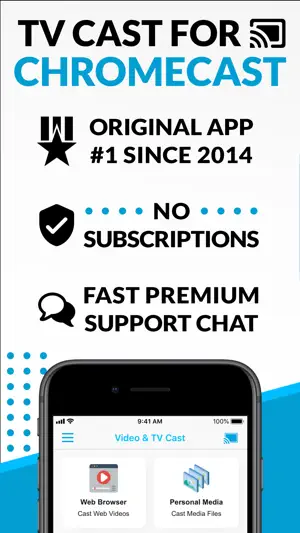


About TV Cast Pro for Chromecast
Watch any web video and your personal photos, videos & music on your Chromecast or Google Cast powered TV. Enjoy the show on your big screen. With Video & TV Cast you can browse through the web and stream any online video on your Chromecast (movies, TV shows, sports, music and more). Just navigate to your favorite website and wait for the video link detection. The video link will appear below the browser. Tap it and the video will be sent to your big screen instantly! Streaming personal media from your device is also supported. * The app only works with all Chromecast devices from Google and on devices with Google Cast or Chromecast built-in. * iTunes movies and DRM-protected videos like Amazon Prime, Netflix, Hulu, Vudu, DirecTV, Xfinity, HBO Now are not supported! * The app streams only the video part of a website and not the whole website content (No screen or tab mirroring!). * Sometimes it is necessary to play the video on your iPad or iPhone first before it gets discovered by the app for streaming. * If a specific video does not cast, please check our FAQ. If that does not help, please give us a chance to help you by dropping a mail to [email protected] instead of leaving a negative comment on the App Store. We will try to add support for your video as soon as possible. >>> PRO FEATURES * Remote Playbar: A remote control that allows you to fast forward or rewind videos while browsing. It syncs across all your iPads & iPhones that are connected to the same Chromecast. So your video can be controlled by different users in the same room. * Personal Media: Cast unlimited personal photos, videos and music directly from your device or from cloud services like iCloud and Dropbox. * Ad-Blocker + No Sponsoring Ads: The Pro app version has no ads and the Ad-Blocker blocks ads & popups on most websites that you visit. You can update, enable/disable ad-blocking at any time in the settings. * Bookmarks: Save unlimited website bookmarks. Synchronize and transfer them between different TV Cast apps and iOS devices by using backup and restore via iCloud. * Subtitles: Display subtitles & closed captions on TV. * Desktop Mode: Change the browser user-agent and cloak your iPhone/iPad as a desktop PC to load the desktop website instead of the mobile website. Please note that this will NOT enable video casting on websites that serve Flash videos in desktop mode. * Change Homepage: Set your personal homepage in the settings. >>> USER FEEDBACKS "You've brought the chromecast to life on iOS devices!! And you designed it work easily and quickly" Ryan, England “I looooove your app. It has taken my Chromecast to a whole new level.” Rosalind Romero, USA >>> A MESSAGE FROM THE DEVELOPERS We want to say thank you for all your great support and kindly invite you to honestly rate our app. This helps us to keep up our app development and support for you. Please do not trust other apps that ask you for 5-star ratings in exchange for premium upgrades. This is against good developer ethics and also against Apple guidelines. If you have any feedback, feature requests or other requests, please notify us at [email protected]. Disclaimer: This app is not affiliated with Google or any other trademark mentioned here. Chromecast is a trademark of Google LLC.
Ratings & reviews
4.3
8.1K ratings
What’s new
Version 3.13 · Updated May 6, 2026
- Bug fixes
App privacy
The developer, Kraus und Karnath GbR 2Kit Consulting, reported these privacy practices to Apple.
Data Not Linked to You
The following data, which may be collected but is not linked to your identity, may be used for the following purposes:
- Usage Data: Product Interaction
- Location: Coarse Location
- User Content: Photos or Videos, Audio Data, Customer Support
- Diagnostics: Crash Data, Performance Data
Used for: Analytics, App Functionality
Alternatives to TV Cast Pro for Chromecast
Looking for apps like TV Cast Pro for Chromecast? Here are 6 similar apps on the App Store. The highest rated is iWebTV PRO (4.7/5), and 5 of the 6 are free to download.
-
 Mirror For Chromecast App
3.9
-
 Photo Video Cast to Chromecast
4.6
-
 Sony TV Screen Mirroring Cast
4.0
-
 iWebTV PRO
4.7
-
 Smart Mirror | TV & Device
4.2
-
 AllCast Screen Mirroring to TV
4.4
| App | Rating | Price | Last updated | Compare |
|---|---|---|---|---|
| TV Cast Pro for Chromecast | 4.3 / 5 (8,166 ratings) | 9.99 USD | May 6, 2026 | |
| Mirror For Chromecast App | 3.9 / 5 (791) | Free | Jul 23, 2026 | Compare |
| Photo Video Cast to Chromecast | 4.6 / 5 (3,300) | Free | Dec 19, 2025 | Compare |
| Sony TV Screen Mirroring Cast | 4.0 / 5 (2,291) | Free | Dec 16, 2024 | Compare |
| iWebTV PRO | 4.7 / 5 (4,584) | 6.99 USD | Nov 25, 2026 | Compare |
| Smart Mirror | TV & Device | 4.2 / 5 (25,095) | Free | May 5, 2025 | Compare |
| AllCast Screen Mirroring to TV | 4.4 / 5 (17) | Free | Aug 11, 2026 | Compare |