

Da Vinci Eye: AR Trace & Draw
Da Vinci Eye LLC Graphics & Design iPhoneiPadiPod touch
Da Vinci Eye: AR Trace & Draw is a free Graphics & Design app for iPhone and iPad by Da Vinci Eye LLC. Rated 4.6/5 from 12,041 ratings. Requires iOS 17.6.
- Rating
- 4.6
- 12K ratings
- Price
- Free
- on the App Store
- Size
- 204 MB
- Age 12+
- Updated
- Oct 8
- 2026 · v5.0.3
Screenshots



About Da Vinci Eye: AR Trace & Draw
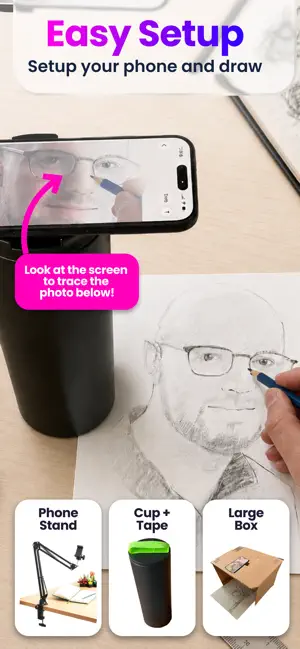
As seen on Shark Tank and featured in Apple's Apps We Love, Watercolor Artist Magazine, Handmade Seller Magazine, LifeHacker, MakeUseOf, Fast Company (Innovation Award winner), Apple News and more! Da Vinci Eye is used by millions of creatives from painters to bakers to make incredible artwork. The app is not just for tracing, it offers a wide range of drawing tools, lessons, daily drawing prompts, and a supportive community to share your artwork! IMPORTANT!: Please read how this app works below and the device requirements for AR Mode BEFORE purchasing. HIGHLIGHTS • Create incredible artwork from your own photos • Make hyper-realistic drawings with our strobe feature • Record time-lapse videos of your drawings • Separate images into layers by color value, then view those areas on your canvas • Easily learn the fundamentals of drawing • Breakdown any image into step-by-step instructions • Video tutorials • Use filters to make drawing even easier • Zoom in to capture micro details in your drawings • Connect with our community to share your artwork • Insanely fast customer support! PERFECT FOR ANY ARTIST • Bakers • Cartoonists • Tattoo Artists • Illustrators • Fiverr Designers • Hobbyists • Makeup artists • Nail Technicians • Animators No matter what skill level you’re at — Da Vinci Eye is here for you! OVERVIEW How many times have you been drawing a portrait for hours only to realize that the nose or the eye is in the wrong place? You can use Da Vinci Eye to layout artwork before you begin or even check your work as you progress. Having a hard time seeing where lights or darks go? Breakdown images into layers by color value. Then virtually project those layers on top of your image. You can see exactly where to place the darkest darks, mid-tones, and highlights. CAN'T THINK OF WHAT TO DRAW? Check out our inspiration section for user uploaded reference photos. If you have a great pic, you can even upload your own content for other artists to draw. LEARNING HOW TO DRAW? We have lessons using our unique patent-pending learning method. You can also turn ANY photo into a step by step shading drawing lesson. HOW DOES IT WORK? Based on a tool that has been used by artists for centuries, this app is a digital version of a Camera Lucida. You suspend your iPhone or iPad above or in front of your canvas with a stand, tall glass, or other objects easily found around your house. When you look through your phone, you will see both the image and the canvas simultaneously. It's similar in functionality to an art projector or light box, but with the ability to do so much more. You can draw on any surface, zoom in to draw micro details in your drawing, and you don't have to draw in the dark. WILL THIS HELP ME LEARN HOW TO DRAW? Using Da Vinci Eye, you will be training your eye to recognize proportions and draw with shading while training your hand to translate precise lines and strokes on paper. You’ll learn faster and more efficiently using our proven techniques compared to any other app. AR MODE REQUIREMENTS To use AR mode, you must have an A10x or A11 processor and above. We recommend using: – iPhone 8 and newer (iPhone 7 and below will not work) – iPad Mini 5th Generation and newer – iPad Air 2019 and newer – iPad Pro 3rd Gen (Any pro made after 2018) and newer AR & CLASSIC MODE AR mode anchors your image to an object in the real world. This lets you move your canvas or phone, and the drawing and projected image will stay aligned. Classic mode is like a normal art projector, where if you move your phone or canvas, the drawing will no longer be aligned. AR mode is especially useful for drawing or painting on an easel. However, in most cases, Classic mode will achieve the same result. TAKE YOUR DRAWING TO THE NEXT LEVEL Download Da Vinci Eye today! No one ever regretted sharpening their drawing skills. Terms of Use Link: http://davincieyeapp.com/terms-of-service/
Ratings & reviews
4.6
12K ratings
What’s new
Version 5.0.3 · Updated October 8, 2026
Da Vinci Eye 5.0 is here! This is one of the biggest updates we’ve ever made. We redesigned the app from the ground up to make creating artwork easier, more intuitive, and more enjoyable. What’s new in 5.0: • A completely new Liquid Glass design • A rebuilt drawing screen with a cleaner interface and easier-to-understand controls • A new Guided Setup that walks you through getting started step by step • Record long-form videos of your drawing process • Support for 7 new languages • Brand new instructional videos to help you get the most out of Da Vinci Eye • Search community inspiration to quickly find photos and artwork you want to create • And so much more! We’ve also made improvements throughout the app to make everything feel faster, clearer, and easier to use. Da Vinci Eye has grown a lot since we first launched, but our goal is still the same: create powerful digital tools that help you make real artwork. As always, thank you so much for your support, feedback, drawings, paintings, murals, cakes, and everything else you’ve created with Da Vinci Eye. We genuinely could not keep building this without you. If you run into a bug, have an idea for a feature, or just want to say hello, you can contact us directly from the side menu in the app. We hope you love Da Vinci Eye 5.0! Sam & Charissa 5.0.3 -> Added Italian Translations 5.0.1 -5.0.2 -> Quick fixes and updates + Tap with 3 fingers to hide the drawings screen overlay.
App privacy
The developer, Da Vinci Eye LLC, reported these privacy practices to Apple.
Data Linked to You
The following data, which may be collected and linked to your identity, may be used for the following purposes:
- Contact Info: Email Address
Used for: Developer’s Advertising or Marketing, App Functionality
Data Not Linked to You
The following data, which may be collected but is not linked to your identity, may be used for the following purposes:
- Identifiers: Device ID
- Usage Data: Product Interaction
- Diagnostics: Crash Data, Performance Data, Other Diagnostic Data
Used for: Developer’s Advertising or Marketing, Analytics, App Functionality
Alternatives to Da Vinci Eye: AR Trace & Draw
Looking for apps like Da Vinci Eye: AR Trace & Draw? Here are 6 similar apps on the App Store. The highest rated is AR Drawing How to Draw Sketch (4.7/5), and all 6 are free to download.
-
 AR Drawing How to Draw Sketch
4.7
AR Drawing How to Draw Sketch
4.7
-
 Sketchar: AR Drawing App
4.2
Sketchar: AR Drawing App
4.2
-
 AR Projector Tracing & Drawing
4.4
AR Projector Tracing & Drawing
4.4
-
 AR Drawing: Sketch & Paint
4.5
AR Drawing: Sketch & Paint
4.5
-
 Wand - AI canvas
4.7
Wand - AI canvas
4.7
-
 PicTrace®: AR Drawing & Sketch
4.6
PicTrace®: AR Drawing & Sketch
4.6
| App | Rating | Price | Last updated | Compare |
|---|---|---|---|---|
| Da Vinci Eye: AR Trace & Draw | 4.6 / 5 (12,041 ratings) | Free | October 8, 2026 | |
| AR Drawing How to Draw Sketch | 4.7 / 5 (24,790) | Free | Oct 19, 2026 | Compare |
| Sketchar: AR Drawing App | 4.2 / 5 (9,850) | Free | Oct 18, 2026 | Compare |
| AR Projector Tracing & Drawing | 4.4 / 5 (6,726) | Free | Feb 9, 2026 | Compare |
| AR Drawing: Sketch & Paint | 4.5 / 5 (94,912) | Free | Oct 24, 2026 | Compare |
| Wand - AI canvas | 4.7 / 5 (2,675) | Free | Mar 24, 2026 | Compare |
| PicTrace®: AR Drawing & Sketch | 4.6 / 5 (59,893) | Free | Oct 22, 2026 | Compare |