

Supershift - Shift Calendar
Supershift GmbH Productivity iPhoneiPadiPod touchApple Watch
Supershift - Shift Calendar is a free Productivity app for iPhone and iPad by Supershift GmbH. Rated 4.9/5 from 5,802 ratings. Requires iOS 18.
- Rating
- 4.9
- 5.8K ratings
- Price
- Free
- on the App Store
- Size
- 240 MB
- Age 4+
- Updated
- Nov 3
- 2026 · v2026.42
Screenshots

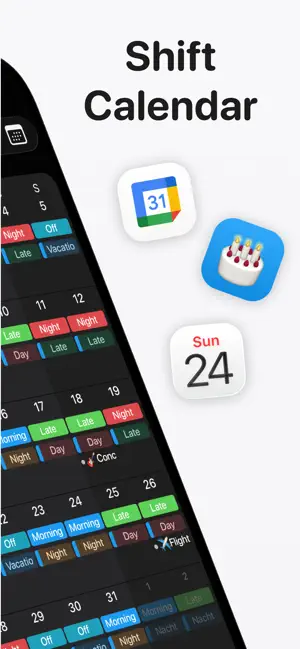


About Supershift - Shift Calendar
Supershift is the world's most downloaded and highest-rated shift calendar app on iOS. It is built specifically for nurses, doctors, paramedics, police officers, firefighters, factory and manufacturing workers, retail staff, airport crew, and bus, train, and tram drivers. No account required. No internet required. Open the app and start planning immediately - your schedule is yours, stored entirely on your device, and available anywhere from the ward to the cab to the factory floor. If you are looking for an alternative to bloated shift apps that track your data or force you to log in, Supershift is the cleaner and faster. WHY SHIFT WORKERS CHOOSE SUPERSHIFT • Multiple shifts per day: Easily schedule early + late shifts, main + on-call, split shifts, or second jobs. • Custom emojis & colors: Assign specific colors and icons to every shift type so you can read your month at a glance. • Full Dark Mode: A beautiful, eye-friendly dark mode for comfortable night-shift viewing. • No account required: Start using it in seconds. • Works fully offline: Your schedule is always accessible, even without a cell signal or Wi-Fi. CALENDAR SHARING Share your work schedule with family, partners, friends, or coworkers so everyone stays in sync. Coordinate shift swaps, check availability instantly, and cut out the endless back-and-forth texting. SMART SHIFT ALARMS Stop setting alarms manually every Sunday night. Assign a wake-up time to each shift type once, and Supershift automatically sets the right alarm for every early, late, or night shift based on your schedule. COMPLEX ROTATIONS Define your rotation pattern once and apply it up to 2 years in advance. Supershift effortlessly handles 4-on-4-off, DuPont, Pitman, Panama, Continental, 2-2-3, and any custom rotation you throw at it. REPORTS & TRACKING Track earnings, shift differentials, hours per shift type, overtime, and shift counts (e.g., vacation days, sick days, training days). Perfect for verifying payroll checks and simplifying tax time. APPLE WATCH Glance at current and upcoming shifts right from your wrist. Watch complications include countdown timers showing exactly when your shift starts and how much time is remaining. HOME SCREEN WIDGETS Keep your schedule front and center with Day, 2-week, 4-week, or Agenda view widgets right on your home screen and lock screen. CLOUD SYNC Use optional Cloud Sync to keep your iPhone and iPad perfectly aligned, and to instantly restore your data when you get a new device. SUPERSHIFT PRO FEATURES • iOS Calendar Export: Push your shifts directly to Apple Calendar, Google Calendar, or Outlook. • PDF Export: Create and share a polished PDF version of your monthly calendar complete with title, times, breaks, notes, location, and total hours worked. • External Calendar Integration: See birthdays, appointments, and personal events from your external calendars right alongside your shifts. Privacy Policy: https://supershift.app/privacy.html Terms of Use: https://www.apple.com/legal/internet-services/itunes/dev/stdeula/
Ratings & reviews
4.9
5.8K ratings
What’s new
Version 2026.42 · Updated November 3, 2026
• iPhone Duo Support: Supershift now makes full use of the large screen - folded, unfolded and everything in between. Cards, dialogs and the calendar menu move out of the way, and nothing hides behind the side bar. • Every Window Size: Calendar, reports and all detail screens now adapt properly to iPad Split View. • Fresh Navigation: Titles, toolbars and the calendar menu were rebuilt for the latest iOS look - including a redesigned Settings area. • Bug fixes & improvements
App privacy
The developer, Supershift GmbH, reported these privacy practices to Apple.
Data Used to Track You
The following data may be used to track you across apps and websites owned by other companies:
- Usage Data: Advertising Data
Data Not Linked to You
The following data, which may be collected but is not linked to your identity, may be used for the following purposes:
- Usage Data: Advertising Data
- Contact Info: Email Address, Name
- Diagnostics: Crash Data
- Other Data: Other Data Types
Used for: Third-Party Advertising, Developer’s Advertising or Marketing, App Functionality
Alternatives to Supershift - Shift Calendar
Looking for apps like Supershift - Shift Calendar? Here are 6 similar apps on the App Store. The highest rated is Work Shift Calendar (Shifter) (4.8/5), and all 6 are free to download.
-
 Shift Day Work Calendar: Spoke
4.7
Shift Day Work Calendar: Spoke
4.7
-
 Work Shift Calendar (Shifter)
4.8
Work Shift Calendar (Shifter)
4.8
-
 My Shift Planner - Calendar
4.8
My Shift Planner - Calendar
4.8
-
 Shift Work Calendar & Schedule
4.6
Shift Work Calendar & Schedule
4.6
-
 Shift Work Calendar | Schedule
4.7
Shift Work Calendar | Schedule
4.7
-
 Shift Calendar / Schedule
| App | Rating | Price | Last updated | Compare |
|---|---|---|---|---|
| Supershift - Shift Calendar | 4.9 / 5 (5,802 ratings) | Free | November 3, 2026 | |
| Shift Day Work Calendar: Spoke | 4.7 / 5 (14,347) | Free | Oct 2, 2026 | Compare |
| Work Shift Calendar (Shifter) | 4.8 / 5 (2,625) | Free | May 15, 2024 | Compare |
| My Shift Planner - Calendar | 4.8 / 5 (3,566) | Free | Nov 3, 2026 | Compare |
| Shift Work Calendar & Schedule | 4.6 / 5 (373) | Free | Oct 22, 2026 | Compare |
| Shift Work Calendar | Schedule | 4.7 / 5 (9,627) | Free | Nov 3, 2026 | Compare |
| Shift Calendar / Schedule | – | Free | Nov 3, 2026 | Compare |