

oscRFR
Alien Stagecraft Utilities iPhoneiPadiPod touch
oscRFR is a free Utilities app for iPhone and iPad by Alien Stagecraft. Rated 4.4/5 from 20 ratings. Requires iOS 15.0. Updated October 4, 2026.
- Rating
- 4.4
- 20 ratings
- Price
- Free
- on the App Store
- Size
- 7 MB
- Age 4+
- Updated
- Oct 4
- 2026 · v2.1.6
Screenshots

About oscRFR
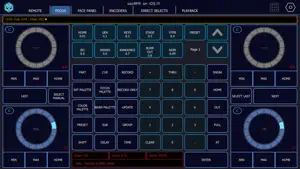
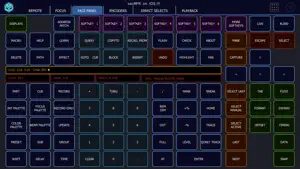
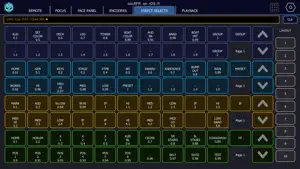
It's your console, in your hand. oscRFR is the complete wireless remote for ETC Eos and grandMA3: every key, encoder, fader and direct select on the phone or tablet you already own, so you can walk the stage while you focus and nobody has to sit at the desk. **** oscRFR is currently formatted for Tablets. We've made it available for the larger phone formats - but please do not purchase it if you are only looking for a remote on a smaller phone. *** It talks to the console directly over OSC rather than streaming the screen, so it's fast. Your keypress becomes a command on the console, and full feedback — command line, encoder values, cue text, fader levels — comes straight back, so you always know what you're touching and what cue you're in. ETC EOS • Every hard key on the facepanel, with softkey labels from the console • Encoders with coarse, fine and super-fine, saveable in layouts • Direct selects with labels, saveable in layouts • Every fader in your showfile, paged • A dedicated focus page • Labels for cues, channels, palettes, presets, subs, macros, curves, scenes and notes • Colour picker with up to 14 preset tiles per layout • Channel patch, type, label and level • Works with consoles and ETCnomad. Eos 2.3 or later. GRANDMA3 • Keypad and command line showing the desk's own prompt • Encoders with live values, direct selects, playback, layouts, sequence sheet, focus page • Toggle keys that light when the console says they are on • One-tap setup installs the Companion plugin on the console, with your consent, and checks the link for you • Solo and Team modes • Consoles and onPC, grandMA3 2.4, with a running session and a bridged network oscRFR PAGE LAYOUTS Save every page of buttons, encoders and direct selects. Master layouts capture the whole app, so different venues get different setups. Save as many console configurations as you have consoles. FREE, AND WHAT PRO ADDS The free version connects to your console and gives you the hard keys, keypads and command line, forever. Encoders, faders, direct-select fires and the colour picker show live but are view-only. oscRFR Pro is US $9.99 a year and unlocks everything: encoders, faders, direct selects, colour picker, labels, and every feature we add from here on, including grandMA3. Bought oscRFR when it was a paid app? Thank you. Everything your original app had stays unlocked, free, forever, automatically. Features added since then, like grandMA3, are part of Pro. Nothing gets in the way of a show. If the app can't reach the store — most console networks have no internet — it lets you work. WHAT IT COLLECTS Nothing. No account, no analytics, no crash reporting. The only network traffic is OSC to your console and the store's own billing when you subscribe. WHAT IT NEEDS A wireless network that reaches the console, and the console's IP address. Landscape, on a phone or a tablet. Connection help with console-side screenshots is inside the app and works offline. Made by Alien Stagecraft, a small company of working lighting programmers. Built by programmers for programmers. On the App Store since 2016. Not affiliated with or endorsed by ETC or MA Lighting. Eos is a trademark of Electronic Theatre Controls, Inc. grandMA3 is a trademark of MA Lighting International GmbH. oscRFR Pro is an auto-renewable subscription. Payment is charged to your App Store account at confirmation of purchase. The subscription renews automatically unless cancelled at least 24 hours before the end of the current period. Manage or cancel it in your App Store account settings. Terms of Use (EULA): https://www.apple.com/legal/internet-services/itunes/dev/stdeula/ Privacy Policy: https://www.alienstagecraft.com/privacy
Ratings & reviews
4.4
20 ratings
What’s new
Version 2.1.6 · Updated October 4, 2026
Fixes • Eos Encoders: Min, Max, Home and the parameter (P) key under each wheel work again. • Eos Focus: tapping P on an empty wheel no longer puts stray dashes on the command line, and the wheels stay round and centered on every screen size.
App privacy
The developer, Alien Stagecraft, reported these privacy practices to Apple.
Data Not Collected
The developer does not collect any data from this app.
Alternatives to oscRFR
Looking for apps like oscRFR? Here are 6 similar apps on the App Store. The highest rated is Omnistat: System Monitor (4.9/5), and 3 of the 6 are free to download.
-
 Omnistat: System Monitor
4.9
Omnistat: System Monitor
4.9
-
 A3d Scanner
3.7
A3d Scanner
3.7
-
 iRFR - BTS
2.9
iRFR - BTS
2.9
-
 iRFR - LR
4.0
iRFR - LR
4.0
-
 EveryCord: Screen Recorder
4.2
EveryCord: Screen Recorder
4.2
-
 iRFR Preview
2.8
iRFR Preview
2.8
| App | Rating | Price | Last updated | Compare |
|---|---|---|---|---|
| oscRFR | 4.4 / 5 (20 ratings) | Free | October 4, 2026 | |
| Omnistat: System Monitor | 4.9 / 5 (64) | Free | Sep 25, 2026 | Compare |
| A3d Scanner | 3.7 / 5 (3) | 24.99 USD | Mar 24, 2026 | Compare |
| iRFR - BTS | 2.9 / 5 (17) | 49.99 USD | Aug 26, 2025 | Compare |
| iRFR - LR | 4.0 / 5 (2) | 49.99 USD | Aug 26, 2025 | Compare |
| EveryCord: Screen Recorder | 4.2 / 5 (2,332) | Free | Sep 29, 2026 | Compare |
| iRFR Preview | 2.8 / 5 (4) | Free | Aug 26, 2025 | Compare |
Compare oscRFR with the top alternatives: ratings, updates, ASO score and keyword gaps →