

Vibration Detector
Nitrio Utilities iPhoneiPadiPod touch
Vibration Detector is a paid Utilities app for iPhone and iPad by Nitrio. Rated 1.0/5 from 1 ratings. Requires iOS 16. Updated January 27, 2026.
- Rating
- 1.0
- 1 ratings
- Price
- 2.99 USD
- on the App Store
- Size
- 2 MB
- Age 4+
- Updated
- Jan 27
- 2026 · v1.2
Screenshots



About Vibration Detector
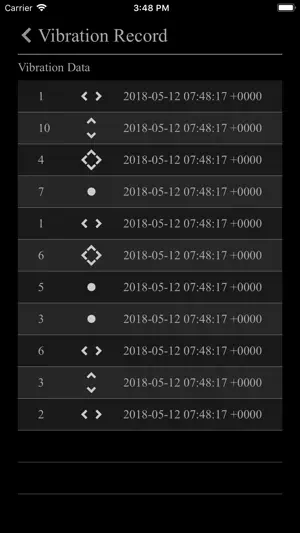
Vibration detector or Seismograph uses accelearation sensor to measure vibration or an earthquake, and it shows a reference as a seismic detector. Detect vibration and record it. Vibration detector transforms your iPhone into a high-grade industrial vibration analyzer. Built for technicians, engineers, and DIY enthusiasts, this app leverages the advanced MEMS accelerometer in your device to monitor, alarm, and log mechanical health in real-time. Vibration Detector or Vibration Meter measures vibrations using your device’s sensors on all 3 axes: X, Y, Z and shows reference to earthquake vibrations (seismograph, body tremor, seismometer). Vibration Meter can also be called seismograph or seismometer when used for measuring seismic activity. Features: - Record vibrations with time and date. - Set a vibration level threshold for recording. - Play a sound when the vibration threshold is reached. - Dim screen option for battery saving. - Lightweight app with a small size, optimized for everyday use. - Real-Time Precision Monitoring Get instant readouts of vibration magnitude. Our sensor fusion algorithm filters out gravity to give you the most accurate "true vibration" data across X, Y, and Z axes. - Multi-Unit Support Switch seamlessly between industry-standard units. Whether you prefer G-Force (g), Velocity in inches per second (in/s), or millimeters per second (mm/s), the app converts all data and thresholds instantly. - Dual-Threshold Logic Total control over your data. Set a Log Threshold to automatically record peaks for later analysis, and a separate Alarm Threshold to trigger a system-standard audible warning when vibrations reach critical levels. - The "Vibration Sheet" (Data Logger) Every significant event is timestamped and recorded in a dedicated history sheet. Manage your data with ease using swipe-to-delete or the "Clear All" function for new sessions. - Stealth "Detach" Mode Designed for long-term monitoring. Tap the Dim button to turn the screen completely black and drop brightness to zero. This saves battery and prevents screen burn-in while the device is taped or clamped to machinery. A single tap brings the UI back instantly. - Intuitive "Bottom-Control" UI Engineered for one-handed use in the field. All sliders, unit toggles, and start buttons are positioned at the bottom of the screen, keeping the massive center readout unobstructed. How to Use 1. Mount: Secure your iPhone firmly to the surface you wish to measure. 2. Set: Adjust your Log and Alarm sliders based on your required sensitivity. 3. Start: Hit "Start Monitoring" to begin the live feed. 4. Dim: If recording for a long period, tap the Moon icon to enter Stealth Mode. 5. Review: Open the Vibration History sheet to analyze the captured peaks and timestamps. *This is a universal app that work for both iPhone and iPad. Thanks for your support and do visit nitrio.com for more apps for your iOS devices.
What’s new
Version 1.2 · Updated January 27, 2026
- Updated for the Latest Devices - Minor Bug Fixes
App privacy
The developer, Nitrio, reported these privacy practices to Apple.
Data Not Collected
The developer does not collect any data from this app.
Alternatives to Vibration Detector
Looking for apps like Vibration Detector? Here are 6 similar apps on the App Store. The highest rated is Vibration Detector Sensor (5.0/5), and 5 of the 6 are free to download.
-
 Vibration Detector Sensor
5.0
Vibration Detector Sensor
5.0
-
 Vibration Detect II
-
 Remotely See
-
 FileAssist
4.0
FileAssist
4.0
-
 Ghost Sound - Seek Paranormal
-
 NoiseLog: Log & Report Noise
| App | Rating | Price | Last updated | Compare |
|---|---|---|---|---|
| Vibration Detector | 1.0 / 5 (1 rating) | 2.99 USD | January 27, 2026 | |
| Vibration Detector Sensor | 5.0 / 5 (1) | Free | Apr 6, 2026 | Compare |
| Vibration Detect II | – | 9.99 USD | Jan 13, 2025 | Compare |
| Remotely See | – | Free | Nov 14, 2024 | Compare |
| FileAssist | 4.0 / 5 (1) | Free | Jul 10, 2026 | Compare |
| Ghost Sound - Seek Paranormal | – | Free | Sep 14, 2026 | Compare |
| NoiseLog: Log & Report Noise | – | Free | Jun 5, 2026 | Compare |
Compare Vibration Detector with the top alternatives: ratings, updates, ASO score and keyword gaps →