

Flacbox: Hi-Res Music Player
EVERAPPZ SL Music iPhoneiPadiPod touch
Flacbox: Hi-Res Music Player is a free Music app for iPhone and iPad by EVERAPPZ SL. Rated 4.6/5 from 8,608 ratings. Requires iOS 15.5.
- Rating
- 4.6
- 8.6K ratings
- Price
- Free
- on the App Store
- Size
- 256 MB
- Age 12+
- Updated
- Oct 27
- 2026 · v7.8
Screenshots


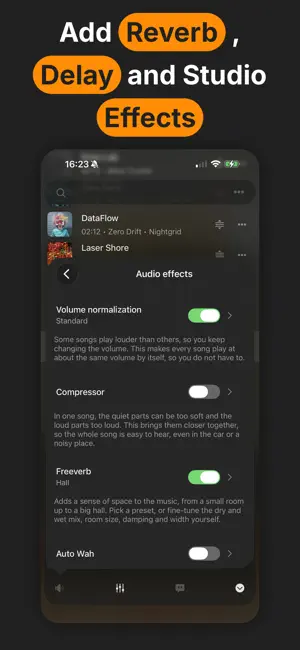
About Flacbox: Hi-Res Music Player
Flacbox is a Hi-Res music player for people who love great sound. Play almost any audio file on your iPhone or iPad in full lossless quality. Stream music from your NAS or cloud, and adjust the sound with a built-in equalizer. Save space on your device by moving your music to a NAS or cloud. Stream it back, or save songs for offline listening. Your music library updates by itself and sorts songs by album, artist, genre, and composer. Make playlists, change the song order, and manage your files with the built-in file manager. Find any song fast with smart search. The equalizer has genre presets, manual controls, and a tool to make the sound louder. You can save your own presets and share them. SUPPORTED AUDIO FORMATS - Lossless and Hi-Res: FLAC, ALAC, WAV, AIFF, DSF (DSD), PCM. - Lossy: MP3, AAC, OGG, OPUS, AC3, WMA. - Containers: M4A, M4V, MP4, MKV, MOV, MPEG. - Tracker and MOD music: MOD, XM, IT, S3M. - And more. AUDIO EFFECTS - Shape your sound in real time with reverb, delay, echo, chorus, flanger, phaser, and auto-wah. - Add character with distortion, and control dynamics with a compressor. - Crossfeed makes headphone listening more natural and less tiring. DSP CHAIN - Build your own signal chain from professional filters and tools. - Filters: low-pass, high-pass, band-pass, and notch to shape or clean up the sound. - EQ: peaking, low-shelf, and high-shelf for precise tone control. - Level and drive: gain, soft-clip saturation, and a bit crusher for a lo-fi edge. - Creative processors: tremolo, delay, ring modulator, and stereo width. MUSIC VISUALIZER - Watch full-screen animated visuals that react live to your music. - Choose from a large library of presets, or let them cycle. CLOUD AND PRIVATE STORAGE - iCloud Drive, Dropbox, OneDrive, Box, MEGA, Yandex Disk, pCloud, HiDrive, OpenDrive, MediaFire, MyDrive, Put.io, InfiniCLOUD, WD MyCloud Home, Cloud Mail.ru, and Baidu Cloud. - Private cloud services like MEGA, Internxt, and Proton Drive are also supported. MEDIA SERVERS - Connect Plex, Subsonic, Navidrome, Jellyfin, and Emby to open your full music library. COMPUTER AND NAS CONNECTIONS - Connect with SMB, WebDAV, DLNA, FTP, SFTP, and NFS. - Connects directly to QNAP, WD My Cloud Home, Nextcloud, and Synology Drive. - Smart buffering helps music play without breaks on slow networks. - Add files from your computer with iTunes File Sharing or Wi-Fi transfer. OFFLINE LISTENING - Save songs, albums, or full artists to listen without internet. - Turn on the audio cache to save recent songs without doing it by hand. LYRICS AND COMMENTS - See timed lyrics and song notes inside each track. - Add the Lyrics widget to your Home Screen for quick access. AIRPLAY AND CHROMECAST - Send music to Apple TV, HomePod, smart speakers, and other devices with AirPlay, AirPlay 2, or Chromecast. APPLE CARPLAY - A simple CarPlay screen lets you choose music while you drive. WIDGETS - Home Screen widgets show your playback queue and let you start where you stopped. PLAYBACK CONTROLS - Adjust playback speed without changing the pitch. - Save and restore your play queue and last position. - Sleep timer and skip time controls. - Shuffle and repeat modes, including stop after the current track. - Plays in the background while you use other apps. FILE MANAGER AND LIBRARY - Sort your music by title, album, artist, album artist, genre, composer, rating, year, BPM, play count, bitrate, or length. - Edit song tags with the built-in ID3 editor. - Open files from external memory cards. - Save playlists in M3U, M3U8, and CUE formats. QUICK ACCESS - Find your music in Recently Played, Favorites, and Bookmarks. AUDIO QUALITY - Sample rates from 8 kHz to 384 kHz. - Audio output in default or mixed mode. - Support for 1 to 7 audio channels. Get Flacbox now and turn your iPhone into a real Hi-Res player. Privacy Policy: https://www.everappz.com/privacy-policy Terms and Conditions: https://www.everappz.com/terms-and-conditions
Ratings & reviews
4.6
8.6K ratings
What’s new
Version 7.8 · Updated October 27, 2026
Hello everyone! This is a big update focused on a customizable layout, a refreshed interface for the newest iPhone and iPad, and smoother playback. Customizable Tab Bar and Sidebar - Reorder and edit your tabs. Choose which items appear in the tab bar and sidebar and arrange them your way. - Add extra items, and collapse or expand sections for Connect, Local Files, Media Library, and Settings. - Bookmarks and Comments tabs are now available on iPhone. Media Library - External folders can now sync into your Media Library. - Rebuilt metadata sync with a live total and processed counter. - Many reliability fixes for local and external file syncing. Design and Layout - Full support for the latest iPhone and iPad screens. - Updated colors to better match the system light and dark appearance. - Lots of split view and navigation polish. Backup - New option to exclude the app from iTunes and iCloud backup. More - Fixed playback of cloud files when using the Sound FX audio engine. - Last.fm album artist scrobbling option. - New and updated translations in many languages. - New search in Cloud Files for quicker access. - Google Cast artwork fix. - Numerous smaller fixes and performance improvements throughout. Thank you for using Flacbox! If you enjoy it, please rate it on the App Store. Have a question or found a problem? Email us at [email protected].
App privacy
The developer, EVERAPPZ SL, reported these privacy practices to Apple.
Data Used to Track You
The following data may be used to track you across apps and websites owned by other companies:
- Identifiers: Device ID
Data Linked to You
The following data, which may be collected and linked to your identity, may be used for the following purposes:
- Location: Coarse Location
- Identifiers: Device ID
- Usage Data: Product Interaction, Advertising Data
- Contact Info: Email Address
Used for: Third-Party Advertising, Developer’s Advertising or Marketing, Analytics, App Functionality
Data Not Linked to You
The following data, which may be collected but is not linked to your identity, may be used for the following purposes:
- Diagnostics: Performance Data, Other Diagnostic Data, Crash Data
- Purchases: Purchase History
- Identifiers: User ID
Used for: Third-Party Advertising, Developer’s Advertising or Marketing, Analytics, App Functionality
Alternatives to Flacbox: Hi-Res Music Player
Looking for apps like Flacbox: Hi-Res Music Player? Here are 6 similar apps on the App Store. The highest rated is foobar2000 (4.5/5), and all 6 are free to download.
-
 foobar2000
4.5
-
 VOX – MP3 & FLAC Music Player
4.2
-
 Equalizer Fx: Bass Booster App
4.2
-
 Equalizer+ HD music player
3.8
-
 Music Mastering: AudioMaster
4.5
-
 Boom: Bass Booster & Equalizer
3.9
| App | Rating | Price | Last updated | Compare |
|---|---|---|---|---|
| Flacbox: Hi-Res Music Player | 4.6 / 5 (8,608 ratings) | Free | October 27, 2026 | |
| foobar2000 | 4.5 / 5 (223) | Free | Oct 27, 2026 | Compare |
| VOX – MP3 & FLAC Music Player | 4.2 / 5 (3,157) | Free | Sep 28, 2026 | Compare |
| Equalizer Fx: Bass Booster App | 4.2 / 5 (27,992) | Free | Dec 19, 2025 | Compare |
| Equalizer+ HD music player | 3.8 / 5 (9,363) | Free | Aug 20, 2024 | Compare |
| Music Mastering: AudioMaster | 4.5 / 5 (2,790) | Free | Oct 7, 2026 | Compare |
| Boom: Bass Booster & Equalizer | 3.9 / 5 (4,568) | Free | Oct 10, 2026 | Compare |