

Salat Calculator - MAUK
Majlis Ansarullah UK Utilities iPhoneiPadiPod touch
Salat Calculator - MAUK is a free Utilities app for iPhone and iPad by Majlis Ansarullah UK. Rated 5.0/5 from 5 ratings. Requires iOS 11.0.
- Rating
- 5.0
- 5 ratings
- Price
- Free
- on the App Store
- Size
- 20 MB
- Age 4+
- Updated
- Feb 3
- 2025 · v2.2
Screenshots
About Salat Calculator - MAUK
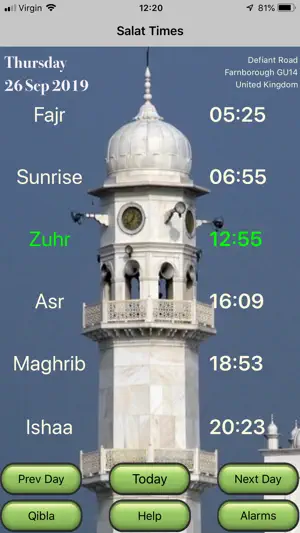
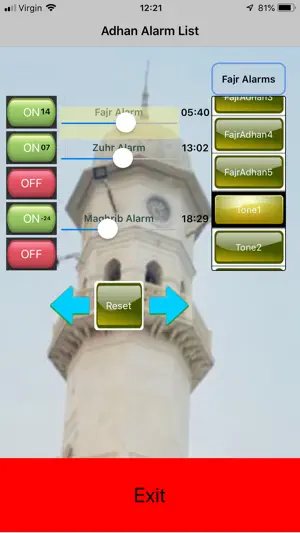
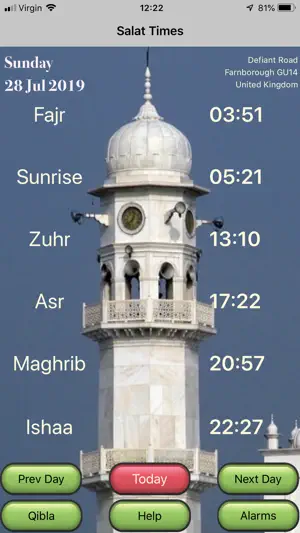
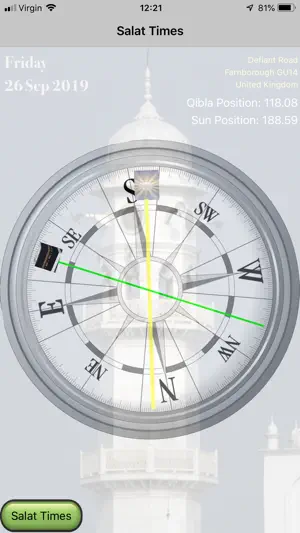
The Salat times of the 5 daily prayers are calculated for the location obtained by your GPS. Also calculates the Qibla direction relative to true north and also relative to the sun. Large Salat times makes it easy to read and the next Salat time is highlighted in green colour. A choice of 5 different Adhans to be used as alarms for each of the 5 Salat times. Each Alarm time can adjusted +/- 100 minutes from the current Salat time. In addition, 5 different tone alarms are also available Pressing the Next Button will display the next day's time. A press and hold on the Next Button will display the times 30 days on. Similarly, for the Previous button. Each Salat's alarm time is set by adjusting it's slider. The user is presented with 4 user options for Fajr and Ishaa calculation methods. The 80/90 Mins option has been developed under Khalifatul Masih IV (may Allah strengthen him) instructions that if in a location there is twilight, then Fajr angle is 90 minutes before sunrise. If there is no twilight then set the Fajr angle as 80 minutes before sunrise. There is a limiting latitude of 55.87 degrees, above which if there is no twilight then the timings are calculated for location at latitude 55.87 degrees. Other options are also available for other locations, and these are for calculation of Fajr and Ishaa times at sun being 18 degrees, 16 degrees or 12 degrees below the horizon. Each salat can be set to have a different adhans - up to 5 different adhans available and 5 different tones. Each adhan/tone alarm can be set at the Salat time, or easily adjust to +/- 100 minutes from the salat time. On the Adhan Alarm screen a click on the reset button will reset the active adhan slider time to mid point (i.e. at salat time). A press and hold on the reset button, sets all the 5 adhan slider times back to mid point. Listen to the Adhan by clicking on an Adhan Alarm button. Mute the sound by clicking on the same Adhan Alarm button. When the Alarm sounds, it can be silenced by clicking on the Alarm notification. Qibla direction is from True north, and also can be set by aligning with the sun position.
Ratings & reviews
5.0
5 ratings
What’s new
Version 2.2 · Updated February 3, 2025
Updated Asr time of 00:00 for all latitudes with negative values Updated bug of Next day salat time when on last Sunday of October - (affecting day light saving time)
App privacy
The developer, Majlis Ansarullah UK, reported these privacy practices to Apple.
Data Not Collected
The developer does not collect any data from this app.
Alternatives to Salat Calculator - MAUK
Looking for apps like Salat Calculator - MAUK? Here are 6 similar apps on the App Store. The highest rated is PrepTracker: Emergency Prep (5.0/5), and all 6 are free to download.
-
 PrepTracker: Emergency Prep
5.0
PrepTracker: Emergency Prep
5.0
-
 Salat - Prayer Times
5.0
Salat - Prayer Times
5.0
-
 Salah: Prayer Times & Adhan
-
 Salaty - Islamic companion
4.1
Salaty - Islamic companion
4.1
-
 Al-Islam | Islamic Pillars
4.8
Al-Islam | Islamic Pillars
4.8
-
 Salat Times - Islamic Prayers
4.8
Salat Times - Islamic Prayers
4.8
| App | Rating | Price | Last updated | Compare |
|---|---|---|---|---|
| Salat Calculator - MAUK | 5.0 / 5 (5 ratings) | Free | February 3, 2025 | |
| PrepTracker: Emergency Prep | 5.0 / 5 (1) | Free | Oct 27, 2026 | Compare |
| Salat - Prayer Times | 5.0 / 5 (7) | Free | Oct 14, 2026 | Compare |
| Salah: Prayer Times & Adhan | – | Free | Oct 7, 2026 | Compare |
| Salaty - Islamic companion | 4.1 / 5 (9) | Free | Oct 4, 2026 | Compare |
| Al-Islam | Islamic Pillars | 4.8 / 5 (64) | Free | Oct 15, 2026 | Compare |
| Salat Times - Islamic Prayers | 4.8 / 5 (1,905) | Free | Feb 11, 2026 | Compare |