

Hudway Go: Navigation with HUD
HUDWAY LLC Navigation iPhoneiPadiPod touch
Hudway Go: Navigation with HUD is a free Navigation app for iPhone and iPad by HUDWAY LLC. Rated 3.2/5 from 511 ratings. Requires iOS 13.0.
- Rating
- 3.2
- 511 ratings
- Price
- Free
- on the App Store
- Size
- 58 MB
- Age 4+
- Updated
- Dec 28
- 2024 · v6.0.3
Screenshots
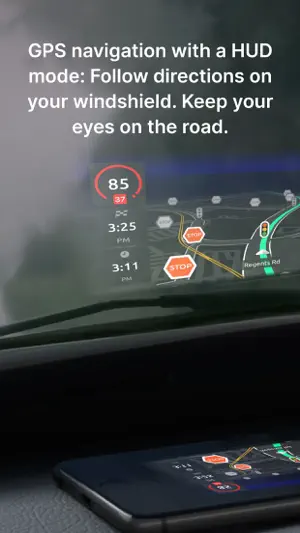


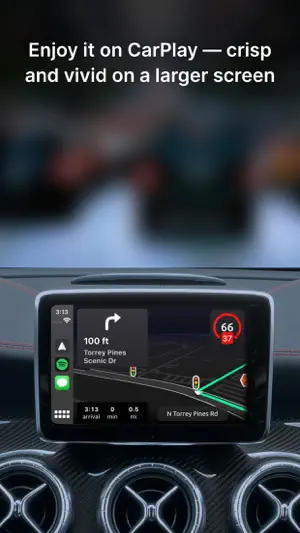
About Hudway Go: Navigation with HUD
HUDWAY Go is a GPS navigation app which turns your smartphone into a heads-up display. Enjoy driving any car with a HUD powered by just your phone. *** "Hudway Go is one of the cleverest driving apps we've seen" — CNET "Hudway Go is unbelievably cool for one special reason: It actually lets you see your directions and route right on your windshield" — USA Today "Hudway HUD tools will remind you nothing less than a science fiction movie that you watched recently" — crazyengineers.com "HUDWAY Go turns your windshield into a jet fighter cockpit" — digitaltrends.com *** HUDWAY Go helps you drive safer in fog, rain, heavy snow, in dusk and darkness. Set your destination, select the route and place your phone on the dash — to see the route reflected on your windshield. Keep your eyes on the road and know in advance what’s ahead — a straight run, or a sharp turn. The dark windy unknown roads become more predictable this way. Features: - Easy-to-follow 3D route view - Classic map view - Heads-up (HUD) mode available for both the map and the 3D route iews - Customizable voice assistant - Speed limits and speed cam alerts - A sum-up of fuel consumption and cost for each trip - A selection of trip widgets, like ETA, speed, distance traveled, directions on the next manoeuvre, etc. - Alternative routes and stopovers - Favorite locations, personal records, driving score, weekly and monthly statistics, and more Note: Any issues found or suggestions you're willing to share — shoot us an email right from the app. We have auto-renewing subscriptions for the premium features in the app. And here's how they work: — We have 1-month, 3-months, 6-months, 1-year and lifetime subscriptions. — Your iTunes account is charged at confirmation of purchase — If you want to cancel the renewal, be sure to do it 24-hours before subscription expires: within 24-hours prior to the end of the current period your account is automatically charged for renewal — You can actually cancel the auto-renewal right after you've purchased the subscription: the subscription you've paid for won't cancel, but you won't be charged for the next period when it ends. We thought you'd like to know that: 1. On a clear day, your phone screen may not be able to produce a legible reflection. This is when you can use the app in a regular mode with the phone fixed in a mount. At night, in dusk, or in dull weather the reflection is normally well-discernible. 2. When driving, make sure that your smartphone or tablet is firmly fixed, and doesn't obstruct your view of the road. 3. Just as any other other navigation app, HUDWAY Go extensively uses GPS which may quickly drain your phone battery. If you're willing to get yourself a HUD that works day&night, shows your speed, directions, messenger notifications and incoming calls — all while your phone stays in your pocket, check out our HUDWAY Drive device at hudway.co/drive Privacy Policy hudway.co/privacy Terms of Use hudway.co/terms
Ratings & reviews
3.2
511 ratings
What’s new
Version 6.0.3 · Updated December 28, 2024
– Updated 2D maps to vector ones, now they work smoother and faster – Now application settings can be changed during a trip – Navigation mode in 3D mode now has a light theme – Updated display of the list of maneuvers – Updated the PREMIUM mode: added the purchase of a mode for a day, a premium mode with a trial, you no longer need to create an account to purchase – Bug fixes
App privacy
The developer, HUDWAY LLC, reported these privacy practices to Apple.
Data Linked to You
The following data, which may be collected and linked to your identity, may be used for the following purposes:
- Contact Info: Email Address, Name
- Location: Coarse Location
- Identifiers: User ID
Used for: Developer’s Advertising or Marketing, Analytics, App Functionality
Data Not Linked to You
The following data, which may be collected but is not linked to your identity, may be used for the following purposes:
- Location: Precise Location
- User Content: Customer Support
- Usage Data: Product Interaction
- Diagnostics: Crash Data, Performance Data
- Identifiers: Device ID
Used for: Analytics, App Functionality
Alternatives to Hudway Go: Navigation with HUD
Looking for apps like Hudway Go: Navigation with HUD? Here are 6 similar apps on the App Store. The highest rated is GPS Route Maps – Navigation (4.7/5), and all 6 are free to download.
-
 Car HUD: Speed & Navigation
3.0
Car HUD: Speed & Navigation
3.0
-
 CarOS: Car Dashboard & Dashcam
-
 iCarMode: Drive Safe Dashboard
4.0
iCarMode: Drive Safe Dashboard
4.0
-
 GPS Route Maps – Navigation
4.7
GPS Route Maps – Navigation
4.7
-
 Magic Earth Navigation & Maps
3.9
Magic Earth Navigation & Maps
3.9
-
 Head-Up Display - Speedometer
| App | Rating | Price | Last updated | Compare |
|---|---|---|---|---|
| Hudway Go: Navigation with HUD | 3.2 / 5 (511 ratings) | Free | December 28, 2024 | |
| Car HUD: Speed & Navigation | 3.0 / 5 (2) | Free | Oct 2, 2026 | Compare |
| CarOS: Car Dashboard & Dashcam | – | Free | Oct 21, 2026 | Compare |
| iCarMode: Drive Safe Dashboard | 4.0 / 5 (250) | Free | Oct 29, 2026 | Compare |
| GPS Route Maps – Navigation | 4.7 / 5 (859) | Free | Oct 21, 2025 | Compare |
| Magic Earth Navigation & Maps | 3.9 / 5 (569) | Free | Oct 27, 2026 | Compare |
| Head-Up Display - Speedometer | – | Free | Jul 4, 2026 | Compare |