

All-Reminder
Muhammad Ibrahim Productivity iPhoneiPadiPod touch
All-Reminder is a free Productivity app for iPhone and iPad by Muhammad Ibrahim. Rated 3.4/5 from 15 ratings. Requires iOS 26.0. Updated September 30, 2026.
- Rating
- 3.4
- 15 ratings
- Price
- Free
- on the App Store
- Size
- 11 MB
- Age 4+
- Updated
- Sep 30
- 2026 · v6.0
Screenshots


About All-Reminder
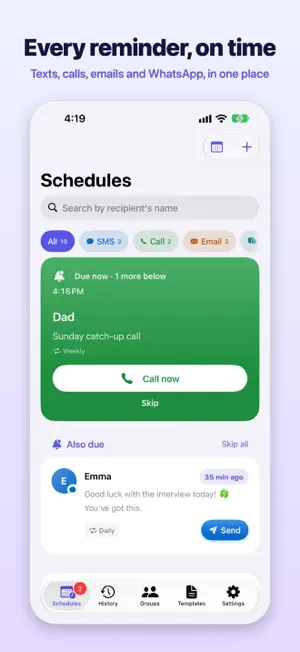
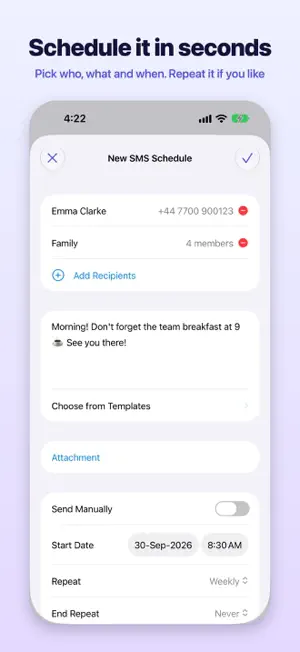
Never forget to text, call or email someone again. All-Reminder lets you schedule SMS, phone calls, emails and WhatsApp messages ahead of time. When the moment comes, it reminds you and opens the message ready to send, so it only takes a tap. SEE WHAT'S DUE, AT A GLANCE • A Home screen built around right now: what's due appears at the top, with a big Send or Call button • Everything coming up is grouped into Today, Tomorrow, This week and Later • Filter by SMS, Call, Email or WhatsApp with one tap • Every reminder shows how often it repeats, when it starts and ends, and whether it has a photo attached • Switch to the Calendar view to see your week day by day SCHEDULE IT IN SECONDS • One simple form for texts, calls, emails and WhatsApp • Repeat hourly, daily, weekly, monthly or yearly, with an end date if you want one • Send to several people at once, or to a saved Group • Start from a Template for the messages you send often • Add a photo to texts, WhatsApp messages and emails NEVER MISS THE MOMENT • A notification the moment a reminder is due; tap it and the message opens, ready to send • A Live Activity counts down on your Lock Screen and Dynamic Island as a reminder approaches • Home Screen and Lock Screen widgets show what's next • Urgent alerts sound like an alarm and break through Silent Mode and Focus, for the reminders you truly can't miss • Siri and Shortcuts: create, send and check on reminders hands-free • Set up a Shortcuts automation that opens the right message for you at the time you choose STAY IN CONTROL • Not the right moment? Skip it in one tap, or Skip all. Recurring reminders carry on as scheduled • Undo a skip straight away if you change your mind • Pause a recurring reminder and resume it later • The History tab keeps every finished reminder, grouped by month, showing whether it was sent, called, opened or skipped • Search History by name or by what you wrote, and schedule any past message again in one tap WRITE LESS • On-device AI drafting (Premium): say what the message is for and how it should sound, and get a ready-to-edit draft. It runs entirely on your device • Apple's Writing Tools work in every message field DESIGNED FOR iOS 26 • A clean new look with a tab bar for Schedules, History, Groups, Templates and Settings • Beautiful in Light and Dark Mode, and easy to read at larger text sizes PREMIUM • Unlimited active reminders (the free plan includes up to 10) • Calendar view, sending to Groups, Templates, custom notification sounds, photo attachments and AI drafting • Weekly, monthly and yearly plans: a free trial on weekly and monthly, and a lower price for your first year on yearly • Payment is charged to your Apple Account. Subscriptions renew automatically unless cancelled at least 24 hours before the end of the current period. Manage or cancel anytime in Settings. A note on sending: iOS doesn't let any app send a text, place a call or send a WhatsApp message without you. All-Reminder puts the right message, to the right person, in front of you at the right time, so sending is one tap. Privacy Policy: https://sites.google.com/view/krectsolutions/privacy-policy Terms of Use: https://sites.google.com/view/krectsolutions/terms-of-service
Ratings & reviews
3.4
15 ratings
What’s new
Version 6.0 · Updated September 30, 2026
All-Reminder 6.0 is a complete redesign. NEW LOOK • A fresh new app icon and colours • A tab bar for Schedules, History, Groups, Templates and Settings, in place of the side menu • Redesigned reminder rows that show when a reminder repeats, starts and ends, and whether it has a photo A HOME SCREEN BUILT AROUND RIGHT NOW • What's due now appears at the top with a big Send or Call button, and upcoming reminders move there 15 minutes ahead • Skip a reminder, or Skip all, in one tap, with Undo. Recurring reminders carry on as scheduled • Every due reminder has its own Send or Call button, right in the list • Paused reminders have their own section on Home, ready to resume HISTORY • A new History tab keeps every finished reminder, grouped by month • See how each one ended: sent, called, opened or skipped • Schedule any past message again as a new reminder, and search what you wrote ALSO • A new Premium screen with clearer plans and prices, and your plan and renewal date if you're subscribed • The Live Activity now keeps counting down reliably and ends once you've handled the reminder • Call reminders now keep the date and time you set • Many smaller fixes and refinements All-Reminder now requires iOS 26 or later.
App privacy
The developer, Muhammad Ibrahim, reported these privacy practices to Apple.
Data Not Linked to You
The following data, which may be collected but is not linked to your identity, may be used for the following purposes:
- Usage Data: Product Interaction, Advertising Data
- Diagnostics: Crash Data, Performance Data
Used for: Analytics
Alternatives to All-Reminder
Looking for apps like All-Reminder? Here are 6 similar apps on the App Store. The highest rated is Reminder Text: SMS Reminders (4.8/5), and all 6 are free to download.
-
 Call Later - phone scheduler
2.6
Call Later - phone scheduler
2.6
-
 Hello - A phone call planner
4.5
Hello - A phone call planner
4.5
-
 Reminderbase: Scheduled Text
4.5
Reminderbase: Scheduled Text
4.5
-
 Reminder Text: SMS Reminders
4.8
Reminder Text: SMS Reminders
4.8
-
 Kyew - Schedule Text Messages
4.3
Kyew - Schedule Text Messages
4.3
-
 Fext - Group Text Messaging
4.0
Fext - Group Text Messaging
4.0
| App | Rating | Price | Last updated | Compare |
|---|---|---|---|---|
| All-Reminder | 3.4 / 5 (15 ratings) | Free | September 30, 2026 | |
| Call Later - phone scheduler | 2.6 / 5 (5) | Free | Mar 5, 2025 | Compare |
| Hello - A phone call planner | 4.5 / 5 (58) | Free | Mar 3, 2026 | Compare |
| Reminderbase: Scheduled Text | 4.5 / 5 (448) | Free | Jun 4, 2026 | Compare |
| Reminder Text: SMS Reminders | 4.8 / 5 (132) | Free | Jul 12, 2026 | Compare |
| Kyew - Schedule Text Messages | 4.3 / 5 (301) | Free | Sep 16, 2026 | Compare |
| Fext - Group Text Messaging | 4.0 / 5 (552) | Free | Aug 10, 2026 | Compare |
Compare All-Reminder with the top alternatives: ratings, updates, ASO score and keyword gaps →