

NumPad: Calculator Keyboard
More Voltage Productivity iPhoneiPadiPod touch
NumPad: Calculator Keyboard is a paid Productivity app for iPhone and iPad by More Voltage. Rated 4.2/5 from 232 ratings. Requires iOS 16.0.
- Rating
- 4.2
- 232 ratings
- Price
- 2.99 USD
- on the App Store
- Size
- 8 MB
- Age 4+
- Updated
- Oct 1
- 2026 · v2.1.1
Screenshots


About NumPad: Calculator Keyboard
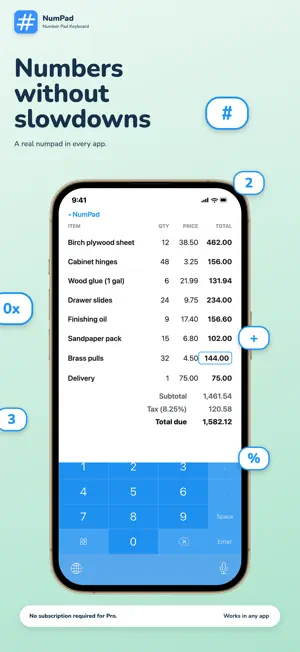
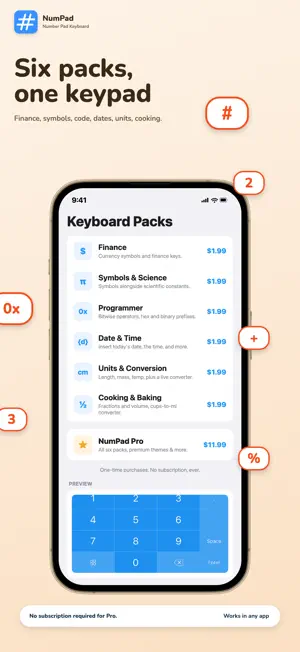
Type a number, get an answer. NumPad puts a full numeric keypad and calculator right inside your iPhone keyboard. Type "1200*0.0825" and the answer floats above your cursor before you even reach for "=". Tap it to insert, or keep typing to refine. LIVE MATH, WHILE YOU TYPE Start any expression — "84.50*1.18", "250-20%", "3*12+40" — and a floating result chip appears above the cursor as you type. Same engine as the "=" key and Siri, with zero extra taps. KEYBOARDS FOR YOUR ACTUAL WORK Swap in a specialty key layout for what you're doing — six packs included: • Finance — currency symbols for fast price entry • Symbols & Science — π, √, ^, ° and math notation • Programmer — hex prefixes and bitwise operators • Date & Time — today's date or the current time in one tap • Units & Conversion — length, mass, temperature with a live offline converter • Cooking & Baking — fraction keys (½ ⅓ ¼) plus cups-to-millilitres converter PRO SHORTCUTS Long-press "%" for a two-step tax + tip calculator. Long-press "." for reusable text snippets. Long-press "0" for clipboard history. Long-press "=" for the unit and recipe converter. Every calculation lands on a running result tape you can revisit anytime. BUILT FOR THE LATEST iOS NumPad speaks Siri: "Calculate with NumPad," "Convert units with NumPad," and "Calculate a tip with NumPad" work the moment the app is installed — no setup. Every pack runs fully offline. On the latest iOS, the optional Glass theme uses real Liquid Glass, matched for light and dark mode. YOUR LAYOUT, YOUR CALL A custom keyboard with the layout you choose — full keypads, compact rows, your arrangement. If you enter numbers anywhere — payments, spreadsheets, expenses, code, recipes — NumPad pays for itself the first day.
Ratings & reviews
4.2
232 ratings
What’s new
Version 2.1.1 · Updated October 1, 2026
Bug Fixes • Maintenance update
App privacy
The developer, More Voltage, reported these privacy practices to Apple.
Data Not Linked to You
The following data, which may be collected but is not linked to your identity, may be used for the following purposes:
- Usage Data: Product Interaction
- Diagnostics: Crash Data, Performance Data
Used for: Analytics, App Functionality
Alternatives to NumPad: Calculator Keyboard
Looking for apps like NumPad: Calculator Keyboard? Here are 6 similar apps on the App Store. The highest rated is Inventory Tracker Itemlist (4.7/5), and 5 of the 6 are free to download.
-
 CalKeyboard
3.4
CalKeyboard
3.4
-
 Remote KeyPad and NumPad Pro
4.6
Remote KeyPad and NumPad Pro
4.6
-
 Big Keys Keyboard
3.6
Big Keys Keyboard
3.6
-
 Inventory Tracker Itemlist
4.7
Inventory Tracker Itemlist
4.7
-
 Symbol Keyboard - 2000+ Signs
4.6
Symbol Keyboard - 2000+ Signs
4.6
-
 Cheatsheet: Sticky Note Widget
4.7
Cheatsheet: Sticky Note Widget
4.7
| App | Rating | Price | Last updated | Compare |
|---|---|---|---|---|
| NumPad: Calculator Keyboard | 4.2 / 5 (232 ratings) | 2.99 USD | October 1, 2026 | |
| CalKeyboard | 3.4 / 5 (5) | Free | Dec 16, 2025 | Compare |
| Remote KeyPad and NumPad Pro | 4.6 / 5 (652) | 9.99 USD | Oct 15, 2026 | Compare |
| Big Keys Keyboard | 3.6 / 5 (961) | Free | Sep 28, 2026 | Compare |
| Inventory Tracker Itemlist | 4.7 / 5 (213) | Free | Aug 28, 2026 | Compare |
| Symbol Keyboard - 2000+ Signs | 4.6 / 5 (7,333) | Free | Apr 13, 2025 | Compare |
| Cheatsheet: Sticky Note Widget | 4.7 / 5 (1,913) | Free | Oct 23, 2026 | Compare |