

Track Assistant - Trip logging
Zakelijk Rijden BV Business iPhoneiPadiPod touch
Track Assistant - Trip logging is a free Business app for iPhone and iPad by Zakelijk Rijden BV. Requires iOS 16.0. Updated October 21, 2026.
- Price
- Free
- on the App Store
- Size
- 20 MB
- Age 4+
- Updated
- Oct 21
- 2026 · v2.1.9
Screenshots

About Track Assistant - Trip logging
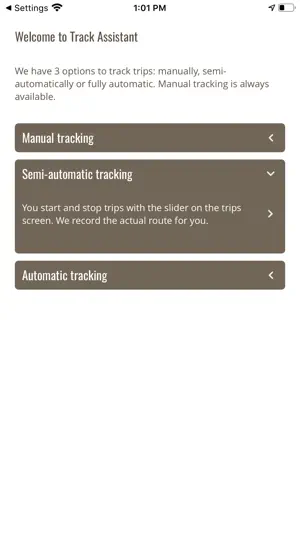
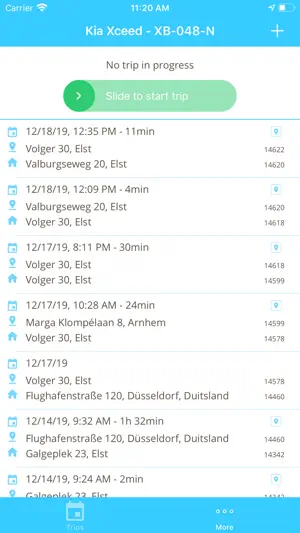
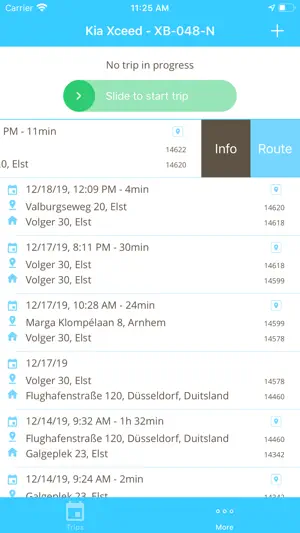
EASIEST APP TO TRACK YOUR MILES: MANUAL, SEMI-AUTOMATIC OR 100% AUTOMATICALLY Whether you’re self-employed or on the job, whether you need it for a tax claim or an expense, or just want to keep track for your own stats, Track Assistant offers you the most convenient app to track your car miles. No black-box that needs to be installed, no paper notes in your dashboard drawer anymore. No painful mileage administration at the end of the month anymore. MANUAL LOGGING Just add your trips by filling in the departure and destination address. Either by using the shortcut buttons like 'Home', 'Favorit' or GPS. Or just start typing and autocomplete finds the address for you. Distances are calculated by GoogleMaps. SEMI-AUTOMATIC TRIP LOGGING By using the slider, you can start and stop logging a trip any time you need, any trip you need. By using the slider, Track Assistant logs the exact route and distance you have driven. 100% AUTOMATIC TRIP LOGGING WITH IBEACON The Track Assistant app automatically detects when you are in your car and start a trip. When you leave your car at the end of a trip, it detects the end and fills in the trip into your administration, with start/stop date & time, distance and odometer values. Automatically. YOUR PERSONAL OVERVIEW Track Assistant is the only solution that syncs your mileage administration between your App and your online account. In your online account you can create your personal reports by using filters like date, label and private versus business trips. MILES OR KILOMETERS? Living in the UK, Germany or Italy? In your Track Assistant account you can simply select the metric system you would like to use. Kilometers or miles. This will automatically setup your account correctly in your iPhone app.
What’s new
Version 2.1.9 · Updated October 21, 2026
- Updates in our tracking algorithm - Fixes for automatically starting and stopping a trip - Resolving location updates - iOS 27 updates
App privacy
The developer, Zakelijk Rijden BV, reported these privacy practices to Apple.
Data Linked to You
The following data, which may be collected and linked to your identity, may be used for the following purposes:
- Usage Data: Product Interaction
- Location: Precise Location, Coarse Location
- Contact Info: Physical Address, Email Address, Name, Other User Contact Info
- User Content: Customer Support
- Identifiers: User ID
- Diagnostics: Other Diagnostic Data
Used for: Analytics, App Functionality
Data Not Linked to You
The following data, which may be collected but is not linked to your identity, may be used for the following purposes:
- Identifiers: Device ID
- Diagnostics: Crash Data
Used for: App Functionality
Alternatives to Track Assistant - Trip logging
Looking for apps like Track Assistant - Trip logging? Here are 6 similar apps on the App Store. The highest rated is Gekko Trips - GPS tracker (3.3/5), and 5 of the 6 are free to download.
-
 RitLogger rittenregistratie
-
 Rittenregistratie
-
 RitMeister
-
 Gekko Trips - GPS tracker
3.3
Gekko Trips - GPS tracker
3.3
-
 RitMeter
-
 Nedsoft RittenRegistratie Plus
| App | Rating | Price | Last updated | Compare |
|---|---|---|---|---|
| Track Assistant - Trip logging | – | Free | October 21, 2026 | |
| RitLogger rittenregistratie | – | 1.99 USD | Oct 23, 2026 | Compare |
| Rittenregistratie | – | Free | Mar 19, 2026 | Compare |
| RitMeister | – | Free | Jun 17, 2026 | Compare |
| Gekko Trips - GPS tracker | 3.3 / 5 (3) | Free | Oct 19, 2026 | Compare |
| RitMeter | – | Free | Oct 27, 2026 | Compare |
| Nedsoft RittenRegistratie Plus | – | Free | Oct 15, 2026 | Compare |