

TimeLog - Track your time
hirokazu murabe Lifestyle iPhoneiPadiPod touch
TimeLog - Track your time is a free Lifestyle app for iPhone and iPad by hirokazu murabe. Requires iOS 17.6. Updated February 26, 2026.
- Price
- Free
- on the App Store
- Size
- 4 MB
- Age 4+
- Updated
- Feb 26
- 2026 · v19.1
Screenshots

About TimeLog - Track your time
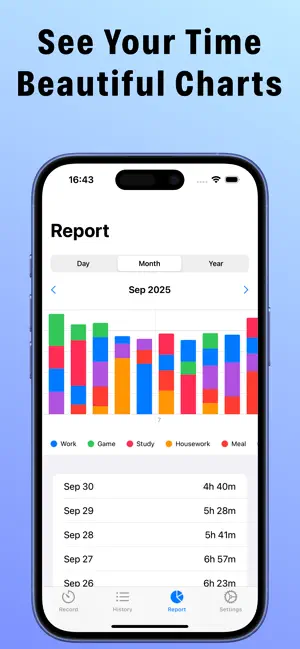
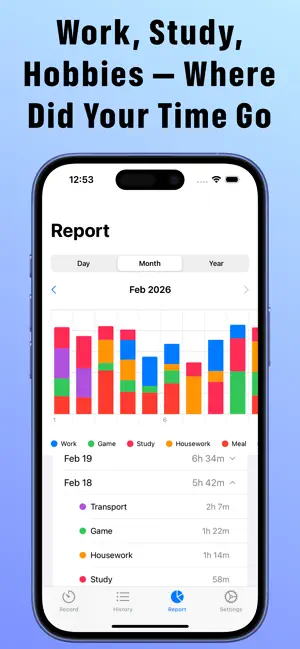
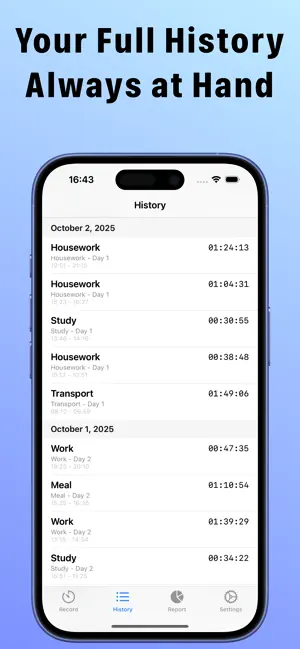
Where did your day go? Most people are shocked when they finally see how they actually spend their time. TimeLog shows you the truth - and helps you change it. With just one tap, start tracking any activity. Watch your day unfold in beautiful, color-coded charts. Finally understand where your hours are really going. WHY TIMELOG STANDS OUT One-Tap Tracking Start and stop the timer in an instant. No complicated setup. Just tap and go. Customizable Categories Create categories that match your life - Work, Study, Exercise, Family time, and more. Assign a unique color to each for a visual snapshot of your day. Powerful Visual Reports Daily, monthly, and yearly bar charts reveal your habits at a glance. Tap any date or month to instantly see a breakdown by category. Spot patterns. Make smarter decisions. Complete History Every session is saved and searchable. Add memos to entries for richer, more detailed records. Your personal time journal, always at your fingertips. Private & Secure Your data stays on your device. No account required. No data shared. Ever. WHO IS TIMELOG FOR? - Students who want to study smarter, not harder - Professionals and freelancers tracking billable hours - Anyone chasing a goal and needing to stay accountable - People who want to build better habits and live more intentionally The most successful people don't guess how they spend their time. They measure it. Download TimeLog for free and take the first step toward your most productive life. PREMIUM PLAN Unlock the full TimeLog experience with Premium: - Completely ad-free - Add logs manually for times you forgot to record - Edit any log's time, category, and memo - Export your data as CSV for deeper analysis - Automatic iCloud sync across all your devices Payment is charged to your Apple ID at confirmation of purchase. Subscription renews automatically unless canceled at least 24 hours before the end of the current period. Manage or cancel anytime in your App Store account settings. Privacy Policy: https://ios-mac-a7694.web.app/privacy.html Terms of Use: https://www.apple.com/legal/internet-services/itunes/dev/stdeula/
What’s new
Version 19.1 · Updated February 26, 2026
Added iCloud sync support. Your data is automatically synced across devices signed in to the same iCloud account. The report screen now shows a breakdown by category. Tap a date or month in the list below the chart to view a detailed summary for each category. Added the option to hide ads. *Premium feature
App privacy
The developer, hirokazu murabe, reported these privacy practices to Apple.
Data Used to Track You
The following data may be used to track you across apps and websites owned by other companies:
- Identifiers: Device ID
Data Not Linked to You
The following data, which may be collected but is not linked to your identity, may be used for the following purposes:
- Identifiers: Device ID
Used for: Third-Party Advertising
Alternatives to TimeLog - Track your time
Looking for apps like TimeLog - Track your time? Here are 6 similar apps on the App Store. The highest rated is Timelook 24-hour Pie Chart (5.0/5), and all 6 are free to download.
-
 TimeLog - Timestamp Counter
3.5
TimeLog - Timestamp Counter
3.5
-
 Oshi Time: Study & Focus Timer
-
 ノーミー
ノーミー
-
 集中タイマー - 勉強・仕事・筋トレを記録し自己啓発
-
 Mockle: Time Tracker & Focus
-
 Timelook 24-hour Pie Chart
5.0
Timelook 24-hour Pie Chart
5.0
| App | Rating | Price | Last updated | Compare |
|---|---|---|---|---|
| TimeLog - Track your time | – | Free | February 26, 2026 | |
| TimeLog - Timestamp Counter | 3.5 / 5 (2) | Free | Aug 5, 2026 | Compare |
| Oshi Time: Study & Focus Timer | – | Free | Oct 3, 2026 | Compare |
| ノーミー | – | Free | Oct 30, 2024 | Compare |
| 集中タイマー - 勉強・仕事・筋トレを記録し自己啓発 | – | Free | Nov 30, 2023 | Compare |
| Mockle: Time Tracker & Focus | – | Free | Aug 3, 2026 | Compare |
| Timelook 24-hour Pie Chart | 5.0 / 5 (1) | Free | Jun 18, 2026 | Compare |