

Telugu Keyboard (Mobile)
Rajeev Prasad Lifestyle iPhoneiPadiPod touch
Telugu Keyboard (Mobile) is a free Lifestyle app for iPhone and iPad by Rajeev Prasad. Rated 3.1/5 from 10 ratings. Requires iOS 14.0. Updated May 1, 2025.
- Rating
- 3.1
- 10 ratings
- Price
- Free
- on the App Store
- Size
- 29 MB
- Age 4+
- Updated
- May 1
- 2025 · v11.3
Screenshots



About Telugu Keyboard (Mobile)
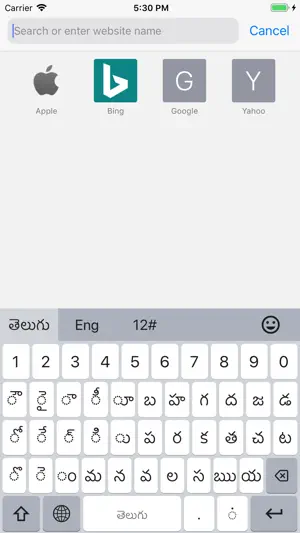
Telugu Keyboard Fully Integrated Keyboard for iOS Now compatible with the latest iOS versions Telugu Keyboard offers a smooth, fully integrated typing experience tailored for iPhone and iPad users. Designed with both beginners and advanced users in mind, it features an intuitive layout, smart features, and Unicode support for fast and accurate Telugu input. Key Features Optimized Telugu Layout: Designed for efficient and natural Telugu typing. Seamless Language Switching: Quickly switch between Telugu and English keyboards. Emoji and Symbol Support: Access a wide range of emojis and symbols for expressive typing. Theme Customization: Choose from preset themes or create your own with custom colors and images. Key Feedback Options: Enable or adjust sound and vibration for each keypress. Advanced Typing Features Smart Cursor Control: Use long-press or force touch gestures for easy cursor movement. Unicode Accuracy: Ensures proper rendering of Telugu script and characters. Quick Input Shortcuts: Double-tap the spacebar to insert a period. Double-tap the period key to insert a comma. Tap short vowels twice to insert extended vowel forms. Classic Layout Built for clarity and ease of use, the Classic Layout combines traditional Telugu input methods with a modern, responsive design—ideal for users at any skill level. Setup Instructions Quick Setup: Open the app and select Setup Telugu Keyboard. Go to Settings > Keyboards. Enable Telugu Keyboard (Full Access not required). Use the Globe icon on your keyboard to switch as needed. Manual Setup: Go to Settings > General > Keyboard > Keyboards. Tap Add New Keyboard. Find Telugu under Third-Party Keyboards and enable it. Use the Globe icon to switch to Telugu Keyboard while typing. Privacy Commitment We do not collect or store any personal data. All typing stays private and local to your device. Experience smarter Telugu typing—simple, customizable, and secure.
Ratings & reviews
3.1
10 ratings
What’s new
Version 11.3 · Updated May 1, 2025
+ performance enhancements + bug fixes
App privacy
The developer, Rajeev Prasad, reported these privacy practices to Apple.
Data Used to Track You
The following data may be used to track you across apps and websites owned by other companies:
- Identifiers: Device ID
Data Linked to You
The following data, which may be collected and linked to your identity, may be used for the following purposes:
- Identifiers: Device ID
Used for: Third-Party Advertising
Alternatives to Telugu Keyboard (Mobile)
Looking for apps like Telugu Keyboard (Mobile)? Here are 6 similar apps on the App Store. The highest rated is TTDevasthanams (4.8/5), and all 6 are free to download.
-
 Nithra Telugu Calendar 2026
4.4
Nithra Telugu Calendar 2026
4.4
-
 Moksha Nidhi
4.7
Moksha Nidhi
4.7
-
 TTDevasthanams
4.8
TTDevasthanams
4.8
-
 Neetho - Date The Telugu Way
4.4
Neetho - Date The Telugu Way
4.4
-
 Pronto: House Help in Minutes
4.5
Pronto: House Help in Minutes
4.5
-
 NoBrokerHood - Manage Visitors
3.9
NoBrokerHood - Manage Visitors
3.9
| App | Rating | Price | Last updated | Compare |
|---|---|---|---|---|
| Telugu Keyboard (Mobile) | 3.1 / 5 (10 ratings) | Free | May 1, 2025 | |
| Nithra Telugu Calendar 2026 | 4.4 / 5 (34) | Free | Sep 25, 2026 | Compare |
| Moksha Nidhi | 4.7 / 5 (214) | Free | Oct 11, 2026 | Compare |
| TTDevasthanams | 4.8 / 5 (1,193) | Free | Apr 10, 2026 | Compare |
| Neetho - Date The Telugu Way | 4.4 / 5 (1,431) | Free | Oct 16, 2026 | Compare |
| Pronto: House Help in Minutes | 4.5 / 5 (341) | Free | Oct 20, 2026 | Compare |
| NoBrokerHood - Manage Visitors | 3.9 / 5 (48) | Free | Oct 21, 2026 | Compare |