

Live Home 3D Pro: House Design
Belight Software, ltd Lifestyle iPhoneiPadiPod touch
Live Home 3D Pro: House Design is a paid Lifestyle app for iPhone and iPad by Belight Software, ltd. Rated 4.5/5 from 962 ratings. Requires iOS 17.0.
- Rating
- 4.5
- 962 ratings
- Price
- 129.99 USD
- on the App Store
- Size
- 533 MB
- Age 4+
- Updated
- Oct 20
- 2026 · v5.1
Screenshots



About Live Home 3D Pro: House Design
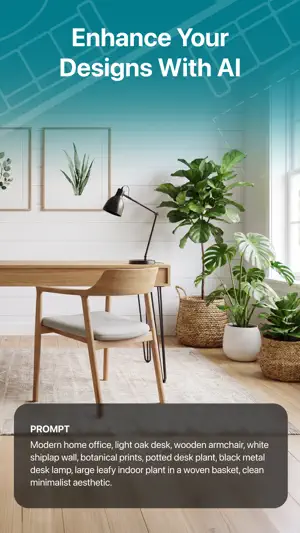
An outstanding home design app that can turn anyone into a designer. Create detailed floor plan layouts, 3D home design visualizations, plan a garden and work with the surrounding landscape—everything is possible with Live Home 3D Pro. Floor Plans, Building and Terrain: • Сreate detailed 2D floor plan layouts. • View real-time dimensions for walls, ceilings and floors when drawing in the 2D Plan view. • Get unlimited floor levels: you will be able to create multi-story buildings and even skyscrapers. • Design from scratch or rely on ready-made house and interior design samples (e.g., kitchens, bathrooms, living rooms, etc). • Work with terrain editing tools for landscape design: create elaborate terrain around your house, lay paths and driveways and plan out your garden or backyard. • Choose from the ready-made roof templates (12 roofs and 16 dormers) or customize the roof by editing its segments to create roofs of any form and complexity. • Work in 2D Elevation view that displays the side view on walls and roof, a perfect tool for working with openings, niches and wall panels. • Scan your room or house using the Room Scanner feature based on LiDAR technology to recreate its digital copy (only for devices with LiDAR sensors built-in). • Use a multi-purpose Building Block tool to create porches, custom columns, beams or even furniture. • Bosch laser measure integration: take accurate measurements with a laser measure, and easily transfer and apply them to objects. Objects and Materials: • Add and move furniture and other objects (5,000+ items), and apply physically based materials (3,000+ supplied materials). • Access thousands of free models that can be imported from the Trimble 3D Warehouse and Sketchfab. • Import 3D models from other applications in most popular formats (COLLADA, FBX, OBJ, USDZ, 3DS, glTF / glb, etc.) • Create sophisticated custom materials, and control their texture and light emissive properties using the Material Editor. Lighting Settings: • Work with natural lighting by setting up true geolocation, time of day and cloudiness. • Adjust light fixtures throughout the house to achieve a realistic lighting scene. • Create custom lamps or achieve the best lighting for your projects with Light Source Editor. Viewing and Sharing Your Project: • Walk through your 3D interior designs. • Project your 3D home into real-world surroundings, and even walk around or inside the house using View in the AR option. • Create flyover videos and 3D renderings of your projects from different angles. • Seamlessly share your projects among iOS, iPadOS, visionOS, macOS or Windows devices. Export: • Export 2D floor plans as PDF and 3D views of your projects as high-resolution images. • Export the entire house design or several objects to USDZ, glTF, SCN, SCNZ, FBX or OBJ format. • Get highly realistic views of your designs with the Cycles offline rendering engine (unlimited number of renders at no extra cost). • Export fast and high quality AI renders of your designs: choose from a multitude of presets and adjust simple settings. • Get Ultra HD export quality for movies and 360° Panoramas and Hi-res (16,000 x 16,000) for still shots. • Create Stereo 3D Video, 360° Video, Stereo 3D 360° Video and 360° Panorama JPEG images. Note: Starting with Live Home 3D version 5.0, you can create an app account and link all your in-app purchases to it, sharing them across all available platforms without re-buying.
Ratings & reviews
4.5
962 ratings
What’s new
Version 5.1 · Updated October 20, 2026
• Cloud AI Rendering: the improved dialog lets you keep working on your project while the current render is in progress. • Print Layout: a new dialog to arrange your project and its details on printed sheets, at the scale you need, before you print. • New in-app: American Houses – 30+ ready-made house projects. • Support for iPhone Duo devices. • Bug fixes and stability improvements.
Alternatives to Live Home 3D Pro: House Design
Looking for apps like Live Home 3D Pro: House Design? Here are 6 similar apps on the App Store. The highest rated is Architectural Digest (4.7/5), and all 6 are free to download.
-
 Interior Design PRO
4.0
Interior Design PRO
4.0
-
 Deck Planner
3.3
Deck Planner
3.3
-
 NPT Backyard
3.7
NPT Backyard
3.7
-
 Architectural Digest
4.7
Architectural Digest
4.7
-
 ARKitchen Kitchen Design
4.3
ARKitchen Kitchen Design
4.3
-
 Morpholio Board - Moodboard
4.6
Morpholio Board - Moodboard
4.6
| App | Rating | Price | Last updated | Compare |
|---|---|---|---|---|
| Live Home 3D Pro: House Design | 4.5 / 5 (962 ratings) | 129.99 USD | October 20, 2026 | |
| Interior Design PRO | 4.0 / 5 (541) | Free | Oct 13, 2026 | Compare |
| Deck Planner | 3.3 / 5 (15) | Free | Aug 13, 2026 | Compare |
| NPT Backyard | 3.7 / 5 (101) | Free | Sep 22, 2026 | Compare |
| Architectural Digest | 4.7 / 5 (460) | Free | Jan 12, 2026 | Compare |
| ARKitchen Kitchen Design | 4.3 / 5 (501) | Free | May 6, 2025 | Compare |
| Morpholio Board - Moodboard | 4.6 / 5 (3,758) | Free | Jul 17, 2026 | Compare |