

Word Families by Teach Speech
Red Five LLC Education iPad
Word Families by Teach Speech is a paid Education app for iPad by Red Five LLC. Rated 3.7/5 from 3 ratings. Requires iOS 15.0. Updated August 22, 2026.
- Rating
- 3.7
- 3 ratings
- Price
- 2.99 USD
- on the App Store
- Size
- 6 MB
- Age 4+
- Updated
- Aug 22
- 2026 · v3.0
Screenshots



About Word Families by Teach Speech
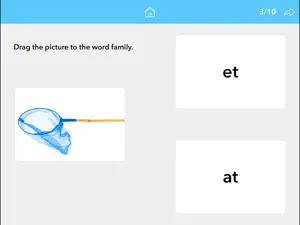
Word Families by Teach Speech Apps helps develop the skills needed to help recognize and learn word families. Word families are groups of words that have a common feature or pattern - they have some of the same combinations of letters in them and a similar sound. For example, sat, mat, and bat are a family of words with the "at" sound and letter combination in common. Using word families is a powerful way to teach beginning spellers that words contain patterns. Included in this app are the most common word families and some of the words they make up. This interactive app helps individuals learn word families in a fun and engaging way. Four activities include: - Word sort - drag and drop - Complete the word - choose from 3 options - Word families - drag and drop - Identify the items in the word family Teach Speech Apps encourages learning side-by-side with an engaged adult. Benefits: - Develops reading, spelling, listening and language skills - Enriches vocabulary - Professional photos for individuals of all ages and learning levels - Multi-sensory learning - combining seeing and hearing feedback - Reinforcement sounds that can be turned on/off in settings - Options found in settings to customize user experience - Aligned with the Common Core Standards - No ads - No in-app purchases Privacy Policy: Teach Speech Apps does not collect personal information. To learn more, visit : http://www.teachspeechapps.com/privacy-policy.html Email Teach Speech Apps with questions or feedback: [email protected] Find us on Facebook: Teach Speech Apps, LLC Twitter: @teachspeechapps
What’s new
Version 3.0 · Updated August 22, 2026
The biggest update to Word Families yet, rebuilt from the ground up. A FIX FOR SPEAK WORDS The printed word under a picture used to appear only when Speak Words was turned off — the setting worked backwards. It now does what it says. A BETTER FIT ON EVERY IPAD The layout now adjusts to your screen instead of assuming one size, so nothing is cramped or cut off, whether you use an iPad mini or a 13-inch Pro. Bigger level cards, larger text and a roomier top bar throughout. SETTINGS THAT DO WHAT THEY SAY Speak Words, Auto Advance and Sound On Incorrect all work properly now. Auto Advance also waits for a word to finish reading before turning the page, so answers are never cut off mid-word. CHOOSE EASY OR ADVANCED The app now asks which level of challenge suits your student the first time you open it. Easy keeps to one picture and two families in Level 3, and to the gentler word list in Level 4. Advanced adds three pictures at a time and the harder reading below. Change it any time in Settings. DRAG AND DROP THAT RESPONDS RIGHT AWAY Pictures now move the moment a finger touches them. Previously a child had to press and hold before anything would budge, which is a hard gesture for little hands. When a picture lands on the family it belongs to, the two join into one so the finished word reads as a whole. A WRONG ANSWER IS NOW A WRONG ANSWER If a picture goes to the wrong family, that box turns red and stays red, the box it should have gone to turns green, and the question moves on. Before, a child could keep trying until the picture stuck, which meant the drag exercise could not really be got wrong and every score came out perfect. QUESTIONS THAT SAY WHAT THEY MEAN Level 1 and Level 4 both used to ask you to "select the items". Level 1 now asks for the images and Level 4 asks for the words. A LEVEL 4 THAT REALLY TESTS READING A word family is a spelling pattern, but the wrong answers in Level 4 used to be unrelated words — dog and bell against the _ap family — so a child could pass the whole level by listening for the sound and never read anything. In Advanced the wrong answers now rhyme with the family but are spelled differently. Bun, fun and sun belong to the _un family; one, done and won do not. Answer by ear and you take all six. Answer by reading the pattern and you take three. Easy keeps the older, gentler version for children who are not reading yet. PLEASE NOTE: THIS UPDATE NEEDS IPADOS 15 OR LATER Older iPads that cannot go past iPadOS 14 will keep the version they have, and it will carry on working.
App privacy
The developer, Red Five LLC, reported these privacy practices to Apple.
Data Not Collected
The developer does not collect any data from this app.
Alternatives to Word Families by Teach Speech
Looking for apps like Word Families by Teach Speech? Here are 6 similar apps on the App Store. The highest rated is PrepPositions (5.0/5).
-
 PrepPositions
5.0
-
 Describing Skills
-
 Phonological Awareness Lab
3.3
-
 Junganew: A Herd of Sounds "S"
5.0
-
 Reading for Details: III
-
 Fasteroid
| App | Rating | Price | Last updated | Compare |
|---|---|---|---|---|
| Word Families by Teach Speech | 3.7 / 5 (3 ratings) | 2.99 USD | August 22, 2026 | |
| PrepPositions | 5.0 / 5 (1) | 19.99 USD | Feb 7, 2026 | Compare |
| Describing Skills | – | 9.99 USD | Mar 4, 2025 | Compare |
| Phonological Awareness Lab | 3.3 / 5 (3) | 21.99 USD | Oct 14, 2025 | Compare |
| Junganew: A Herd of Sounds "S" | 5.0 / 5 (2) | 9.99 USD | Jan 30, 2026 | Compare |
| Reading for Details: III | – | 3.99 USD | Dec 1, 2025 | Compare |
| Fasteroid | – | 2.99 USD | Sep 25, 2024 | Compare |