

Blur Photo Editor
Sohel Ibna Saad Photo & Video iPhoneiPadiPod touch
Blur Photo Editor is a free Photo & Video app for iPhone and iPad by Sohel Ibna Saad. Rated 4.4/5 from 10,599 ratings. Requires iOS 15.0.
- Rating
- 4.4
- 10.5K ratings
- Price
- Free
- on the App Store
- Size
- 158 MB
- Age 4+
- Updated
- Oct 12
- 2026 · v5.9.7
Screenshots

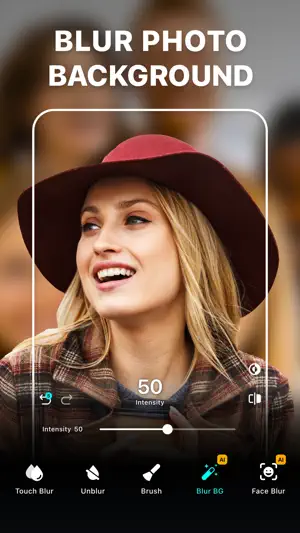
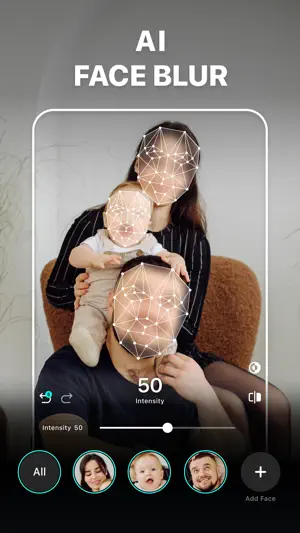
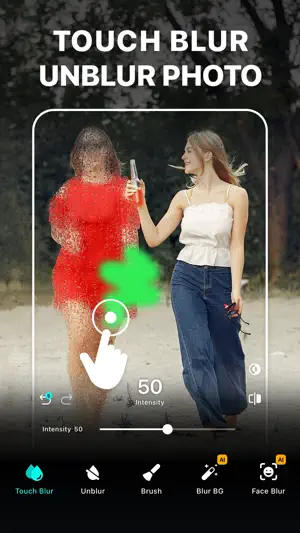
About Blur Photo Editor
Blur Photo Editor is the best photo blurring and mosaic app for iPhone and iPad, designed to blur backgrounds and create professional-looking photos. Easily blur or pixelate faces, hide license plates, or redact sensitive information such as credit card numbers with precision. Use AI-powered face blur, background blur, and mosaic effects to keep your photos clean, private, and ready to share. When you're ready to go beyond privacy, unleash your creativity with powerful background removal, split color effects, and a massive library of ready-to-use templates. Key Features: • Wide range of blur and mosaic effects, including motion blur, point blur, bokeh, and more • One-tap background blur with AI subject detection • AI-powered face blur and mosaic for censoring • Detect and redact sensitive text information like documents, IDs, and credit cards • Unblur parts of accidentally edited images • Zoom for precise editing • Radial and linear blur for depth effects • Shape blur tools to highlight or hide areas • Large catalog of photo filters • Edit with tools like crop, rotate, and fine-tune using brilliance, denoise, and more • Instant background removal • Artistic RGB split effects with Split Color • Enhance photo to improve clarity and sharpness • 200+ creative templates to make stunning edits in seconds • Add custom text to photos with fonts, colors, and styles. • Photo collage maker with layouts • Blend images with artistic double exposure effects. • "My Project" to save work in progress Advanced Blur Editing Suite Blur, censor, and stylize your photos with precision using a powerful mix of tools. Apply Gaussian blur, pixelate, motion blur, bokeh, and mosaic effects, or experiment with glass, water, distortion, and paint-styles to create depth and visual impact. Fine-tune focus with radial and linear blur for DSLR-style depth, and enhance with a wide range of filters including B&W, vintage, portrait, and classic styles for a professional finish. Creative Templates & Design Studio Explore a rich library of professionally designed templates to create eye-catching visuals in seconds. Choose from a wide variety of formats including collage templates, scrapbook styles, posters, frames, cutout collages, and many more creative categories designed for social media, stories, and marketing content. Simply add your photos, personalize text, and instantly generate polished designs. Enhance Photo Quality Fix low-quality or blurry photos with intelligent improvements that sharpen details, reduce noise, and boost colors. Restore clarity and improve overall image quality effortlessly while preserving natural textures and realism. How to mosaic + blur a photo on iPhone or iPad? • From Home, tap Start Editing and select a photo • Tap on Blur. Then swipe or trace your finger across the photo • Go to Effects and select the desired blur effect • Adjust intensity as needed • Tap the tick and tap Save to export Auto-Renewable Subscription Terms: Subscribe to unlock full access to all features. • Subscription Length: Weekly, Yearly • Payment is charged to your Apple ID account at confirmation of purchase. • Subscription with a free trial period automatically renews to a paid subscription unless canceled at least 24 hours before the end of the trial period. • Your account will be charged for renewal within 24 hours before the end of the trial period. • You can manage or cancel subscriptions from your App Store account settings. • Any unused portion of a free trial will be forfeited when purchasing a subscription. • By signing up for this subscription, you agree to our Terms of Use and Privacy Policy. Terms of Use: https://pixeltouch.net/legal/blurphoto/terms.html Privacy Policy: https://pixeltouch.net/legal/blurphoto/privacy.html Disclaimer: This app is free to download but requires an auto-renewing subscription to access full functionality.
Ratings & reviews
4.4
10.5K ratings
What’s new
Version 5.9.7 · Updated October 12, 2026
[Fixes] • Bug fixes and performance improvements.
App privacy
The developer, Sohel Ibna Saad, reported these privacy practices to Apple.
Data Used to Track You
The following data may be used to track you across apps and websites owned by other companies:
- Identifiers: User ID, Device ID
Data Linked to You
The following data, which may be collected and linked to your identity, may be used for the following purposes:
- Purchases: Purchase History
- Identifiers: User ID, Device ID
- Usage Data: Product Interaction, Advertising Data
- Diagnostics: Crash Data
- Other Data: Other Data Types
Used for: Third-Party Advertising, Developer’s Advertising or Marketing, Analytics, Product Personalization, App Functionality, Other Purposes
Alternatives to Blur Photo Editor
Looking for apps like Blur Photo Editor? Here are 6 similar apps on the App Store. The highest rated is Blur Photo Effect Background (4.7/5), and all 6 are free to download.
-
 Blur Photo Effect Background
4.7
Blur Photo Effect Background
4.7
-
 Blur Photo Editor: blur effect
4.7
Blur Photo Editor: blur effect
4.7
-
 Blur Photo
4.4
Blur Photo
4.4
-
 Focos
4.7
Focos
4.7
-
 Blur Image Background - Editor
3.7
Blur Image Background - Editor
3.7
-
 Blur Photo Editor & Mosaic
4.7
Blur Photo Editor & Mosaic
4.7
| App | Rating | Price | Last updated | Compare |
|---|---|---|---|---|
| Blur Photo Editor | 4.4 / 5 (10,599 ratings) | Free | October 12, 2026 | |
| Blur Photo Effect Background | 4.7 / 5 (27,452) | Free | Oct 1, 2026 | Compare |
| Blur Photo Editor: blur effect | 4.7 / 5 (1,695) | Free | Jul 16, 2026 | Compare |
| Blur Photo | 4.4 / 5 (31,543) | Free | Oct 21, 2026 | Compare |
| Focos | 4.7 / 5 (51,392) | Free | Mar 26, 2026 | Compare |
| Blur Image Background - Editor | 3.7 / 5 (145) | Free | Oct 19, 2026 | Compare |
| Blur Photo Editor & Mosaic | 4.7 / 5 (6,353) | Free | Oct 31, 2026 | Compare |
Compare Blur Photo Editor with the top alternatives: ratings, updates, ASO score and keyword gaps →