

Desqueeze - Batch Resizer
Aliaksei Khutarshchykau Photo & Video iPhoneiPadiPod touch
Desqueeze - Batch Resizer is a free Photo & Video app for iPhone and iPad by Aliaksei Khutarshchykau. Rated 4.6/5 from 775 ratings. Requires iOS 17.0.
- Rating
- 4.6
- 775 ratings
- Price
- Free
- on the App Store
- Size
- 51 MB
- Age 4+
- Updated
- Sep 23
- 2026 · v4.9.5
Screenshots

About Desqueeze - Batch Resizer
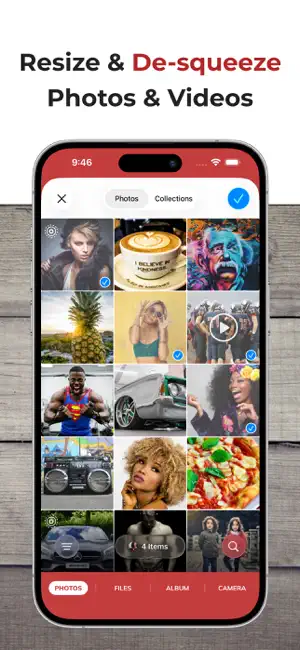
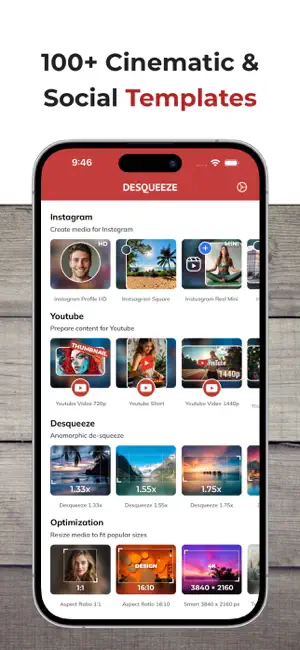
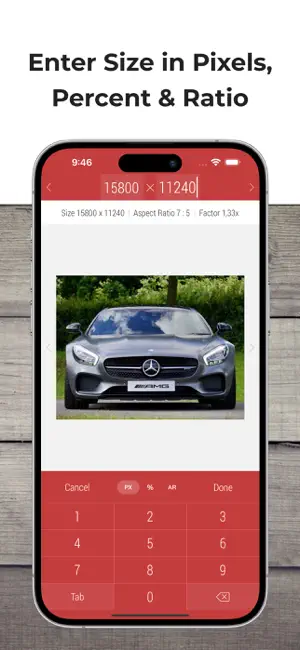
Resize, de-squeeze, and upscale your photos and videos — with batch processing, HDR, and Live Photo support. Apply 100+ templates for quick social media, optimization, and anamorphic results. Enter exact sizes up to 18,000 × 12,000 px for photos and 8K for videos for your custom results. Optimize format, file size, and color profile — while preserving high quality and metadata. DESQUEEZE FEATURES: Resize Photos and Videos • Enter a new size in pixels, aspect ratios, and percentages • Resize in three different ways: Stretch, Fill, and Fit • Choose between Normal and Smart size for more flexible resizing • Batch resize an unlimited number of photos and videos • Reuse up to 10 recent resizing tasks with one tap • De-squeeze anamorphic photos to achieve a natural look • Resize Live Photos while preserving their format, or convert them to still images Import Sources inside Desqueeze • Select photos and videos from the Photo Library • Select any full album from the Photo Library • Select multiple photos and videos from the Files app • Take a picture with the camera Reformat Photos • Choose between PNG, JPEG, HEIC, and TIFF image formats • Specify compression quality for JPEG, HEIC, and TIFF formats • Select Auto format to reuse the original image format when possible • Adjust image resolution with a new DPI, or keep the original DPI Reformat Videos • Choose between MP4, QuickTime (MOV), and M4V video formats • Select Auto format to reuse the original video format when possible • Choose video codec between Auto, H.264, and HEVC(H.265) • Specify video bitrate or use Automatic Edit Photos and Videos • Flip and rotate images or videos • Choose a background color for Fit mode • Specify default background color for photos and videos • Adjust position and offset for Fill and Fit modes Manage Colors for Photo and Video • Apply one of 12 Color Profiles, inlcuding Original (Automatic) • Process photos and videos while preserving HDR Templates • Use a universal set of 100+ standard templates to resize photos and videos for specific platforms and standards, including Instagram, YouTube, Facebook, and more • Create personal templates for your own tasks • Duplicate standard templates and modify personal templates • Customize standard Tempalate Library for your workflow and needs Photo Viewer and Video Player • Preview photos or play videos on the Result screen (long press a photo or video to preview) Share Photos and Videos • Save results to the Photo Library or Files app • Share results via Instagram, Mail, Facebook, Messages, etc • Use original or custom names for shared results ——— Basic (Free) version has some limitations. You can learn more about them inside the app. ——— Upgrade to PRO to unlock all features and remove all Basic version limitations (In-App Purchase). PRO version is available to other family members when Family Sharing is enabled. PRO version can be canceled at any time. ——— Maximum target pixel size for photos and videos: Photos (8-bit): • Basic (Free) version: 4,032 x 3,024 px • PRO version: from 12,000 x 10,000 px (iPhone XR) up to 18,000 x 12,000 px (iPhone 16 Pro) Note: Maximum size for 16-bit photos is lower due to hardware limitations. Videos: • Basic (Free) version: 1920 x 1080 px • PRO version: 7680 x 4320 pixels (8K) ——— Contact & Links • Contact us by Email: [email protected] • Follow us on Twitter and Facebook: @desqueeze • Visit our Website: http://desqueeze.com • Terms of Use: https://www.apple.com/legal/internet-services/itunes/dev/stdeula/ • Privacy Policy: http://desqueeze.com/privacy
Ratings & reviews
4.6
775 ratings
What’s new
Version 4.9.5 · Updated September 23, 2026
Update 4.9.5 includes improvements for better compatibility with the latest iOS 27.
App privacy
The developer, Aliaksei Khutarshchykau, reported these privacy practices to Apple.
Data Linked to You
The following data, which may be collected and linked to your identity, may be used for the following purposes:
- Identifiers: Device ID
- Diagnostics: Crash Data
- Other Data: Other Data Types
Used for: Analytics, App Functionality
Alternatives to Desqueeze - Batch Resizer
Looking for apps like Desqueeze - Batch Resizer? Here are 6 similar apps on the App Store. The highest rated is Easy Desqueezer (5.0/5), and all 6 are free to download.
-
 StreamChamp: Streaming App
4.6
StreamChamp: Streaming App
4.6
-
 Presets & Filters - Koloro
4.7
Presets & Filters - Koloro
4.7
-
 Easy Desqueezer
5.0
Easy Desqueezer
5.0
-
 Batch Resize
4.6
Batch Resize
4.6
-
 DPI - Dots per inch
4.7
DPI - Dots per inch
4.7
-
 SR3H Video Converter
3.4
SR3H Video Converter
3.4
| App | Rating | Price | Last updated | Compare |
|---|---|---|---|---|
| Desqueeze - Batch Resizer | 4.6 / 5 (775 ratings) | Free | September 23, 2026 | |
| StreamChamp: Streaming App | 4.6 / 5 (3,513) | Free | Dec 24, 2025 | Compare |
| Presets & Filters - Koloro | 4.7 / 5 (2,336) | Free | Apr 23, 2026 | Compare |
| Easy Desqueezer | 5.0 / 5 (1) | Free | Oct 19, 2025 | Compare |
| Batch Resize | 4.6 / 5 (510) | Free | Aug 30, 2026 | Compare |
| DPI - Dots per inch | 4.7 / 5 (1,054) | Free | Sep 2, 2026 | Compare |
| SR3H Video Converter | 3.4 / 5 (5) | Free | Apr 21, 2026 | Compare |