

Player Gear - Speed Changer
REAFO CO., LTD. Photo & Video iPhoneiPadiPod touch
Player Gear - Speed Changer is a free Photo & Video app for iPhone and iPad by REAFO CO., LTD. Rated 4.6/5 from 75 ratings. Requires iOS 16.0.
- Rating
- 4.6
- 75 ratings
- Price
- Free
- on the App Store
- Size
- 35 MB
- Age 4+
- Updated
- Oct 13
- 2026 · v6.4
Screenshots



About Player Gear - Speed Changer
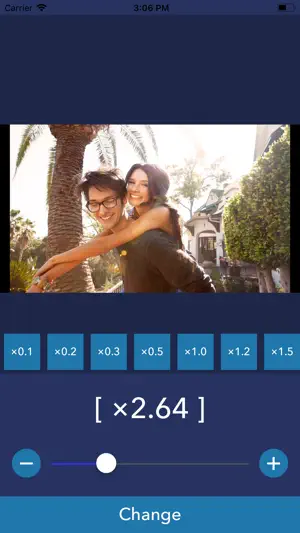
PlayerGear is the way to change playback speed to play Video/Music. PlayerGear lets you make your videos/music/podcasts fast or slow. - How to use - 1. Select media you want to play. (Many types of media can be played. but it's not played if the media has DRM.) 2. Push play button. 3. You can change playback speed by pushing [x2.0] button and selecting speed. 4. You can also change a pitch of the sound by pushing [w] button. [Player Controls with Gestures] - Double-tap for fast forward/rewind You can fast forward or rewind by double-tapping the left or right side of the player screen. - Temporarily change playback speed by long-pressing You can change the playback speed to a preset speed while long-pressing. Please note that if the difference between the playback speeds before and after the long press is too large, the playback may become choppy. - Swipe to seek You can seek by swiping left or right on the screen. [Player Settings] The following options can now be configured: - Set the time before the player controls (such as the seek bar) automatically hide - Set the fast forward/rewind time - Set the playback speed during long-press - Toggle the long-press function On/Off - Toggle swipe to seek On/Off [Playlist Feature] Free Version * Create and manage playlists. * Play songs one at a time. * Continuous playback is not available, but playlists can be used as a convenient way to organize your favorite songs. Premium Version * Create and manage playlists. * Enjoy continuous playback of all songs in a playlist, including background playback. * To use continuous playback, all items in the selected playlist must be saved locally on your device. * Playback may stop if a file needs to be downloaded or if a file is unavailable (for example, if it has been deleted or can no longer be accessed). * Repeat the entire playlist or repeat a single track. ----------------- [Term Of Use] https://policies.reafo.io/terms/playergear/en/ [Privacy Policy] https://policies.reafo.io/privacy/en/
Ratings & reviews
4.6
75 ratings
What’s new
Version 6.4 · Updated October 13, 2026
Thank you for using our app! - The last used playback speed is now restored when you reopen the app. - Made other minor improvements and bug fixes.
App privacy
The developer, REAFO CO., LTD., reported these privacy practices to Apple.
Data Used to Track You
The following data may be used to track you across apps and websites owned by other companies:
- Usage Data: Advertising Data
Data Not Linked to You
The following data, which may be collected but is not linked to your identity, may be used for the following purposes:
- Usage Data: Advertising Data
- Diagnostics: Crash Data
Used for: Third-Party Advertising, Analytics
Alternatives to Player Gear - Speed Changer
Looking for apps like Player Gear - Speed Changer? Here are 6 similar apps on the App Store. The highest rated is Video Speed Changer - Editor (4.7/5), and all 6 are free to download.
-
 Nu-Movie ~ Export Video/Audio
4.6
Nu-Movie ~ Export Video/Audio
4.6
-
 Video Speed - Change & Edit
4.3
Video Speed - Change & Edit
4.3
-
 Video Speed Changer - Editor
4.7
Video Speed Changer - Editor
4.7
-
 Video Speed slow motion editor
4.6
Video Speed slow motion editor
4.6
-
 WMDPlayer
4.1
WMDPlayer
4.1
-
 Slow Motion Video & Speed Up
3.7
Slow Motion Video & Speed Up
3.7
| App | Rating | Price | Last updated | Compare |
|---|---|---|---|---|
| Player Gear - Speed Changer | 4.6 / 5 (75 ratings) | Free | October 13, 2026 | |
| Nu-Movie ~ Export Video/Audio | 4.6 / 5 (236) | Free | Sep 25, 2026 | Compare |
| Video Speed - Change & Edit | 4.3 / 5 (90) | Free | Dec 13, 2025 | Compare |
| Video Speed Changer - Editor | 4.7 / 5 (1,351) | Free | Oct 6, 2026 | Compare |
| Video Speed slow motion editor | 4.6 / 5 (100) | Free | Apr 7, 2025 | Compare |
| WMDPlayer | 4.1 / 5 (10) | Free | Oct 13, 2026 | Compare |
| Slow Motion Video & Speed Up | 3.7 / 5 (243) | Free | Jul 17, 2026 | Compare |