

Golf Swing AI Analyzer: CheCam
KEI co. Sports iPhoneiPadiPod touch
Golf Swing AI Analyzer: CheCam is a free Sports app for iPhone and iPad by KEI co. Requires iOS 17.0. Updated October 6, 2026.
- Price
- Free
- on the App Store
- Size
- 24 MB
- Age 4+
- Updated
- Oct 6
- 2026 · v3.10.3
Screenshots
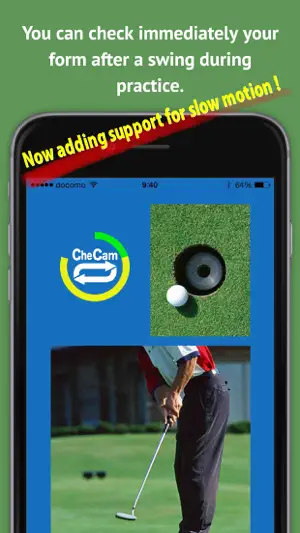
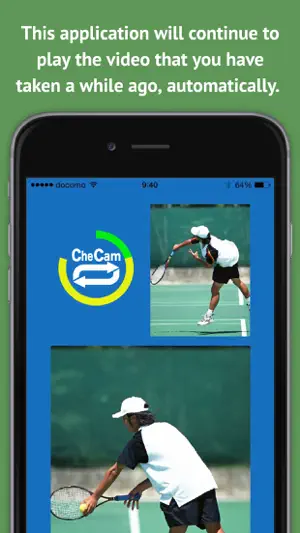
About Golf Swing AI Analyzer: CheCam
Wasting time tapping screens? Forgetting your swing feels by the time you get home? CheCam is the ultimate 100% hands-free golf swing check and habit app powered by advanced AI. Just set up your device on a tripod, press record once, and hit! Analyze and adjust your posture with zero touches. Build a solid habit by reviewing swings, comparing with your best form, and keeping daily notes automatically. --- ■ v3.9.0 Major Update - Magical AI Features (1) [AI Mode: Default ON from Startup] Just swing! AI automatically detects your shots, crops the swing segment, and replays it in beautiful slow-mo (0.25x to 1.0x). *AI Auto-Face Mask (Premium): redone in v3.9.0 for flawless tracking even on profiles and back views. (2) Time-Shift Delay Playback (Normal Mode) Set a delay from 5 to 999 seconds to loop your swing. Swing, walk to your screen, and watch your form replay automatically. No screen touches required. (3) Dual-Screen Sync Comparison (Impact Sync) Line up your past "Perfect Swing" with today's swing. AI detects the exact impact moment to sync both videos within 1 millisecond. Compare posture perfectly and instantly identify flaws. *v3.9.0 Update: Stream stuttering and lag for cloud videos are completely eliminated! Enjoy smooth comparison like local files. (4) Auto-Favorite Linked "Swing Notes" Type one character to auto-save to Favorites and protect from auto-cleanup. (Note: Un-favoriting deletes comments forever). (5) My Logs (Golf Swing Calendar) Track practice organized by date and club. Filling your calendar builds a solid habit that drives your game to the next level. --- ■ Why Golfers Choose CheCam - Easy 3-Step Flow: Set up device ▶ Start recording ▶ Swing and look at the screen! - Keep Your Storage Safe: Temporary video cache is automatically cleaned up (up to 1,000MB) as you practice. Only your favorited videos (up to 5 for free) are protected. Video exports are 100% free and unlimited. - High Performance: Built on SwiftData architecture for super-fast video loading and robust, 100% crash-free stability. --- ■ Three Flexible Pricing Plans to Fit Your Golf Life ● Free Plan - Normal Time-Shift Recording: Up to 20 cycles per day - Magical AI Mode: Up to 5 free daily AI session trials (resets automatically at midnight) - Manual "Swing Trace (TRACE)": 100% UNLIMITED and free to use - Favorites & Swing Notes: Save up to 5 videos locally on your device *Note: Dual-screen comparison is only available for favorited videos. Free playbacks display a watermark. ● +10 AI Shot Tickets (Consumable: $3.99) 【NEW】 Adds 10 extra AI recordings (includes AI Auto-Face Mask) instantly for your range session with a simple one-time purchase. No subscription required. ● Basic Plan (One-Time Purchase: $7.99) - Unlocks 100% unlimited Time-Shift delay recording - Hides watermarks on video exports *Note: AI mode daily limits (trial AI recordings) and the 5-video Favorite cap follow the Free Plan. ● AI Plus Plan (Monthly Subscription: $6.99 / Month) - AI Auto-Face Mask: 100% UNLIMITED use (Premium-only privacy protection during swings) - Magical AI Mode (AI Auto-Recording & Slow-mo): 100% UNLIMITED use - Favorites & Swing Notes: 100% UNLIMITED - Dual-Screen Impact Sync Comparison: 100% UNLIMITED use - Practice history automatically backed up to secure Cloud Storage (Firebase). Instantly restore your data on any device. --- Improvement starts with objective feedback. Transform your practice into high-quality growth assets today! *Please note: From v3.9.0 onward, the minimum required OS version is iOS 17.0+. 【Privacy Policy】 https://bolton.jp/checam/checam_privacy_en.html 【Terms of Use】 https://www.apple.com/legal/internet-services/itunes/dev/stdeula/
What’s new
Version 3.10.3 · Updated October 6, 2026
[An update to make CheCam even more comfortable to use] Thank you for using CheCam. - Improved how we invite you to turn on notifications, so it's easier to get reminders that keep you from losing your recorded swings. - Other minor improvements. We'll keep improving CheCam to make your practice even better.
App privacy
The developer, KEI co., reported these privacy practices to Apple.
Data Used to Track You
The following data may be used to track you across apps and websites owned by other companies:
- Purchases: Purchase History
- Identifiers: Device ID
- Usage Data: Product Interaction
Data Linked to You
The following data, which may be collected and linked to your identity, may be used for the following purposes:
- Identifiers: Device ID, User ID
- Contact Info: Email Address, Name
- User Content: Photos or Videos
Used for: Third-Party Advertising, Analytics, App Functionality
Data Not Linked to You
The following data, which may be collected but is not linked to your identity, may be used for the following purposes:
- Purchases: Purchase History
- Location: Coarse Location
- Identifiers: User ID
- Usage Data: Product Interaction
- Diagnostics: Crash Data
Used for: Third-Party Advertising, Analytics, App Functionality
Alternatives to Golf Swing AI Analyzer: CheCam
Looking for apps like Golf Swing AI Analyzer: CheCam? Here are 6 similar apps on the App Store. The highest rated is SwingMax (5.0/5), and all 6 are free to download.
-
 SmartTrack Golf
4.1
SmartTrack Golf
4.1
-
 SwingMax
5.0
SwingMax
5.0
-
 Opengolf: Golf GPS Rangefinder
4.4
Opengolf: Golf GPS Rangefinder
4.4
-
 CADDY+
3.8
CADDY+
3.8
-
 SpineAlign AI Golf Coach
5.0
SpineAlign AI Golf Coach
5.0
-
 Handy Golf
4.9
Handy Golf
4.9
| App | Rating | Price | Last updated | Compare |
|---|---|---|---|---|
| Golf Swing AI Analyzer: CheCam | – | Free | October 6, 2026 | |
| SmartTrack Golf | 4.1 / 5 (14) | Free | Oct 10, 2026 | Compare |
| SwingMax | 5.0 / 5 (13) | Free | Sep 14, 2026 | Compare |
| Opengolf: Golf GPS Rangefinder | 4.4 / 5 (26) | Free | Oct 3, 2026 | Compare |
| CADDY+ | 3.8 / 5 (5) | Free | Oct 10, 2026 | Compare |
| SpineAlign AI Golf Coach | 5.0 / 5 (9) | Free | Sep 22, 2026 | Compare |
| Handy Golf | 4.9 / 5 (18) | Free | Oct 8, 2026 | Compare |