

Innosoft Mobile
Innosoft GmbH Productivity iPhoneiPadiPod touch
Innosoft Mobile is a free Productivity app for iPhone and iPad by Innosoft GmbH. Requires iOS 15.0. Updated October 14, 2026.
- Price
- Free
- on the App Store
- Size
- 61 MB
- Age 4+
- Updated
- Oct 14
- 2026 · v2.10.0
Screenshots


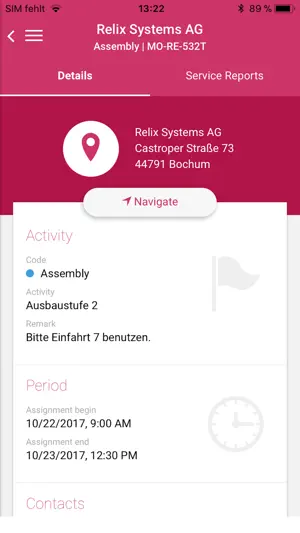
About Innosoft Mobile
From writing service reports to the recording of expenses and times – Innosoft Mobile supports you in the best possible way when carrying out your service tasks. Current range of functions: * Overview of the scheduled and performed service assignments * Clocking/Time stamping of activities * Document entry for service jobs * Recording of performed works * Recording of cash expenses
What’s new
Version 2.10.0 · Updated October 14, 2026
Features - Custom reports now support tables and calculated answers Bugfixes - Fixed a bug in the rich text component on iOs platform that caused that component not to adjust correctly to available heigth when keyboard is shown - Fixed a bug that caused the created after signature flag to be set incorrectly for work logs created as a result of split after the service report was signed Changes - The signature input no longer accepts a single dot - The location tracking feature no longer works when the app moves into the background on iOS Improvements - Added document preview to the file info dialog and optimised preview space in the file import dialog - Added large preview images in the details section for machines and materials. Users can now click on preview image inside list items to enlarge them - Tabs are more limited for absence assignments in details view - Unified validation message styling and font sizes across the application - Added grayed-out styling for free weekends in the assignment calendar view - Added online search functionality for machine dialogs, now accessible through tickets, custom reports, and service reports - Enhanced the ticket dialog with a more advanced machine selection component - The work log dialog now includes a button to view machine details for the selected machine - Restored the contacts card for assignment details and added a flag to toggle its visibility - Work logs can be copied in return journey mode if the respective activity type allows it - 'Auto correct work log offset' enhanced by the option to align offsets for times entered for today. Set feldint to 1 in nachschlag(id) table (tabid=201, id='97') to enable the new additional option - Added standard working hours pre-filling in the weekly report work log dialog if no time has been recorded for the day yet (including service reports)
App privacy
The developer, Innosoft GmbH, reported these privacy practices to Apple.
Data Not Collected
The developer does not collect any data from this app.
Alternatives to Innosoft Mobile
Looking for apps like Innosoft Mobile? Here are 6 similar apps on the App Store.
-
 HybridForms
-
 enaio® mobile
-
 symmedia Hub
-
 Trommelfreimeldung
-
 ams.mobile booking
-
 ZEISS Smart Services Dashboard
| App | Rating | Price | Last updated | Compare |
|---|---|---|---|---|
| Innosoft Mobile | – | Free | October 14, 2026 | |
| HybridForms | – | Free | May 29, 2026 | Compare |
| enaio® mobile | – | Free | Aug 19, 2026 | Compare |
| symmedia Hub | – | Free | Aug 17, 2026 | Compare |
| Trommelfreimeldung | – | Free | May 4, 2026 | Compare |
| ams.mobile booking | – | Free | Jun 26, 2025 | Compare |
| ZEISS Smart Services Dashboard | – | Free | Aug 26, 2026 | Compare |
Compare Innosoft Mobile with the top alternatives: ratings, updates, ASO score and keyword gaps →