

Vibroscope
TOON,LLC Utilities iPhoneiPadiPod touch
Vibroscope is a paid Utilities app for iPhone and iPad by TOON,LLC. Rated 5.0/5 from 2 ratings. Requires iOS 26.0. Updated July 16, 2026.
- Rating
- 5.0
- 2 ratings
- Price
- 7.99 USD
- on the App Store
- Size
- 1 MB
- Age 4+
- Updated
- Jul 16
- 2026 · v10.1
Screenshots



About Vibroscope
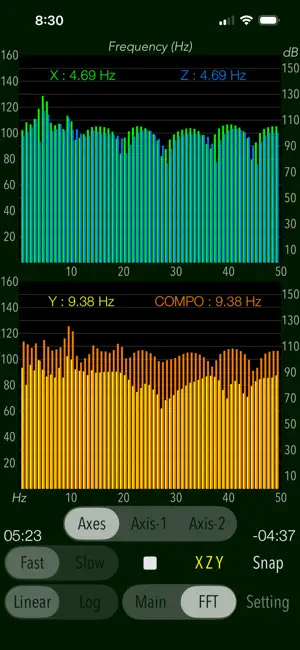
"Vibroscope" is a powerful vibration analysis tool that uses the iPhone's acceleration sensor to measure various vibrations in real time. It allows you to monitor and visualize very low frequency vibrations that are inaudible to the human ear. This app intuitively detects acceleration amounts and displays the two-axial coordinates in the horizontal direction and the time-axis waveform in the vertical direction. It can measure by determining the horizontal or vertical direction to suit the attitude of the iPhone automatically, so as to be available on the floor and desk or handheld. "Vibroscope" is also equipped with FFT analyzer that can analyze the frequency components of very low frequency vibrations. The measurement data can also be saved as a log file, so you can use it as a vibration data logger. Application Examples: - Analysis of the amount of acceleration and frequency components of the floor and walls during car traffic. - Measurement of howling vibration of audio equipment, etc. - Detection of acceleration and vibration of trains and automobiles. - Body balance check (horizontal body shaking detection). - Measurement of vibration acceleration during earthquakes, etc. (displayed value x 100 [GAL]) Features: - Measurement of vibrations (Main): acceleration values (m/s/s) - Real-time display: the horizontal direction (X-Y) - 2-axis vector plane graph, the vertical direction (Z) - the time-varying graph. - Display scale switching of vibration acceleration graph (Linear/Log): Linear - linear scale display, Log - logarithmic scale display. - 3-axis composite acceleration display (Compo) - Peak level value display (Peak) - Switching of acceleration display (Instant/Average): Instant - instantaneous acceleration, Average - average acceleration per second. - Scaling of measurement display range - FFT analysis for 3-axis directional and composite acceleration, with peak frequency (FFT) - FFT graph display control (Axes/Axis-1/Axis-2) - Switching of sensor sampling period (Slow/Fast): slow, fast - Axis direction (Axis): Swapping the axis direction on the graph display during operation. - Measurement timer function: 1 sec to 1 hour - Start delay timer function: 0 - 20 sec - Reference level setting in FFT mode: 1e-6m/s/s, or 1e-5m/s/s - Snapshot of the measurement screen (Snap): Capture the measurement results and Timestamp to "Photos". - Data Logger: X-axis, Y-axis, Z-axis, saved in a text file (UTF8). It saves the measurement data, timestamp to LOG file. Important settings: - At the time of the first access to Photos after installing the app, you will be asked permission to access them from the iOS system. If you did not enable this setting on this time, it cannot be access from the app by privacy restrictions of the iOS. Please enable slide switch of the app in the access permission of the iOS setting, "Settings > Privacy & Security > Photos". - This app does not support to the background operation, so it needs to set on "Never" in the iOS setting, "Settings > General > Auto-Lock" for a long-time operation. Notes: - In general, there is variation and accuracy error by individual terminals and sensor devices of the iPhone, so this app does not recommend the use in the formal measurement. It is also possible that the accuracy error will accumulate if the vibration is too large, it may not be appropriate to display the measured value. - While driving a car or operating machinery, please do not use this app for safety. - The logarithmic scale graph displays very small numerical value, so it may be affected by noise and temperature error in your environment or time fluctuation of sensor calibration. - Log data can be transferred from an iOS device to a Mac or PC using the iTunes File Sharing feature. MacOS Catalina and later can share files between an iOS device and a Mac using the Finder. Please visit our iOS app support page for more information on this app.
What’s new
Version 10.1 · Updated July 16, 2026
- Improved internal processing and performance. - Requires iOS 26.0 or later.
App privacy
The developer, TOON,LLC, reported these privacy practices to Apple.
Data Not Collected
The developer does not collect any data from this app.
Alternatives to Vibroscope
Looking for apps like Vibroscope? Here are 6 similar apps on the App Store. The highest rated is Vibration Meter, seismograph (4.7/5), and all 6 are free to download.
-
 Vibration analysis
4.0
Vibration analysis
4.0
-
 Smart Vibration Meter・Detector
4.1
Smart Vibration Meter・Detector
4.1
-
 Seismometer+
4.5
Seismometer+
4.5
-
 Vibration Meter, seismograph
4.7
Vibration Meter, seismograph
4.7
-
 Vibration meter - Seismometer
4.4
Vibration meter - Seismometer
4.4
-
 Physics Toolbox Sensor Suite
4.7
Physics Toolbox Sensor Suite
4.7
| App | Rating | Price | Last updated | Compare |
|---|---|---|---|---|
| Vibroscope | 5.0 / 5 (2 ratings) | 7.99 USD | July 16, 2026 | |
| Vibration analysis | 4.0 / 5 (43) | Free | Aug 31, 2026 | Compare |
| Smart Vibration Meter・Detector | 4.1 / 5 (27) | Free | Jan 16, 2025 | Compare |
| Seismometer+ | 4.5 / 5 (89) | Free | Dec 12, 2024 | Compare |
| Vibration Meter, seismograph | 4.7 / 5 (729) | Free | Mar 27, 2026 | Compare |
| Vibration meter - Seismometer | 4.4 / 5 (14) | Free | Jun 29, 2026 | Compare |
| Physics Toolbox Sensor Suite | 4.7 / 5 (1,814) | Free | Oct 26, 2026 | Compare |
Compare Vibroscope with the top alternatives: ratings, updates, ASO score and keyword gaps →