

Task Writer - Touch or Stylus
Joshua Lubins Productivity iPhoneiPadiPod touch
Task Writer - Touch or Stylus is a free Productivity app for iPhone and iPad by Joshua Lubins. Rated 3.0/5 from 11 ratings. Requires iOS 17.6.
- Rating
- 3.0
- 11 ratings
- Price
- Free
- on the App Store
- Size
- 31 MB
- Age 4+
- Updated
- Aug 8
- 2026 · v3.0
Screenshots


About Task Writer - Touch or Stylus
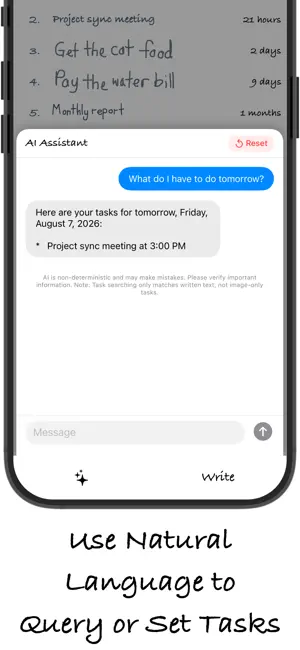
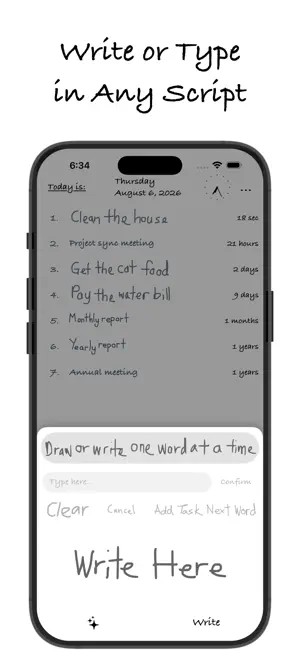
Write, type, draw, and organize your tasks locally and privately with our powerful new On-Device AI Assistant! Task Writer gives you the freedom to build to-do lists your way. Write with your stylus, draw task ideas with your finger, or type them directly using the keyboard. Choose whichever input fits your flow. *** WHAT'S NEW IN VERSION 3.0 *** ON-DEVICE AI ASSISTANT - NATURAL LANGUAGE SCHEDULING: Type or dictate requests (e.g., "remind me to jog tomorrow at 8 AM") to write and schedule tasks completely offline. - SEMANTIC SEARCH: Easily search and filter your tasks using plain English queries. LOCAL HANDWRITING OCR - TEXT SUGGESTIONS: Instantly convert your handwritten strokes on the canvas into digital text. Tap any of the three suggested OCR candidates to auto-fill your tasks without typing. TASK RECURRENCE - RECURRING SCHEDULES: Schedule tasks daily, weekly, monthly, or yearly to stay on top of recurring routines and habits. 100% OFFLINE PRIVACY All AI reasoning, task scheduling, semantic search, and handwriting OCR processing run completely on-device. Your tasks, inputs, and drawings are never uploaded to any servers. *** CORE FEATURES *** - Handwrite, Draw, or Type: Write your tasks naturally in any language, draw sketches to represent goals, or type them directly using your keyboard. - Precise Alerts: Get to-the-minute notifications when a task is due. - Touch Support: Works best with a stylus or just use your finger. Task Writer is a freemium app that is free to use. You can upgrade to Task Writer Premium through an auto-renewable subscription to unlock the following custom styling and ad-free features: - Change Stroke Color - Change Stroke Width - Enable or Disable Advertisements Install Task Writer now and experience private, AI-powered task management. Terms of Use (EULA): https://www.apple.com/legal/internet-services/itunes/dev/stdeula/
Ratings & reviews
3.0
11 ratings
What’s new
Version 3.0 · Updated August 8, 2026
- Introduces a private, on-device AI Assistant to write, schedule, and search tasks offline using natural language. - Integrates local Vision OCR to generate tap-to-insert text suggestions directly from your handwritten canvas strokes. - Adds support for recurring tasks, allowing you to schedule daily, weekly, monthly, or yearly events. - Minor GUI refinements.
App privacy
The developer, Joshua Lubins, reported these privacy practices to Apple.
Data Not Linked to You
The following data, which may be collected but is not linked to your identity, may be used for the following purposes:
- Purchases: Purchase History
Used for: Analytics
Alternatives to Task Writer - Touch or Stylus
Looking for apps like Task Writer - Touch or Stylus? Here are 6 similar apps on the App Store. The highest rated is Notes Air - Simple Notes (4.4/5), and all 6 are free to download.
-
 LinHand-handwritten notes
3.0
-
 Pocket Note - Handwritten note
4.3
-
 AxNote: Note Taking
4.3
-
 iWriters
4.0
-
 Saber: Handwritten Notes
4.0
-
 Notes Air - Simple Notes
4.4
| App | Rating | Price | Last updated | Compare |
|---|---|---|---|---|
| Task Writer - Touch or Stylus | 3.0 / 5 (11 ratings) | Free | August 8, 2026 | |
| LinHand-handwritten notes | 3.0 / 5 (2) | Free | Oct 12, 2026 | Compare |
| Pocket Note - Handwritten note | 4.3 / 5 (14) | Free | Dec 28, 2024 | Compare |
| AxNote: Note Taking | 4.3 / 5 (7) | Free | Oct 22, 2026 | Compare |
| iWriters | 4.0 / 5 (6) | Free | Apr 25, 2024 | Compare |
| Saber: Handwritten Notes | 4.0 / 5 (21) | Free | Oct 20, 2026 | Compare |
| Notes Air - Simple Notes | 4.4 / 5 (8) | Free | Aug 13, 2025 | Compare |