

Following Directions by TSApps
Red Five LLC Education iPhoneiPadiPod touch
Following Directions by TSApps is a paid Education app for iPhone and iPad by Red Five LLC. Requires iOS 15.0. Updated August 25, 2026.
- Price
- 2.99 USD
- on the App Store
- Size
- 8 MB
- Age 4+
- Updated
- Aug 25
- 2026 · v3.0
Screenshots

About Following Directions by TSApps
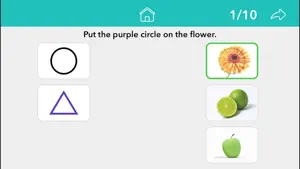
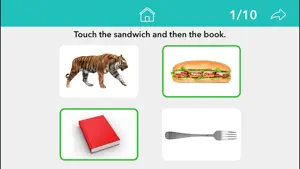
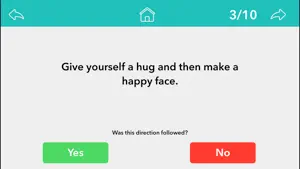
Following Directions by Teach Speech Apps helps develop the skills needed to help boost memory, motor, and auditory processing skills with simple one step directions, two step complex commands including (first / then, before / after), inclusion / exclusion, conditional and motor-skill based directions. This app is great for working on language, auditory processing, vocabulary, memory, receptive language, attention and focus. This interactive app helps individuals learn following directions in a fun and engaging way. Four activities include: - One step directions - drag and drop - Two step directions - choose from 4 pictures - Inclusion / Exclusion - choose from 6 pictures - Motor-skill based and conditional directions Teach Speech Apps encourages learning side-by-side with an engaged adult. Benefits: - Develops reading, spelling, listening and language skills - Enriches vocabulary - Professional photos for individuals of all ages and learning levels - Multi-sensory learning - combining seeing and hearing feedback - Reinforcement sounds that can be turned on/off in settings - Options found in settings to customize user experience - Voice rate option - Aligned with the Common Core Standards - No ads - No in-app purchases Privacy Policy: Teach Speech Apps does not collect personal information. To learn more, visit : http://www.teachspeechapps.com/privacy-policy.html Email Teach Speech Apps with questions or feedback: [email protected] Find us on Facebook: Teach Speech Apps, LLC Twitter: @teachspeechapps
What’s new
Version 3.0 · Updated August 25, 2026
The biggest update to Following Directions yet, rebuilt from the ground up. A BETTER FIT ON EVERY IPAD The layout now adjusts to your screen instead of assuming one size, so nothing is cramped or cut off, whether you use an iPad mini or a 13-inch Pro. EASIER TO SEE AND REACH Bigger level cards, larger text, a roomier top bar and a larger settings button. Pictures now sit on clean white cards, and the green or red mark on an answer sits neatly around the picture instead of floating away from it. DRAG AND DROP THAT RESPONDS RIGHT AWAY Shapes now move the moment a finger touches them. Previously a child had to press and hold before anything would budge, which is a hard gesture for little hands. The shapes and the pictures they land on are both larger. CHOOSE EASY OR ADVANCED The app now asks which level of challenge suits your student the first time you open it, and you can change it any time in Settings. Easy keeps to the simplest questions. Advanced adds the harder ones on top. In Level 1, Advanced adds the directions that name the pictures in the opposite order to the touching, such as "Touch the cow after you touch the jet." In Level 2, Easy asks only for what to include and Advanced brings in the exceptions. In Level 3, Advanced adds the rounds where a shape has to be matched on both its colour and its shape. SETTINGS THAT DO WHAT THEY SAY Speak Words, Auto Advance and Sound On Incorrect all work properly now. Auto Advance also waits for a sentence to finish reading before turning the page, so directions are never cut off mid-word. CLEARER, MORE CONSISTENT DIRECTIONS Level 1 now asks in one consistent way. Level 2 uses one word for leaving something out rather than three, and says "all" whenever more than one picture is wanted. A few Level 2 directions said "both" when three or four pictures were correct; they have been reworded. A SMALLER DOWNLOAD Thanks to the wonders of modern technology, the app is now around half the size it was, with nothing removed. PLEASE NOTE: LEVELS 1, 2 AND 3 HAVE MOVED Drag and Drop was Level 1 and is now Level 3. Two step directions was Level 2 and is now Level 1. Inclusion and exclusion was Level 3 and is now Level 2. Level 4 has not changed. This matches the rest of the Teach Speech range, so the same level number means the same kind of task in every app. The exercises themselves are unchanged.
App privacy
The developer, Red Five LLC, reported these privacy practices to Apple.
Data Not Collected
The developer does not collect any data from this app.
Alternatives to Following Directions by TSApps
Looking for apps like Following Directions by TSApps? Here are 6 similar apps on the App Store. The highest rated is Inference Pics (4.9/5).
-
 More Fun With Directions
4.2
-
 Fun with Verbs & Sentences
3.6
-
 Inference Pics
4.9
-
 Brainy Skills Synonym Antonym
4.2
-
 First Phrases
4.2
-
 Conversation Therapy
4.8
| App | Rating | Price | Last updated | Compare |
|---|---|---|---|---|
| Following Directions by TSApps | – | 2.99 USD | August 25, 2026 | |
| More Fun With Directions | 4.2 / 5 (21) | 15.99 USD | Oct 1, 2026 | Compare |
| Fun with Verbs & Sentences | 3.6 / 5 (10) | 15.99 USD | Dec 24, 2025 | Compare |
| Inference Pics | 4.9 / 5 (17) | 19.99 USD | Jul 22, 2026 | Compare |
| Brainy Skills Synonym Antonym | 4.2 / 5 (17) | 2.99 USD | Jun 11, 2025 | Compare |
| First Phrases | 4.2 / 5 (13) | 15.99 USD | Jun 9, 2026 | Compare |
| Conversation Therapy | 4.8 / 5 (121) | 29.99 USD | Dec 19, 2025 | Compare |