

BabyFile: File Manager Pro
翔 陈 Productivity iPhoneiPadiPod touch
BabyFile: File Manager Pro is a free Productivity app for iPhone and iPad by 翔 陈. Rated 4.0/5 from 4 ratings. Requires iOS 8.0. Updated January 7, 2026.
- Rating
- 4.0
- 4 ratings
- Price
- Free
- on the App Store
- Size
- 76 MB
- Age 4+
- Updated
- Jan 7
- 2026 · v5.8.9
Screenshots
About BabyFile: File Manager Pro
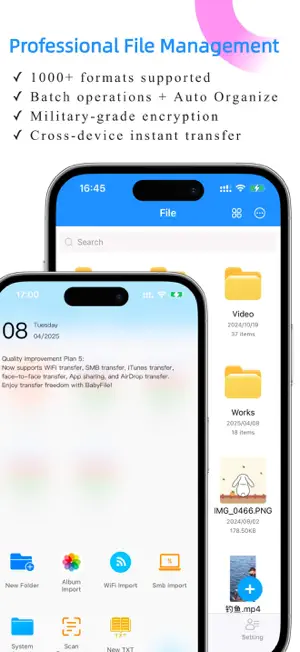
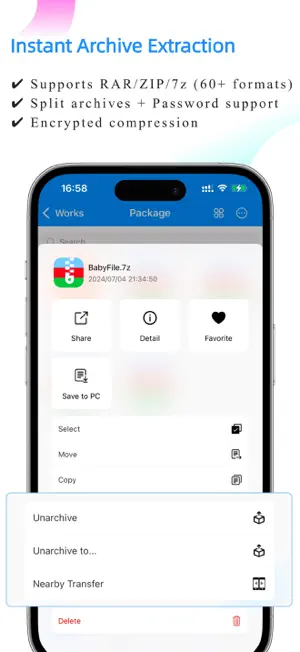
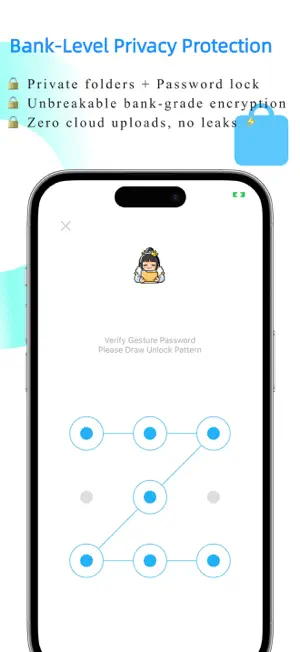
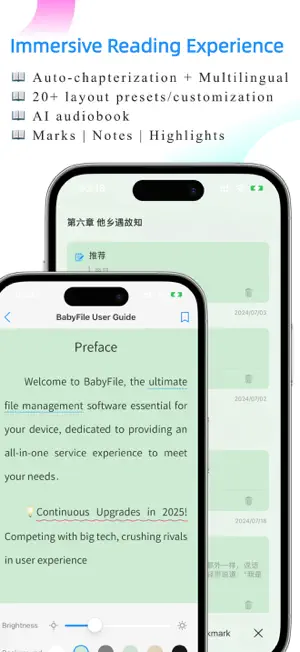
BabyFile Pro is the ultimate AI file manager for iPhone/iPad, helping you unzip Zip/RAR/7Z, transfer files via WiFi, and organize documents securely. *Big Tech Quality* *Features | Experience | Security at Its Peak* Efficiency Enthusiasts | Students | Office Workers | Novel Lovers | Drama Fans – All Love It! ———————————— She looks like a baby, but works like a boss! ● File Management · A Revolutionary Experience • Instant file transfer between phones, tablets, and computers • Private folders + password lock for maximum security • Remote preview & control of computer files from your phone • Supports thousands of file formats – one app is all you need! • Batch operations / Smart categorization / Deep search • Local storage – say goodbye to cloud storage leaks! • ZIP/RAR/7z and 60+ archive formats instantly extracted - (Even supports split archives and Chinese passwords!) ● Novel Reading · The Ultimate Immersion • AI Audiobook + Voice & Speed Adjustment – Listen with Ease • Auto-Reading + Adjustable Speed & Mode – Hands-Free Bliss • Customizable Background | Font | Size | Spacing • Highlighting | Bookmarks | Notes – Capture Every Moment • Supports EPUB | TXT with Auto Chaptering for Multilingual -(Professional-level typesetting, rivaling premium e-readers!) ● Media Playback · Supports All Formats • Plays everything! avi / rmvb / mkv – you name it! • 3x Speed + Subtitle Switch + Audio Track Switch + Picture-in-Picture • Stream movies directly from your PC or external drive! • AirPlay & Casting – Enjoy Big-Screen Viewing! - (Snapshots and aspect ratio adjustments included!) ● Music Player · Hear What You Want • Hi-Res Audio + Floating Lyrics + Elegant Interface • Background Playback + Shuffle & Loop Modes -(Perfect for work + music therapy!) ● Office & Study · Supercharged Productivity • Scan paper docs into HD PDFs in 1 second • Easy Word-to-PDF & Image-to-PDF conversion • One-tap PDF extraction & smooth image conversion • TXT editing – perfect for quick notes! -(Scanned ID photos look sharper than print shop results!) ———————————— 【These Hidden Features Are Insane!】 [+] Flash Sale Sniper: Floating Clock [Clock] [+] One-Tap GIF Maker! [+] Extreme Image Compression – No Quality Loss! [+] Easy Grid Video Maker & Video Editing! [+] Extract BGM from Videos – Just a Tap Away! -(Too many surprises to list them all!) ———————————— ● Continuous Upgrades in 2025! Competing with big tech, crushing rivals in user experience Download now and unlock: → Cute icons, clean interface → Seamless cross-device sync between phone, tablet, and computer ———————————— 【Subscription Terms】 • Subscription period: Monthly or annual plans available • Payment: Charged to iTunes account upon purchase confirmation • Cancel auto-renewal: To cancel, go to "iTunes Store & App Store" > Click "Apple ID" > Select "View Apple ID" > Navigate to "Subscriptions" and cancel before the current period ends. • Renewal: iTunes will charge the renewal fee 24 hours before expiration, extending the subscription by one period. • Privacy Policy: https://www.cnblogs.com/babyfile/p/15369902.html • Terms of Use: https://www.cnblogs.com/babyfile/p/18718778.html ---- Contact Us ---- Official QQ Group: 714836456 Support Email: [email protected]
What’s new
Version 5.8.9 · Updated January 7, 2026
1.Optimized image compression with a 200% improvement in compression capability 2.Improved app interaction experience 3.Optimized app launch speed 4.Optimized image viewer 5.Optimized novel reader 6.Optimized video player 7.UI improvements 8.fix a crash bug
App privacy
The developer, 翔 陈, reported these privacy practices to Apple.
Data Used to Track You
The following data may be used to track you across apps and websites owned by other companies:
- Identifiers: Device ID
Data Not Linked to You
The following data, which may be collected but is not linked to your identity, may be used for the following purposes:
- Identifiers: Device ID, User ID
- Location: Coarse Location
- Usage Data: Product Interaction
- User Content: Photos or Videos, Audio Data
- Diagnostics: Crash Data, Performance Data, Other Diagnostic Data
Used for: Third-Party Advertising, Analytics, App Functionality
Alternatives to BabyFile: File Manager Pro
Looking for apps like BabyFile: File Manager Pro? Here are 6 similar apps on the App Store. The highest rated is koko - transcribe & translate (4.8/5), and all 6 are free to download.
-
 Outline: Notes and More
4.7
Outline: Notes and More
4.7
-
 AI Note Taker: Audio Converter
4.5
AI Note Taker: Audio Converter
4.5
-
 PDF Converter - PDF Scanner
4.5
PDF Converter - PDF Scanner
4.5
-
 File Manager - Exchange files
4.5
File Manager - Exchange files
4.5
-
 koko - transcribe & translate
4.8
koko - transcribe & translate
4.8
-
 File Manager Document Explorer
4.7
File Manager Document Explorer
4.7
| App | Rating | Price | Last updated | Compare |
|---|---|---|---|---|
| BabyFile: File Manager Pro | 4.0 / 5 (4 ratings) | Free | January 7, 2026 | |
| Outline: Notes and More | 4.7 / 5 (68) | Free | Sep 21, 2026 | Compare |
| AI Note Taker: Audio Converter | 4.5 / 5 (26) | Free | Apr 5, 2025 | Compare |
| PDF Converter - PDF Scanner | 4.5 / 5 (35) | Free | Aug 31, 2026 | Compare |
| File Manager - Exchange files | 4.5 / 5 (98) | Free | Jul 9, 2025 | Compare |
| koko - transcribe & translate | 4.8 / 5 (75) | Free | Oct 29, 2025 | Compare |
| File Manager Document Explorer | 4.7 / 5 (33) | Free | May 15, 2026 | Compare |