

Muse AI: Add Music to Video
John Galliano Photo & Video iPhoneiPadiPod touch
Muse AI: Add Music to Video is a free Photo & Video app for iPhone and iPad by John Galliano. Rated 5.0/5 from 3 ratings. Requires iOS 17.0.
- Rating
- 5.0
- 3 ratings
- Price
- Free
- on the App Store
- Size
- 162 MB
- Age 4+
- Updated
- Oct 28
- 2026 · v7.0.3
Screenshots


About Muse AI: Add Music to Video
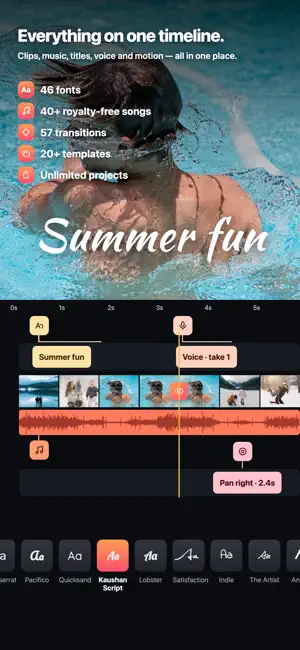
The complete music video editor. Muse turns the video sitting on your phone into something worth posting. Pick your clips, pick a track, and Muse cuts them together. Then stay as long as you like and shape every detail — or leave, because it already looks good. COLLAGES • Photo collages and video collages in 96 layouts — mix photos and videos in any cell • Hold a photo or video and drag it onto another cell to swap them • Trim each clip, set the play order, add music and cut on the beat • Colours, gradients and patterns behind, text on top — and in photo collages, a filter for each photo plus stickers and emoji • Two-cell layouts are free; bigger layouts come with Pro MY VIDEOS Every video you finish is kept in the app, year by year, ready to watch again — full screen, story style: swipe through, tap to pause, swipe down to close. Unfinished projects from the old Muse app are back in Projects. BUILT AROUND MUSIC • Add any song from the built-in catalogue, or use music already on your phone • 40 licensed tracks cleared for commercial use — yours to publish • Set the music level, and trim the track to the part you actually want AUTO CAPTIONS • Turns the speech in your voiceover and clips into captions, timed automatically • Pick the spoken language. Keep the audio on your iPhone, or send it to Apple's best model for accuracy • 10 caption styles, every line editable — and any line the recogniser was unsure about is marked for you to check FILTERS • 115+ looks, from beach and the seasons to food, fitness and interiors • A strength dial that responds as you drag • Search, favourites, and one tap to apply a look to every clip A REAL TIMELINE, NOT A TOY • Clips, music, titles, voiceover and motion all on one timeline • Trim, reorder and split without hunting through menus • Every change previews instantly — no waiting to see what you did 57 TRANSITIONS Dissolves, glitches, whips, zooms and wipes between clips. Pick one and apply it to every cut at once, or set each one by hand. Adjust the duration to the frame. VOICEOVER THAT ACTUALLY WORKS Record straight onto the film with a 3-2-1 count-in. The music ducks under your voice automatically and comes back up when you stop — no manual keyframing, no fighting the mix. 46 FONTS A real type library for your titles and captions, with size, colour and alignment. Type that looks designed rather than defaulted. STILLS THAT MOVE Drop a photo in and give it a slow zoom or pan, so stills sit next to footage without stopping the film dead. EXPORT THAT HOLDS UP • 720p and 1080p, up to 2K and 4K • 9:16, 1:1 and more — sized for wherever it is going • Save to Photos or share anywhere NO ACCOUNT NEEDED Open it and start. Nothing to sign up for, nothing to log into. Your projects stay on your phone as drafts until you say otherwise. MUSE PRO Pro unlocks unlimited length and clips, 2K and 4K export, the full music catalogue, voiceover, all 57 transitions, all 46 fonts, the full filter library and animated photos — and removes the watermark. Available weekly or yearly, or as a one-time purchase if you would rather not subscribe. There is also a one-off that removes the watermark and nothing else, because sometimes that is all you want. Free to try. Nothing is hidden behind a sign-up. Privacy Policy: https://giantsquare.app/legal/muse-privacy Terms of Use (EULA): https://www.apple.com/legal/internet-services/itunes/dev/stdeula/
What’s new
Version 7.0.3 · Updated October 28, 2026
Version 7.0.3 — cover templates, ready sooner COVER TEMPLATES • Pick a template straight away — no picture needed first; the cover starts from the frame you're on • Every template shows sample words until you type your own • The words that come with a template now speak your language HALLOWEEN AND BLACK FRIDAY • Half-price Pro during Halloween and Black Friday — and it renews at half price, every year Thank you for every report — keep them coming.
App privacy
The developer, John Galliano, reported these privacy practices to Apple.
Data Not Linked to You
The following data, which may be collected but is not linked to your identity, may be used for the following purposes:
- Purchases: Purchase History
- Identifiers: Device ID
- Usage Data: Product Interaction
- Diagnostics: Crash Data
Used for: Analytics, App Functionality, Other Purposes
Alternatives to Muse AI: Add Music to Video
Looking for apps like Muse AI: Add Music to Video? Here are 6 similar apps on the App Store. The highest rated is Muse: Your AI Art Partner (5.0/5), and all 6 are free to download.
-
 Muse: Your AI Art Partner
5.0
Muse: Your AI Art Partner
5.0
-
 Muse - AI Trending Photo
4.5
Muse - AI Trending Photo
4.5
-
 Video Editor with Music・VidLab
4.4
Video Editor with Music・VidLab
4.4
-
 SlideShow Maker with Music Fx
4.6
SlideShow Maker with Music Fx
4.6
-
 Slideshow Maker Photo Video
4.6
Slideshow Maker Photo Video
4.6
-
 Slideshow Add Music to Photos
4.4
Slideshow Add Music to Photos
4.4
| App | Rating | Price | Last updated | Compare |
|---|---|---|---|---|
| Muse AI: Add Music to Video | 5.0 / 5 (3 ratings) | Free | October 28, 2026 | |
| Muse: Your AI Art Partner | 5.0 / 5 (1) | Free | Oct 22, 2026 | Compare |
| Muse - AI Trending Photo | 4.5 / 5 (12) | Free | Dec 19, 2025 | Compare |
| Video Editor with Music・VidLab | 4.4 / 5 (3,707) | Free | Oct 29, 2026 | Compare |
| SlideShow Maker with Music Fx | 4.6 / 5 (52,771) | Free | Dec 12, 2025 | Compare |
| Slideshow Maker Photo Video | 4.6 / 5 (12,713) | Free | Nov 3, 2023 | Compare |
| Slideshow Add Music to Photos | 4.4 / 5 (10,091) | Free | Mar 18, 2025 | Compare |