

Quick Draft for Obsidian
Quick Draft Apps Productivity In-app purchases
Quick capture ideas into Obsidian Vault
- Rating
- 4.8
- 65 ratings
- Downloads
- 8.5K+
- on Google Play
- Price
- Free
- In-app purchases
- Updated
- Oct 13
- 2026 · v2.0.4
Screenshots


About Quick Draft for Obsidian
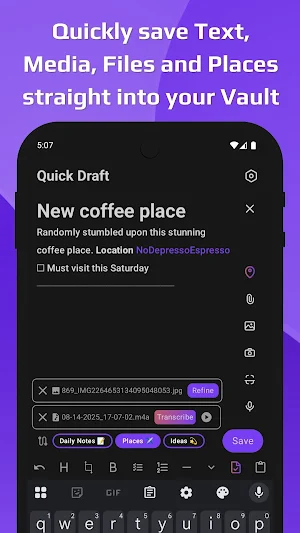
Quick Draft for Obsidian is built for quick capture of ideas. No clutter, no delays—just a blank page ready the instant inspiration strikes.
Type, dictate, or capture an idea, and Quick Draft handles the rest. Your notes flow instantly into Obsidian, so you can quickly capture on mobile and organize later on desktop.
With deep Android integration and seamless Obsidian support, Quick Draft makes quick capture effortless—bridging the gap between inspiration and organized action.
Built by an Obsidian fan — for the Obsidian community 💜
Quick Capture Features
- Quickly capture notes directly into Obsidian
- Unlimited notes, Routes, and Vaults (free)
- Attach images, videos, documents, and files
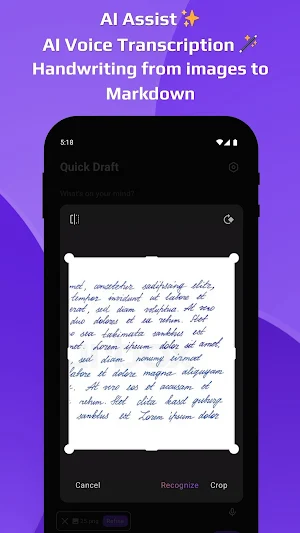
- AI Assist ✨
- Voice recording with high-quality transcription
- Convert text from images to Markdown (handwriting supported)
- Save nearby locations with one tap
- Capture into existing files or create new ones—append, prepend, or insert text
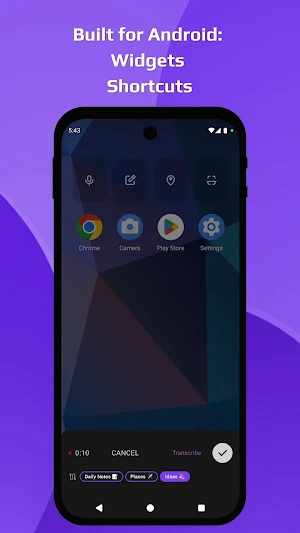
- Built for Android: widgets & shortcuts for instant quick capture
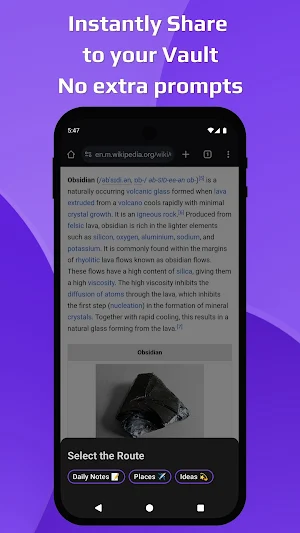
- Share any content from your phone to Obsidian with no extra prompts
- Customizable file destinations
- WYSIWYG Markdown editor
- Templates from presets or existing notes
- Customizable toolbar
- Drafts history
- No sign-in required
Privacy & Setup
Your privacy matters—Quick Draft never needs full Vault access. You choose which files or folders (Destinations) your notes go into. Setup is simple with an in-app tutorial.
Use Routes to streamline quick capture: send notes to multiple Destinations, apply formatting, and automate actions. Customize everything anytime in Settings.
Quick Draft is free, with optional paid features to cover operational costs.
This app is developed independently. Obsidian® name and logo are trademarks of Obsidian.md, used here for identification only.
Type, dictate, or capture an idea, and Quick Draft handles the rest. Your notes flow instantly into Obsidian, so you can quickly capture on mobile and organize later on desktop.
With deep Android integration and seamless Obsidian support, Quick Draft makes quick capture effortless—bridging the gap between inspiration and organized action.
Built by an Obsidian fan — for the Obsidian community 💜
Quick Capture Features
- Quickly capture notes directly into Obsidian
- Unlimited notes, Routes, and Vaults (free)
- Attach images, videos, documents, and files
- AI Assist ✨
- Voice recording with high-quality transcription
- Convert text from images to Markdown (handwriting supported)
- Save nearby locations with one tap
- Capture into existing files or create new ones—append, prepend, or insert text
- Built for Android: widgets & shortcuts for instant quick capture
- Share any content from your phone to Obsidian with no extra prompts
- Customizable file destinations
- WYSIWYG Markdown editor
- Templates from presets or existing notes
- Customizable toolbar
- Drafts history
- No sign-in required
Privacy & Setup
Your privacy matters—Quick Draft never needs full Vault access. You choose which files or folders (Destinations) your notes go into. Setup is simple with an in-app tutorial.
Use Routes to streamline quick capture: send notes to multiple Destinations, apply formatting, and automate actions. Customize everything anytime in Settings.
Quick Draft is free, with optional paid features to cover operational costs.
This app is developed independently. Obsidian® name and logo are trademarks of Obsidian.md, used here for identification only.
What’s new
Version 2.0.4 · Updated October 13, 2026
THE BIGGEST UPDATE YET • Major UI update with more customization and a new popup Route picker. • Major editor improvements with Properties, embedded media, clickable checkboxes, better previews, and adjustable text size. • Create notes from templates and autofill properties with AI. • Obsidian-compatible dates, locale and location controls, and restored media. • Faster startup.
Alternatives to Quick Draft for Obsidian
Looking for apps like Quick Draft for Obsidian? Here are 6 similar Android apps on Google Play. The highest rated is Basecamp - Project Management (4.7/5), and 4 of the 6 are free to download.
-
Hero Assistant: Run your Day
-
Letters - newsletters manager
-
BetterYou 4.2
-
Basecamp - Project Management 4.7
-
Smart Contact Reminder 4.4
-
Nirvana for GTD 4.3
| App | Rating | Price | Installs | Last updated | Compare |
|---|---|---|---|---|---|
| Quick Draft for Obsidian | 4.8 / 5 | Free | 5,000+ | Oct 13, 2026 | |
| Hero Assistant: Run your Day | – | – | 5,000+ | – | Compare |
| Letters - newsletters manager | – | – | 500+ | Oct 24, 2026 | Compare |
| BetterYou | 4.2 / 5 | Free | 10,000+ | Nov 5, 2026 | Compare |
| Basecamp - Project Management | 4.7 / 5 | Free | 1,000,000+ | Nov 11, 2026 | Compare |
| Smart Contact Reminder | 4.4 / 5 | Free | 10,000+ | Oct 11, 2026 | Compare |
| Nirvana for GTD | 4.3 / 5 | Free | 100,000+ | Oct 21, 2026 | Compare |