

Display Manager for Android
jqssun Tools
Extend is an all-purpose display manager for any physical or virtual display.
- Downloads
- 1K+
- on Google Play
- Price
- Free
- No in-app purchases
- Updated
- Jul 22
- 2026 · v0.0.26
Screenshots
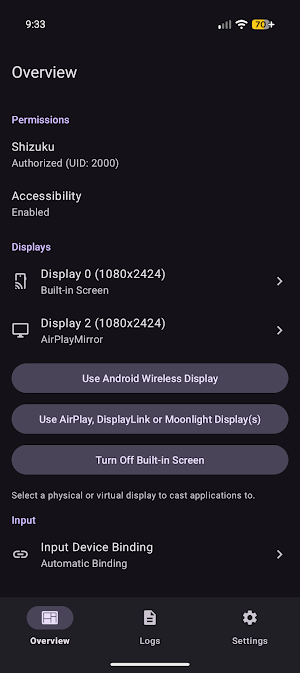
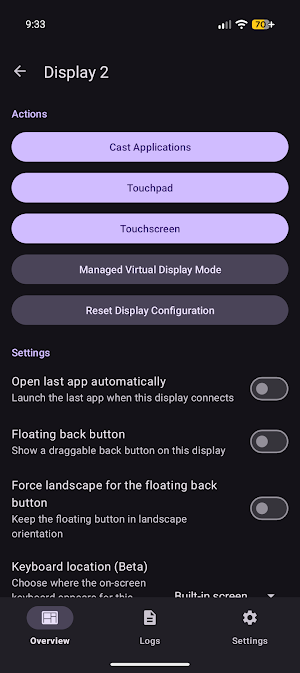
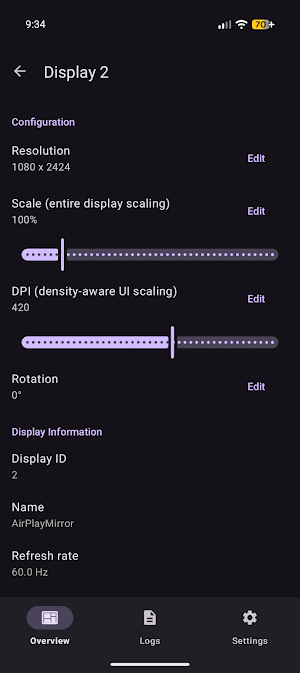
About Display Manager for Android
- Launch any application on any external display in full screen
- Fully customizable resolution, scaling, DPI, and rotation for any display
- Reset any per-display configuration back to system defaults
- Built-in on-screen touchpad and keyboard for controlling any display
- Touchpad control with support for multi-touch, rotation, digitizer only mode
- External input device to display routing per input and display combination
- Navigation controls including Back and Home buttons for content on external displays
- Turning off built-in screen while keeping external displays active
- Managed virtual display mode with customizable on-screen keyboard routing and window behavior
Accessibility Service API may be used to support additional features on external displays. With your consent, it can:
- Simulate navigation actions for the on-screen touchpad and floating button
- Draw the on-screen cursor
- Read window details to direct your input to the focused window on the correct display
This information is used only on your device and is never collected, stored, or shared.
Source: https://github.com/jqssun/android-display-mirror
- Fully customizable resolution, scaling, DPI, and rotation for any display
- Reset any per-display configuration back to system defaults
- Built-in on-screen touchpad and keyboard for controlling any display
- Touchpad control with support for multi-touch, rotation, digitizer only mode
- External input device to display routing per input and display combination
- Navigation controls including Back and Home buttons for content on external displays
- Turning off built-in screen while keeping external displays active
- Managed virtual display mode with customizable on-screen keyboard routing and window behavior
Accessibility Service API may be used to support additional features on external displays. With your consent, it can:
- Simulate navigation actions for the on-screen touchpad and floating button
- Draw the on-screen cursor
- Read window details to direct your input to the focused window on the correct display
This information is used only on your device and is never collected, stored, or shared.
Source: https://github.com/jqssun/android-display-mirror
What’s new
Version 0.0.26 · Updated July 22, 2026
Add support for Android 17
Alternatives to Display Manager for Android
Looking for apps like Display Manager for Android? Here are 4 similar Android apps on Google Play. The highest rated is Titanium Browser (4.5/5), and all 4 are free to download.
-
Titanium Browser 4.5
-
AirPlay Receiver & Server
-
Mirroring (AirPlay & Sunshine)
-
Universal Bluetooth HID Remote
| App | Rating | Price | Installs | Last updated | Compare |
|---|---|---|---|---|---|
| Display Manager for Android | – | Free | 1,000+ | Jul 22, 2026 | |
| Titanium Browser | 4.5 / 5 | Free | 10,000+ | Oct 16, 2026 | Compare |
| AirPlay Receiver & Server | – | Free | 1,000+ | Oct 19, 2026 | Compare |
| Mirroring (AirPlay & Sunshine) | – | Free | 1,000+ | Oct 19, 2026 | Compare |
| Universal Bluetooth HID Remote | – | Free | 1,000+ | Jun 16, 2026 | Compare |