

EdgeDox: Offline Personal AI
Cyberfly labs Tools In-app purchases
Chat with PDFs offline. Ask questions and search documents using private AI
- Rating
- 2.8
- 24 ratings
- Downloads
- 2.1K+
- on Google Play
- Price
- Free
- In-app purchases
- Updated
- Oct 18
- 2026 · v1.2.14
Screenshots
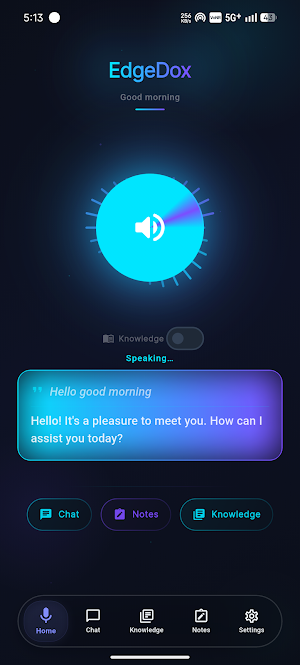
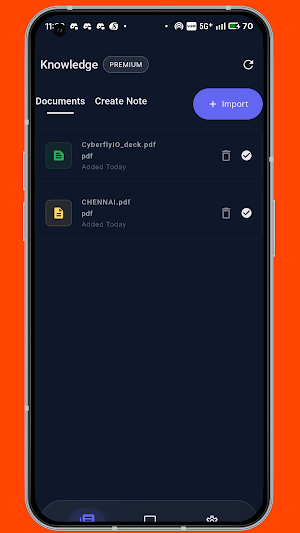
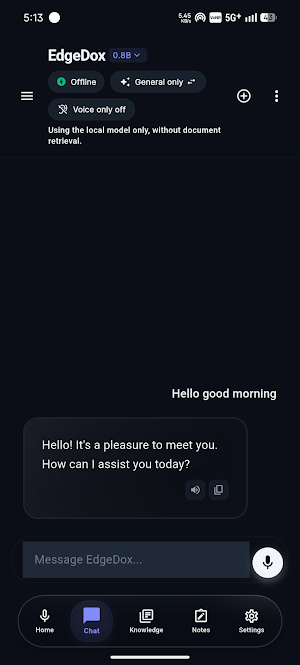
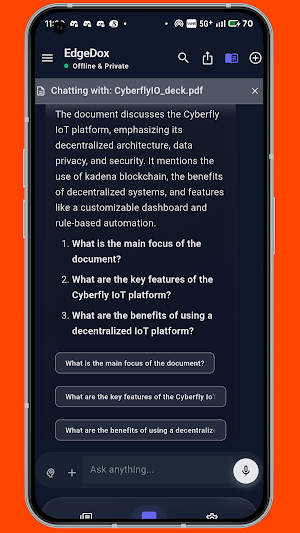

About EdgeDox: Offline Personal AI
EdgeDox: Offline AI for Docs
🧠 Your Documents. Your Device. Your Intelligence.
EdgeDox is a private AI document assistant that lets you chat with PDFs and documents directly on your phone.
Ask questions, search files, and understand long documents instantly using offline AI.
No cloud.
No accounts.
No data uploads.
Everything runs locally on your device, giving you fast responses, complete privacy, and full control over your documents.
Chat With Your PDFs Using AI
EdgeDox works as an AI PDF reader and document assistant that helps you understand documents faster.
Instead of scrolling through hundreds of pages, simply ask your document questions.
You can:
• Chat with PDF files
• Ask questions about documents
• Summarize long PDFs
• Search across multiple documents
• Find answers instantly inside your files
EdgeDox turns your documents into an interactive knowledge assistant.
Supported File Types
EdgeDox supports common document formats.
📄 PDF documents
📝 TXT text files
📘 Markdown (.md) files
Import your files and start chatting with them instantly.
100% Offline AI — Privacy First
Most AI document apps upload your files to remote servers.
EdgeDox works differently.
All AI processing runs directly on your device.
Your documents never leave your phone.
✔ No internet required after setup
✔ No cloud storage
✔ No document uploads
✔ No analytics tracking
✔ No user accounts
Your files remain private and secure at all times.
Intelligent Document Q&A (Local RAG)
EdgeDox uses a local Retrieval-Augmented Generation (RAG) system.
This means:
• Your documents are processed locally
• Relevant content is retrieved from your files
• AI answers are generated based on your documents
Benefits include:
✔ More accurate answers
✔ Faster response time
✔ No hallucinated information
✔ No dependency on cloud AI APIs
This ensures speed, accuracy, and privacy.
Built for Mobile AI
EdgeDox is designed for edge AI on mobile devices.
Optimized for performance:
• Lightweight AI models
• ARM CPU optimized
• Low memory usage
• Smooth performance on mid-range devices
Even in airplane mode, EdgeDox continues to work.
Your AI assistant is always available.
Who Uses EdgeDox?
🎓 Students
Study from lecture PDFs
Ask questions from textbooks
Summarize notes and documents
👨💻 Developers & Engineers
Query technical documentation
Search markdown files
Understand complex manuals faster
🧑💼 Professionals
Review reports and contracts
Work with confidential documents
Keep sensitive files private
🔒 Privacy-Focused Users
Use AI without sending personal data to the cloud.
Why Choose EdgeDox?
EdgeDox is built for people who want AI without sacrificing privacy.
• Offline AI document assistant
• AI PDF reader with chat
• Private document search
• Works without internet
• No data tracking or cloud dependency
If you want AI that respects your privacy, EdgeDox is built for you.
🧠 Your Documents. Your Device. Your Intelligence.
EdgeDox is a private AI document assistant that lets you chat with PDFs and documents directly on your phone.
Ask questions, search files, and understand long documents instantly using offline AI.
No cloud.
No accounts.
No data uploads.
Everything runs locally on your device, giving you fast responses, complete privacy, and full control over your documents.
Chat With Your PDFs Using AI
EdgeDox works as an AI PDF reader and document assistant that helps you understand documents faster.
Instead of scrolling through hundreds of pages, simply ask your document questions.
You can:
• Chat with PDF files
• Ask questions about documents
• Summarize long PDFs
• Search across multiple documents
• Find answers instantly inside your files
EdgeDox turns your documents into an interactive knowledge assistant.
Supported File Types
EdgeDox supports common document formats.
📄 PDF documents
📝 TXT text files
📘 Markdown (.md) files
Import your files and start chatting with them instantly.
100% Offline AI — Privacy First
Most AI document apps upload your files to remote servers.
EdgeDox works differently.
All AI processing runs directly on your device.
Your documents never leave your phone.
✔ No internet required after setup
✔ No cloud storage
✔ No document uploads
✔ No analytics tracking
✔ No user accounts
Your files remain private and secure at all times.
Intelligent Document Q&A (Local RAG)
EdgeDox uses a local Retrieval-Augmented Generation (RAG) system.
This means:
• Your documents are processed locally
• Relevant content is retrieved from your files
• AI answers are generated based on your documents
Benefits include:
✔ More accurate answers
✔ Faster response time
✔ No hallucinated information
✔ No dependency on cloud AI APIs
This ensures speed, accuracy, and privacy.
Built for Mobile AI
EdgeDox is designed for edge AI on mobile devices.
Optimized for performance:
• Lightweight AI models
• ARM CPU optimized
• Low memory usage
• Smooth performance on mid-range devices
Even in airplane mode, EdgeDox continues to work.
Your AI assistant is always available.
Who Uses EdgeDox?
🎓 Students
Study from lecture PDFs
Ask questions from textbooks
Summarize notes and documents
👨💻 Developers & Engineers
Query technical documentation
Search markdown files
Understand complex manuals faster
🧑💼 Professionals
Review reports and contracts
Work with confidential documents
Keep sensitive files private
🔒 Privacy-Focused Users
Use AI without sending personal data to the cloud.
Why Choose EdgeDox?
EdgeDox is built for people who want AI without sacrificing privacy.
• Offline AI document assistant
• AI PDF reader with chat
• Private document search
• Works without internet
• No data tracking or cloud dependency
If you want AI that respects your privacy, EdgeDox is built for you.
What’s new
Version 1.2.14 · Updated October 18, 2026
Embedding Gemma 2 and Gemma 4 Bug fixes and improvement
User reviews

very usefull app

good app

Great AI chat app

awesome app, i used app and it connected with my pdf and doc file and chat with that, sounds like magic

trustable app its using very good

great simple app to perform various needs
Alternatives to EdgeDox: Offline Personal AI
Looking for apps like EdgeDox: Offline Personal AI? Here are 6 similar Android apps on Google Play. The highest rated is Clever AI Hub - Pro AI Agents (4.6/5), and 2 of the 6 are free to download.
-
Secure Pass - Password Manager
-
eaZSt
-
Cruxly AI Tutor Quiz Flashcard
-
Focus Launcher
-
Clever AI Hub - Pro AI Agents 4.6
-
Polytribe: African Languages
| App | Rating | Price | Installs | Last updated | Compare |
|---|---|---|---|---|---|
| EdgeDox: Offline Personal AI | 2.8 / 5 | Free | 1,000+ | Oct 18, 2026 | |
| Secure Pass - Password Manager | – | – | 1,000+ | Aug 15, 2026 | Compare |
| eaZSt | – | – | 100+ | Sep 12, 2026 | Compare |
| Cruxly AI Tutor Quiz Flashcard | – | Free | 1,000+ | Jul 31, 2026 | Compare |
| Focus Launcher | – | – | 5,000+ | Jul 6, 2026 | Compare |
| Clever AI Hub - Pro AI Agents | 4.6 / 5 | Free | 50,000+ | Sep 15, 2026 | Compare |
| Polytribe: African Languages | – | – | – | Apr 7, 2026 | Compare |