
BlackCloak
BlackCloak, Inc. Tools
BlackCloak discovers weaknesses, protects devices & blocks threats.
- Downloads
- 1K+
- on Google Play
- Price
- Free
- No in-app purchases
- Updated
- Sep 11
- 2026 · v2.8.3
Screenshots
About BlackCloak
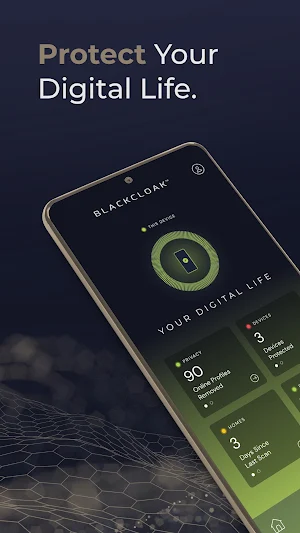
BlackCloak is the pioneer in cybersecurity protection for executives and high-net-worth individuals. To give them peace of mind, BlackCloak protects their privacy, devices, and homes and provides white-glove concierge services and incident response.
The BlackCloak mobile app provides:
• A view into how BlackCloak is constantly providing protection.
• Security tools like a QR Code scanner and a VPN service add security away from home.
• Quick access to contact BlackCloak concierge and schedule one-on-one sessions.
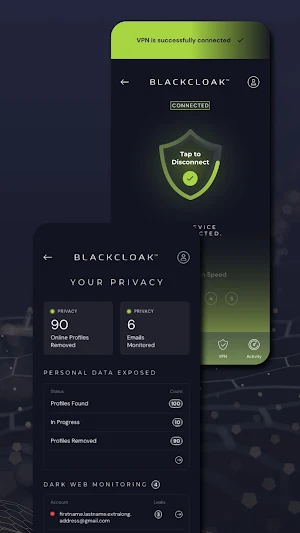
BlackCloak provides a secure and private browsing experience using VPN (Virtual Private Network) technology. The app uses Android's VpnService to establish a safe, encrypted tunnel between your device and the internet. This ensures that your online activities remain private and protected from unauthorized access.
How BlackCloak Uses VpnService:
1. Encryption of Data: BlackCloak encrypts all internet traffic, protecting sensitive information such as personal data, browsing history, and login credentials from third-party tracking, including hackers and advertisers.
2. IP Masking: By routing your connection through different servers, BlackCloak masks your IP address, enhancing your anonymity online. This feature also helps bypass geographic restrictions or censorship.
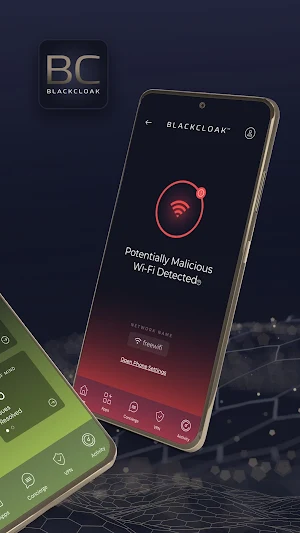
3. Wi-Fi Security: When connected to public Wi-Fi networks, BlackCloak safeguards your connection from potential vulnerabilities, ensuring that your data is not exposed to malicious actors.
4. No-Logs Policy: BlackCloak follows a strict no-logs policy, meaning that your browsing activities are not tracked, collected, or shared.
Permissions and Privacy:
BlackCloak uses Android's VpnService to create the VPN tunnel, which requires permission to monitor and route network traffic through the VPN connection. No other system or application data is accessed or monitored beyond what is necessary to provide the VPN functionality. All operations related to the VPN are handled within the device, maintaining a high level of privacy and control for users.
The BlackCloak mobile app provides:
• A view into how BlackCloak is constantly providing protection.
• Security tools like a QR Code scanner and a VPN service add security away from home.
• Quick access to contact BlackCloak concierge and schedule one-on-one sessions.
BlackCloak provides a secure and private browsing experience using VPN (Virtual Private Network) technology. The app uses Android's VpnService to establish a safe, encrypted tunnel between your device and the internet. This ensures that your online activities remain private and protected from unauthorized access.
How BlackCloak Uses VpnService:
1. Encryption of Data: BlackCloak encrypts all internet traffic, protecting sensitive information such as personal data, browsing history, and login credentials from third-party tracking, including hackers and advertisers.
2. IP Masking: By routing your connection through different servers, BlackCloak masks your IP address, enhancing your anonymity online. This feature also helps bypass geographic restrictions or censorship.
3. Wi-Fi Security: When connected to public Wi-Fi networks, BlackCloak safeguards your connection from potential vulnerabilities, ensuring that your data is not exposed to malicious actors.
4. No-Logs Policy: BlackCloak follows a strict no-logs policy, meaning that your browsing activities are not tracked, collected, or shared.
Permissions and Privacy:
BlackCloak uses Android's VpnService to create the VPN tunnel, which requires permission to monitor and route network traffic through the VPN connection. No other system or application data is accessed or monitored beyond what is necessary to provide the VPN functionality. All operations related to the VPN are handled within the device, maintaining a high level of privacy and control for users.
What’s new
Version 2.8.3 · Updated September 11, 2026
Bug fixes and performance improvements.
User reviews

Wonderful

Great application with first class customer support.
Alternatives to BlackCloak
Looking for apps like BlackCloak? Here are 6 similar Android apps on Google Play. The highest rated is Hypercall (3.9/5), and all 6 are free to download.
-
Start Scan PDF & Creat Manage
-
Hypercall 3.9
-
Image to JPG, PNG, PDF
-
Instant Translator+
-
Daily Browser 3.8
-
FFFF MAX- Get Diamond tips
| App | Rating | Price | Installs | Last updated | Compare |
|---|---|---|---|---|---|
| BlackCloak | – | Free | 1,000+ | Sep 11, 2026 | |
| Start Scan PDF & Creat Manage | – | Free | 10,000+ | Dec 26, 2024 | Compare |
| Hypercall | 3.9 / 5 | Free | 100,000+ | – | Compare |
| Image to JPG, PNG, PDF | – | Free | 500+ | Dec 16, 2024 | Compare |
| Instant Translator+ | – | Free | 10+ | Dec 12, 2024 | Compare |
| Daily Browser | 3.8 / 5 | Free | 1,000+ | Dec 23, 2024 | Compare |
| FFFF MAX- Get Diamond tips | – | Free | 10,000+ | Dec 30, 2024 | Compare |
Compare BlackCloak with the top alternatives: ratings, updates, ASO score and keyword gaps →
Similar apps on Google Play
- Start Scan PDF & Creat Manage
- Hypercall
- Image to JPG, PNG, PDF
- Instant Translator+
- Daily Browser
- FFFF MAX- Get Diamond tips
- Domain Checker
- Sam Car Background
- KaChiKa En | English Learning
- Parking HUB - ຝາກລົດ
- My QR Code
- Contact Manager And Backup
- PDF Reader - PDF App
- Drift Genisys
- AXA-IN Smart Guard
- Bonzo Skin Max Tool
- Global Easy Currency Converter
- File Recovery: Photo & Video
- Flashlight
- ulamp
- alOBD MPG
- Rahn's Oil & Propane
- Lockstar
- Leave Reminder
- Sugar Crush