

写真リサイズPlus 〜画像のサイズ変更・拡大・縮小・回転〜
Nishizumi-Lab Photography
This is a simple photo editing app that allows you to easily adjust the size, rotate, and crop (cut out) photos.
- Downloads
- 55+
- on Google Play
- Price
- Free
- No in-app purchases
- Updated
- Mar 31
- 2026 · v1.0.3
Screenshots


About 写真リサイズPlus 〜画像のサイズ変更・拡大・縮小・回転〜
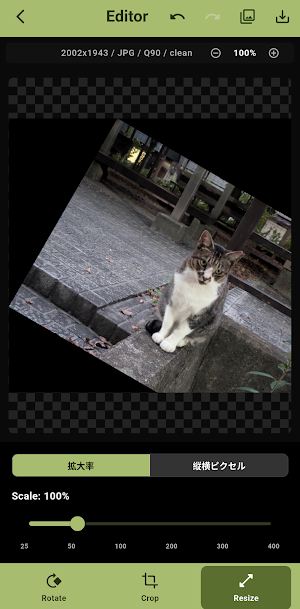
This is a simple photo editing app that allows you to quickly resize, rotate, and crop (cut out) photos from your smartphone. It's convenient for posting to social media, creating images for blogs, and making documents. It provides perfect image editing for all purposes.
【Main Features】
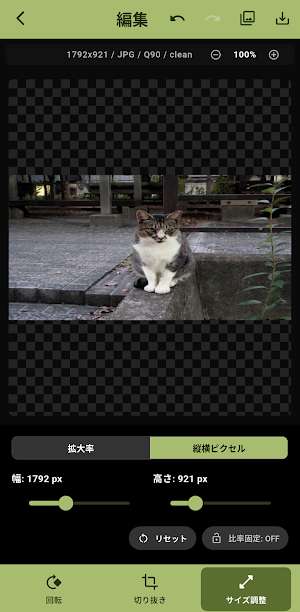
① Size Adjustment
- Intuitive zoom in and out using a slider.
- Precise dimension specification in pixels.
- Resizing is possible without distortion while maintaining the aspect ratio.
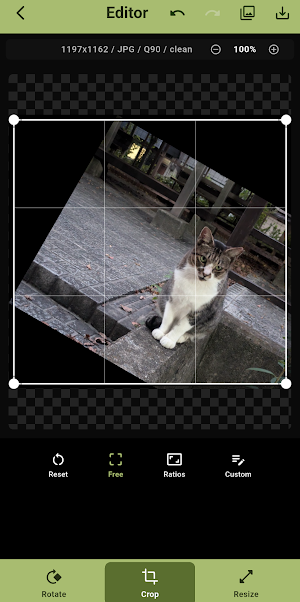
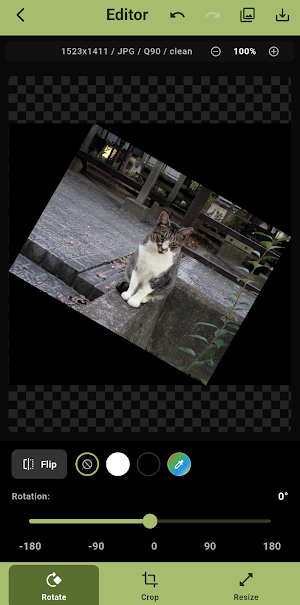
② Intuitive Cropping and Rotation
- Supports free rotation in 1-degree increments. Cropping is possible with a horizontal frame even after rotation.
- Complete with standard aspect ratio presets such as square (1:1), 4:3, and 16:9.
- Instantly correct the orientation of selfies and other photos with the mirror image (left/right flip) function.
③ Convenient Export
- Choose from various save formats: Supports JPG, PNG, and PDF, which is convenient for documents.
• You can select the compression quality (0-100%) and fine-tune the file size.
No login required; completely offline. No troublesome registration whatsoever. Image data is never sent to the server, ensuring your privacy.
Intuitive and beautiful UI with dark mode support.
【Main Features】
① Size Adjustment
- Intuitive zoom in and out using a slider.
- Precise dimension specification in pixels.
- Resizing is possible without distortion while maintaining the aspect ratio.
② Intuitive Cropping and Rotation
- Supports free rotation in 1-degree increments. Cropping is possible with a horizontal frame even after rotation.
- Complete with standard aspect ratio presets such as square (1:1), 4:3, and 16:9.
- Instantly correct the orientation of selfies and other photos with the mirror image (left/right flip) function.
③ Convenient Export
- Choose from various save formats: Supports JPG, PNG, and PDF, which is convenient for documents.
• You can select the compression quality (0-100%) and fine-tune the file size.
No login required; completely offline. No troublesome registration whatsoever. Image data is never sent to the server, ensuring your privacy.
Intuitive and beautiful UI with dark mode support.
What’s new
Version 1.0.3 · Updated March 31, 2026
切り抜きと回転機能の改善を行いました
Alternatives to 写真リサイズPlus 〜画像のサイズ変更・拡大・縮小・回転〜
Looking for apps like 写真リサイズPlus 〜画像のサイズ変更・拡大・縮小・回転〜? Here are 6 similar Android apps on Google Play. All of them are free to download.
-
Video Speed Changer PRO
-
Web画面のメモPLUS
-
PDF-画像 変換PLUS
-
メモ帳 PLUS ~判子やスタンプ・写真がある国産アプリ~
-
写真モザイク&ぼかしPLUS ~指でなぞってかんたん加工~
-
写真のEXIF編集&フレーム追加PLUS
| App | Rating | Price | Installs | Last updated | Compare |
|---|---|---|---|---|---|
| 写真リサイズPlus 〜画像のサイズ変更・拡大・縮小・回転〜 | – | Free | 50+ | Mar 31, 2026 | |
| Video Speed Changer PRO | – | Free | 1,000+ | Oct 16, 2026 | Compare |
| Web画面のメモPLUS | – | Free | 50+ | Mar 29, 2026 | Compare |
| PDF-画像 変換PLUS | – | Free | 5+ | Mar 28, 2026 | Compare |
| メモ帳 PLUS ~判子やスタンプ・写真がある国産アプリ~ | – | Free | 10+ | Mar 22, 2026 | Compare |
| 写真モザイク&ぼかしPLUS ~指でなぞってかんたん加工~ | – | Free | 10+ | Mar 20, 2026 | Compare |
| 写真のEXIF編集&フレーム追加PLUS | – | Free | 10+ | Oct 17, 2026 | Compare |
Similar apps on Google Play
- Video Speed Changer PRO
- Web画面のメモPLUS
- PDF-画像 変換PLUS
- メモ帳 PLUS ~判子やスタンプ・写真がある国産アプリ~
- 写真モザイク&ぼかしPLUS ~指でなぞってかんたん加工~
- 写真のEXIF編集&フレーム追加PLUS
- 最安値の記録帳PLUS -底値で買い物するための節約アプリ
- 保育園・幼稚園 保護者のやることメモ
- 離乳食の記録PLUS - ベビーフード検索・一括登録ができる
- お買い得電卓PLUS 〜単価をすぐに計算して比較〜
- 動画から写真PRO 一括抽出・切り取り・変換
- Resistor ColorCode Calculator
- 西暦・和暦早見表&電卓 PLUS(年齢・干支・メモあり)