
Mosaic - Image Collage Maker
Photography In-app purchases Contains ads
Turn your photos into beautiful collages offline. Layouts, filters, captions.
- Downloads
- 73+
- on Google Play
- Price
- Free
- In-app purchases
- Updated
- Jul 28
- 2026 · v2.0
Screenshots


About Mosaic - Image Collage Maker
A free, offline, multi-language app to turn your photos into beautiful collages.
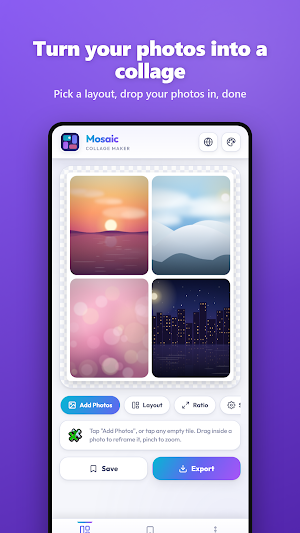
Mosaic is a fast, beautiful collage maker that turns your photos into share-worthy grids in seconds. Pick a layout, drop in your photos, fine-tune the frame, and export in crisp quality. For example you can export for Instagram, WhatsApp, Facebook or your gallery.
CREATE IN SECONDS Add several photos at once and Mosaic arranges them instantly. Tap any tile to fill it, drag inside a photo to reframe it perfectly, and pinch to zoom. One tap shuffles your photos into a fresh arrangement.
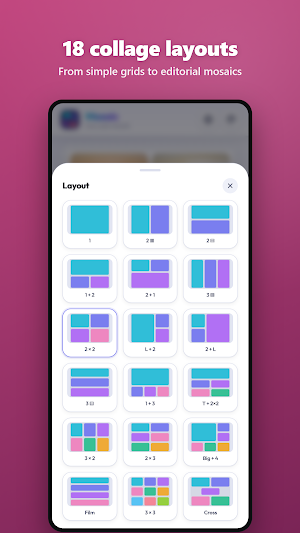
LAYOUTS FOR EVERY STORY Choose from classic grids (2x2, 3x3), hero layouts that make one photo the star, film-strip stacks, mosaic mixes and more. Every layout adapts to your chosen aspect ratio.
MADE FOR SOCIAL Export in the exact shape you need: square posts, 4:5 portraits, tall 9:16 stories, wide 16:9 covers and more. Your collage always comes out pixel-perfect.
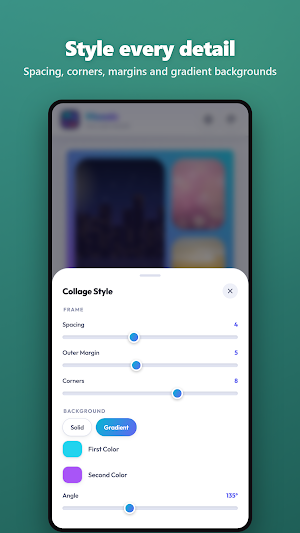
STYLE IT YOUR WAY Adjust spacing between photos, outer margins and corner roundness with simple sliders. Set a clean solid background or a smooth two-color gradient at any angle.
REFRAME EVERY PHOTO Each photo has its own zoom, position, rotate and mirror controls, so every face and every detail lands exactly where you want it.
FILTERS THAT MATCH Give photos a consistent look with brightness, contrast, saturation, warmth and black-and-white adjustments, then apply the same look to every photo in one tap.
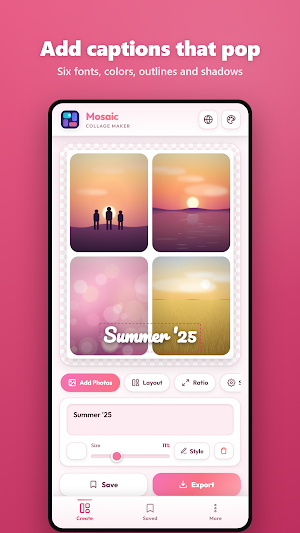
ADD CAPTIONS Drop text anywhere on your collage. Choose fonts from bold headline styles to elegant script, add outlines and soft shadows, rotate and resize freely.
SAVE AND CONTINUE Save works in progress and reopen them later, exactly as you left them.
EXPORT IN HIGH QUALITY Export as PNG or JPG. Upgrade to PRO for extra-sharp HD export at 2560px.
PERSONALIZE THE APP Seven interface themes, from clean light looks to comfortable dark modes, plus multiple languages.
Mosaic is free to use. Upgrade to PRO to unlock every layout, all aspect ratios, gradient backgrounds, photo filters, unlimited captions and HD export.
No watermarks on your collages. Ever.
Download Mosaic and start creating today.
Mosaic is a fast, beautiful collage maker that turns your photos into share-worthy grids in seconds. Pick a layout, drop in your photos, fine-tune the frame, and export in crisp quality. For example you can export for Instagram, WhatsApp, Facebook or your gallery.
CREATE IN SECONDS Add several photos at once and Mosaic arranges them instantly. Tap any tile to fill it, drag inside a photo to reframe it perfectly, and pinch to zoom. One tap shuffles your photos into a fresh arrangement.
LAYOUTS FOR EVERY STORY Choose from classic grids (2x2, 3x3), hero layouts that make one photo the star, film-strip stacks, mosaic mixes and more. Every layout adapts to your chosen aspect ratio.
MADE FOR SOCIAL Export in the exact shape you need: square posts, 4:5 portraits, tall 9:16 stories, wide 16:9 covers and more. Your collage always comes out pixel-perfect.
STYLE IT YOUR WAY Adjust spacing between photos, outer margins and corner roundness with simple sliders. Set a clean solid background or a smooth two-color gradient at any angle.
REFRAME EVERY PHOTO Each photo has its own zoom, position, rotate and mirror controls, so every face and every detail lands exactly where you want it.
FILTERS THAT MATCH Give photos a consistent look with brightness, contrast, saturation, warmth and black-and-white adjustments, then apply the same look to every photo in one tap.
ADD CAPTIONS Drop text anywhere on your collage. Choose fonts from bold headline styles to elegant script, add outlines and soft shadows, rotate and resize freely.
SAVE AND CONTINUE Save works in progress and reopen them later, exactly as you left them.
EXPORT IN HIGH QUALITY Export as PNG or JPG. Upgrade to PRO for extra-sharp HD export at 2560px.
PERSONALIZE THE APP Seven interface themes, from clean light looks to comfortable dark modes, plus multiple languages.
Mosaic is free to use. Upgrade to PRO to unlock every layout, all aspect ratios, gradient backgrounds, photo filters, unlimited captions and HD export.
No watermarks on your collages. Ever.
Download Mosaic and start creating today.
Alternatives to Mosaic - Image Collage Maker
Looking for apps like Mosaic - Image Collage Maker? Here are 6 similar Android apps on Google Play. The highest rated is Image Toolbox - Edit & Convert (4.7/5), and all 6 are free to download.
-
YouCam Enhance: AI Photo&Video 4.2
-
PicWish: AI Photo Editor 2.8
-
Lift: AI Photo Editor 4.2
-
StoryLab - Story Maker 4.5
-
AI Photo Editor: AI Expand 4.3
-
Image Toolbox - Edit & Convert 4.7
| App | Rating | Price | Installs | Last updated | Compare |
|---|---|---|---|---|---|
| Mosaic - Image Collage Maker | – | Free | 50+ | Jul 28, 2026 | |
| YouCam Enhance: AI Photo&Video | 4.2 / 5 | Free | 1,000,000+ | Sep 22, 2026 | Compare |
| PicWish: AI Photo Editor | 2.8 / 5 | Free | 5,000,000+ | Oct 28, 2026 | Compare |
| Lift: AI Photo Editor | 4.2 / 5 | Free | 1,000,000+ | Jul 10, 2026 | Compare |
| StoryLab - Story Maker | 4.5 / 5 | Free | 10,000,000+ | Jul 1, 2024 | Compare |
| AI Photo Editor: AI Expand | 4.3 / 5 | Free | 100,000+ | Aug 24, 2026 | Compare |
| Image Toolbox - Edit & Convert | 4.7 / 5 | Free | 500,000+ | Sep 4, 2026 | Compare |
Similar apps on Google Play
- YouCam Enhance: AI Photo&Video
- PicWish: AI Photo Editor
- Lift: AI Photo Editor
- StoryLab - Story Maker
- AI Photo Editor: AI Expand
- Image Toolbox - Edit & Convert
- AI Photo Generator - Fotorama
- MeeAww-AI Photo & Video Editor
- AI Attractiveness Test-Facewow
- AI Image Generator - Monet
- Post Maker for Social Media
- Promeo - Story & Reels Maker