

App Permission Analyzer
Tools
Local Android permission, tracker, APK, and privacy risk analyzer.
- Downloads
- 218+
- on Google Play
- Price
- Free
- No in-app purchases
- Updated
- May 23
- 2026 · v1.2.5
Screenshots
About App Permission Analyzer
App Permission Analyzer helps you understand the permissions, trackers, and privacy risks of Android apps installed on your device or APK files you choose to analyze.
The app is designed as a local-first privacy utility. Analysis runs on your device, and no internet connection is required.
Key features:
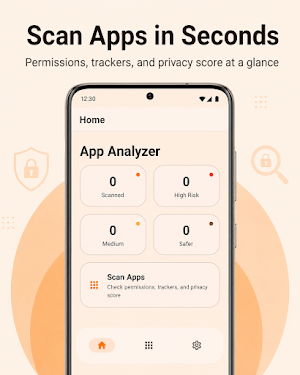
Installed Apps Scanner
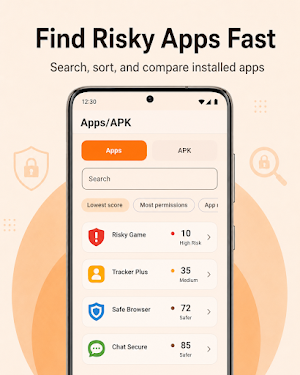
Scan installed apps and review their requested permissions. You can view privacy scores, permission categories, tracker indicators, and risk warnings for each app. System apps can be included or excluded from the scan.
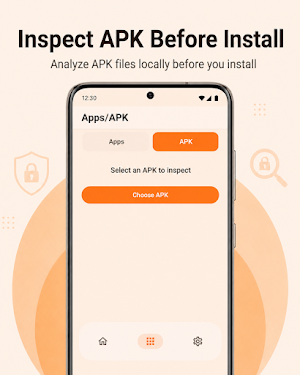
APK File Analyzer
Select an APK file from your device and inspect its manifest before installation. APK files are copied to temporary cache only for local analysis.
Privacy Score
Each app receives a privacy score from 0 to 100 based on factors such as sensitive permissions, background access, tracker indicators, risky permission combinations, and special access patterns.
Permission Insights
Permissions are grouped into clear categories such as privacy, device access, communication, background access, tracking, and other permissions. Each permission includes a plain-language explanation and a privacy impact level.
Tracker Detection
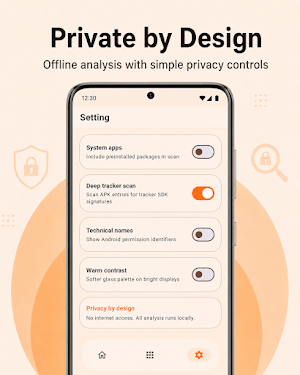
Detect common tracker and analytics SDK indicators such as Firebase Analytics, Google AdMob, Facebook SDK, AppsFlyer, Adjust, OneSignal, and others. Deep scan mode can inspect APK entries and DEX string chunks for known tracker signatures.
Risk Warnings
The app highlights permissions and combinations that may deserve closer review, such as location with microphone access, SMS with contacts, camera with storage, background access, overlay usage, or accessibility-related declarations.
Privacy by Design
- No internet permission required
- No data uploaded or transmitted
- Analysis runs locally on the device
- APK files are used only for temporary local analysis
- Settings are stored locally on your device
Important note:
App Permission Analyzer provides informational analysis based on app permissions, manifest data, tracker signatures, and known risk patterns. A lower score or warning does not always mean an app is unsafe, and a higher score does not guarantee that an app is risk-free. Use the results as a privacy review tool to make more informed decisions.
The app is designed as a local-first privacy utility. Analysis runs on your device, and no internet connection is required.
Key features:
Installed Apps Scanner
Scan installed apps and review their requested permissions. You can view privacy scores, permission categories, tracker indicators, and risk warnings for each app. System apps can be included or excluded from the scan.
APK File Analyzer
Select an APK file from your device and inspect its manifest before installation. APK files are copied to temporary cache only for local analysis.
Privacy Score
Each app receives a privacy score from 0 to 100 based on factors such as sensitive permissions, background access, tracker indicators, risky permission combinations, and special access patterns.
Permission Insights
Permissions are grouped into clear categories such as privacy, device access, communication, background access, tracking, and other permissions. Each permission includes a plain-language explanation and a privacy impact level.
Tracker Detection
Detect common tracker and analytics SDK indicators such as Firebase Analytics, Google AdMob, Facebook SDK, AppsFlyer, Adjust, OneSignal, and others. Deep scan mode can inspect APK entries and DEX string chunks for known tracker signatures.
Risk Warnings
The app highlights permissions and combinations that may deserve closer review, such as location with microphone access, SMS with contacts, camera with storage, background access, overlay usage, or accessibility-related declarations.
Privacy by Design
- No internet permission required
- No data uploaded or transmitted
- Analysis runs locally on the device
- APK files are used only for temporary local analysis
- Settings are stored locally on your device
Important note:
App Permission Analyzer provides informational analysis based on app permissions, manifest data, tracker signatures, and known risk patterns. A lower score or warning does not always mean an app is unsafe, and a higher score does not guarantee that an app is risk-free. Use the results as a privacy review tool to make more informed decisions.
What’s new
Version 1.2.5 · Updated May 23, 2026
- Improved user experience with smoother animation. - Fixed bugs and improved app stability.
Alternatives to App Permission Analyzer
Looking for apps like App Permission Analyzer? Here are 6 similar Android apps on Google Play. The highest rated is Hermit — Lite Apps Browser (4.6/5), and all 6 are free to download.
-
Control+ 3.8
-
Autosync - File Sync & Backup 4.5
-
Hermit — Lite Apps Browser 4.6
-
Android System WebView Dev 4.1
-
MindMeister - Mind Mapping 3.4
-
Total Drive - Cloud Storage 3.6
| App | Rating | Price | Installs | Last updated | Compare |
|---|---|---|---|---|---|
| App Permission Analyzer | – | Free | 100+ | May 23, 2026 | |
| Control+ | 3.8 / 5 | Free | 10,000+ | Nov 4, 2026 | Compare |
| Autosync - File Sync & Backup | 4.5 / 5 | Free | 100,000+ | Oct 14, 2026 | Compare |
| Hermit — Lite Apps Browser | 4.6 / 5 | Free | 1,000,000+ | Nov 4, 2026 | Compare |
| Android System WebView Dev | 4.1 / 5 | Free | 1,000,000+ | Nov 6, 2026 | Compare |
| MindMeister - Mind Mapping | 3.4 / 5 | Free | 5,000,000+ | Oct 14, 2026 | Compare |
| Total Drive - Cloud Storage | 3.6 / 5 | Free | 500,000+ | Jul 27, 2026 | Compare |