
HD Screen Recorder & My Video Recorder & Editor
Brahms Soft Tech Video Players & Editors
HD Screen Recorded not only helps you to record your screen also capture images
- Downloads
- 100+
- on Google Play
- Price
- Free
- No in-app purchases
- Updated
- Jun 17
- 2020 · v1.0
Screenshots
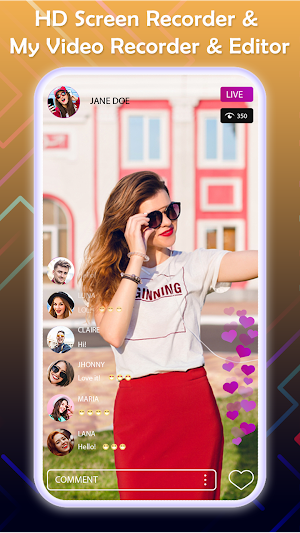


About HD Screen Recorder & My Video Recorder & Editor
Modern technology has made it possible for the recording of many devices like smartphones. Today, anyone can record their mobile screen with audio and upload it to YouTube in a few clicks.
Why don't you try HD Screen Recorder & My Video Recorder & Editor, the most advanced screen recording app? It will permit you to capture mobile screens, video tutorials and online academic lessons.
You can record lectures, webinars, games and Skype calls and video conferencing from your mobile phones, and share on YouTube.
HD Screen Recorder & My Video Recorder & Editor app allows you to make a screen capture of your screen with ease.
It can record all actions that happened on your screen when you are there or when you are away.
Today, if you have more knowledge about a field than the average person, then you can quickly make a screencast video teaching people how to do that which you are good at.
A video demonstration is easier and drives your point home quicker than pages of books or blogs.
Video remains the fastest way to learn how to accomplish tasks or use a tool.
For example, instead of read through a 15-page manual on how to create an email account, you can simply record yourself creating one.
Video conferencing Zoom has no feature to watch or replay a meeting after it is over; instead it allows you to record if permitted by the host. Here, HD Screen Recorder & My Video Recorder & Editor helps you.
To review the Zoom meeting later, you can record your screen while the meeting is going on with or without the host's permission.
features
- Easy to use
- Record webinars, Skype call, learning tutorials
- Take a screen shot
- Edit Recorded video, trim and add audio in recording
- Convert Video to Mp3 easily
- Share recorded video on Social media
How to Use?
- Go to play store and Install the HD Screen Recorder & My Video Recorder & Editor app
- Click on "Start" and enable the screen recording function on.
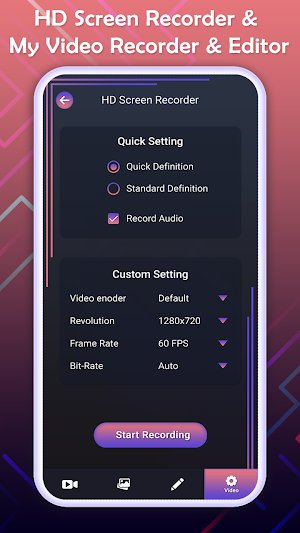
- Now Set the Video encoder, Resolution, Frame rate, Bit-rate on custom settings
- Click "Start Recording" and your recording are beginning.
- record your video and add your voice
- Share it on social media and get famous.
Why don't you try HD Screen Recorder & My Video Recorder & Editor, the most advanced screen recording app? It will permit you to capture mobile screens, video tutorials and online academic lessons.
You can record lectures, webinars, games and Skype calls and video conferencing from your mobile phones, and share on YouTube.
HD Screen Recorder & My Video Recorder & Editor app allows you to make a screen capture of your screen with ease.
It can record all actions that happened on your screen when you are there or when you are away.
Today, if you have more knowledge about a field than the average person, then you can quickly make a screencast video teaching people how to do that which you are good at.
A video demonstration is easier and drives your point home quicker than pages of books or blogs.
Video remains the fastest way to learn how to accomplish tasks or use a tool.
For example, instead of read through a 15-page manual on how to create an email account, you can simply record yourself creating one.
Video conferencing Zoom has no feature to watch or replay a meeting after it is over; instead it allows you to record if permitted by the host. Here, HD Screen Recorder & My Video Recorder & Editor helps you.
To review the Zoom meeting later, you can record your screen while the meeting is going on with or without the host's permission.
features
- Easy to use
- Record webinars, Skype call, learning tutorials
- Take a screen shot
- Edit Recorded video, trim and add audio in recording
- Convert Video to Mp3 easily
- Share recorded video on Social media
How to Use?
- Go to play store and Install the HD Screen Recorder & My Video Recorder & Editor app
- Click on "Start" and enable the screen recording function on.
- Now Set the Video encoder, Resolution, Frame rate, Bit-rate on custom settings
- Click "Start Recording" and your recording are beginning.
- record your video and add your voice
- Share it on social media and get famous.
Alternatives to HD Screen Recorder & My Video Recorder & Editor
Looking for apps like HD Screen Recorder & My Video Recorder & Editor? Here are 5 similar Android apps on Google Play. The highest rated is Voice Changer, Voice Recorder (4.6/5), and all 5 are free to download.
-
Photo & Video & Audio Recover 3.9
-
Voice Changer, Voice Recorder 4.6
-
Music Download – Mp3 Music Dow 3.8
-
Screen Mirroring with TV - Cas
-
Neat Color Call Phone - Color
| App | Rating | Price | Installs | Last updated | Compare |
|---|---|---|---|---|---|
| HD Screen Recorder & My Video Recorder & Editor | – | Free | 100+ | Jun 17, 2020 | |
| Photo & Video & Audio Recover | 3.9 / 5 | Free | 500,000+ | Jan 29, 2024 | Compare |
| Voice Changer, Voice Recorder | 4.6 / 5 | Free | 10,000+ | Oct 30, 2020 | Compare |
| Music Download – Mp3 Music Dow | 3.8 / 5 | Free | 10,000+ | Mar 19, 2020 | Compare |
| Screen Mirroring with TV - Cas | – | Free | 1,000+ | Jun 11, 2020 | Compare |
| Neat Color Call Phone - Color | – | Free | 100,000+ | Jun 13, 2023 | Compare |