
Urdu Speech To Text – Urdu Voice Typing Keyboard
Freefuninfo.com Communication
Urdu Speech To Text is best for Urdu Voice Typing. Urdu Voice Typing Keyboard.
- Rating
- 4.3
- 908 ratings
- Downloads
- 10K+
- on Google Play
- Price
- Free
- No in-app purchases
- Updated
- Jan 26
- 2021 · v0.9
Screenshots



About Urdu Speech To Text – Urdu Voice Typing Keyboard
Urdu Speech To Text. Voice Typing Keyboard for Urdu Typing in Urdu Voice. Fast Urdu Voice Typing is easy to use and simple.
With help of Urdu Speech To Text, you can easily get Urdu Text typed in Pages. Using Urdu Speech To Text change your Urdu Voice to Urdu Text.
Urdu Voice Typing Keyboard makes simple and easy use for those people who don't want to spend time in Urdu Typing. It is very easy and simple to get Urdu Text in mobile using your Voice in Urdu.
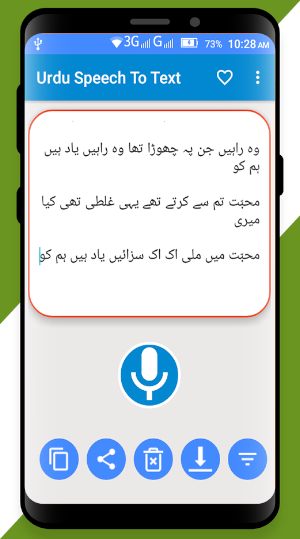
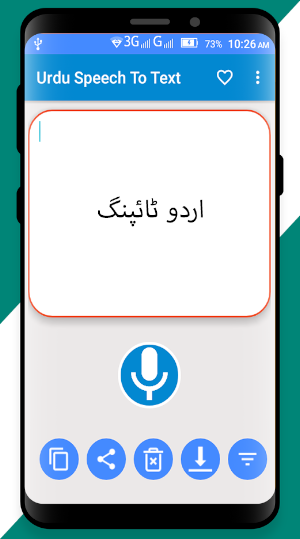
Using Text to Speech Urdu you can click Urdu Voice Typing Keyboard Option To get Urdu Text typed by giving your Voice. Click on Mic button to Speak in Urdu Voice. This Urdu Speech To Text App it gives Automatically Urdu typed text in Urdu Text after when you finish speaking.
You can get Urdu Text typed with the help of Urdu Voice
Urdu Voice Typing is a reduction of time
Fast Voice to text Urdu
Easy Urdu Typing Keyboard with Urdu Voice to Text.
Speech To Text Urdu With Urdu Voice Typing Keyboard.
Voice Typing in Urdu is simple and easy with Urdu Speech To Text Keyboard without any typing effort.
Urdu Voice to text will reduce time and effort in typing Urdu. This Urdu Voice typing Keyboard is very simple and easy for everyone who wants to reduce time. text to speech, text to voice, text to speech urdu, urdu text to speech
Select images from gallery or take new picture from the camera and convert
image to text .
About Image to text Converter, JPG or PNG to text Convert
From app image to word converter.
Steps to use:
1. Pick image from gallery with gallery button or .
Camera button to take new pictures,
select them and convert picture to text.
2. Save in mobile from translate text in image.
3. Convert from image to text.
4. View list of all created PDF.
5. Open word and PDF with any PDF viewer/editor and word.
6. Rename, delete or share convert picture to text.
This app does not collect any personal information of the user.
The target age group for this app is 13 to 18+.
With help of Urdu Speech To Text, you can easily get Urdu Text typed in Pages. Using Urdu Speech To Text change your Urdu Voice to Urdu Text.
Urdu Voice Typing Keyboard makes simple and easy use for those people who don't want to spend time in Urdu Typing. It is very easy and simple to get Urdu Text in mobile using your Voice in Urdu.
Using Text to Speech Urdu you can click Urdu Voice Typing Keyboard Option To get Urdu Text typed by giving your Voice. Click on Mic button to Speak in Urdu Voice. This Urdu Speech To Text App it gives Automatically Urdu typed text in Urdu Text after when you finish speaking.
You can get Urdu Text typed with the help of Urdu Voice
Urdu Voice Typing is a reduction of time
Fast Voice to text Urdu
Easy Urdu Typing Keyboard with Urdu Voice to Text.
Speech To Text Urdu With Urdu Voice Typing Keyboard.
Voice Typing in Urdu is simple and easy with Urdu Speech To Text Keyboard without any typing effort.
Urdu Voice to text will reduce time and effort in typing Urdu. This Urdu Voice typing Keyboard is very simple and easy for everyone who wants to reduce time. text to speech, text to voice, text to speech urdu, urdu text to speech
Select images from gallery or take new picture from the camera and convert
image to text .
About Image to text Converter, JPG or PNG to text Convert
From app image to word converter.
Steps to use:
1. Pick image from gallery with gallery button or .
Camera button to take new pictures,
select them and convert picture to text.
2. Save in mobile from translate text in image.
3. Convert from image to text.
4. View list of all created PDF.
5. Open word and PDF with any PDF viewer/editor and word.
6. Rename, delete or share convert picture to text.
This app does not collect any personal information of the user.
The target age group for this app is 13 to 18+.
What’s new
Version 0.9 · Updated January 26, 2021
Added new Features now you can save and edit text for sharing on social media ✔️ images to Text ✔️ Urdu Voice to Text ✔️ Voice to Urdu Text ✔️ Text to Urdu Speech Bug fix Improve UI design
User reviews

excellent

Wonderful
Very easy and simple app. Not a just good app.This is the best app. Thanks for this ap.❤

Very easy to use great little app

Excilent
Excited
Alternatives to Urdu Speech To Text – Urdu Voice Typing Keyboard
Looking for apps like Urdu Speech To Text – Urdu Voice Typing Keyboard? Here are 5 similar Android apps on Google Play. The highest rated is 6 Kalma - Urdu English Transla (5.0/5), and all 5 are free to download.
-
islamic Dua, Dua Qunoot,Namaz, 4.8
-
Urdu Status - Urdu Poetry 4.9
-
Android Phone Tester– Android 3.8
-
Surah Rahman Multi Translation
-
6 Kalma - Urdu English Transla 5.0
| App | Rating | Price | Installs | Last updated | Compare |
|---|---|---|---|---|---|
| Urdu Speech To Text – Urdu Voice Typing Keyboard | 4.3 / 5 | Free | 10,000+ | Jan 26, 2021 | |
| islamic Dua, Dua Qunoot,Namaz, | 4.8 / 5 | Free | 100,000+ | Apr 16, 2020 | Compare |
| Urdu Status - Urdu Poetry | 4.9 / 5 | Free | 500,000+ | Aug 4, 2020 | Compare |
| Android Phone Tester– Android | 3.8 / 5 | Free | 10,000+ | Jan 4, 2022 | Compare |
| Surah Rahman Multi Translation | – | Free | 500+ | Dec 30, 2021 | Compare |
| 6 Kalma - Urdu English Transla | 5.0 / 5 | Free | 10,000+ | Jan 23, 2021 | Compare |