

JustBooth – DIY Photo Booth
Viglianisi Photography In-app purchases
Turn any phone or tablet into a fun, self-contained photo booth.
- Downloads
- 406+
- on Google Play
- Price
- Free
- In-app purchases
- Updated
- Sep 22
- 2026 · v1.7.1
Screenshots
Save to Pinterest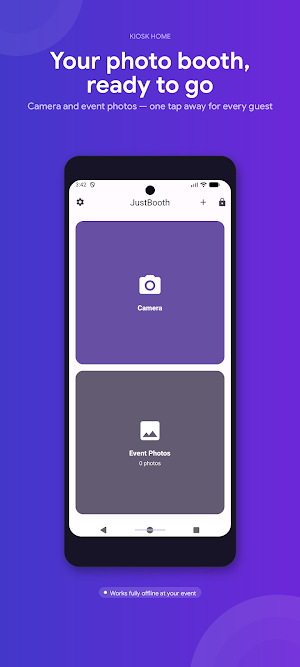
About JustBooth – DIY Photo Booth
📸 Turn any Android tablet or phone into a self-contained photo booth — no extra hardware, no complicated setup. Just install JustBooth, point the camera at your guests, and start capturing memories.
── YOUR DIY PHOTO BOOTH ──
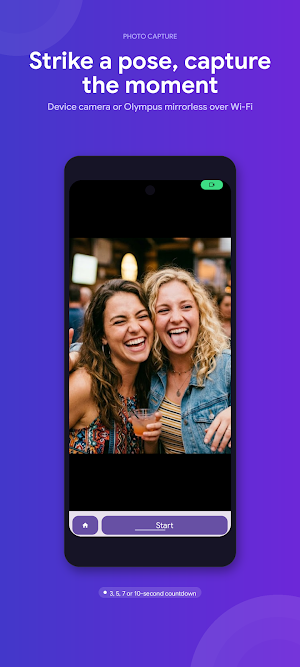
JustBooth works with the built-in camera on any Android device. It also supports Olympus mirrorless cameras over Wi-Fi via OM Image Share, giving you professional-quality photos without a dedicated photo booth machine.
Set up a countdown timer, take the shot, and instantly see the result on screen. Perfect for weddings, birthday parties, corporate events, and any gathering where you want a fun photo station.
── PRINT, SHARE, OR STORE ──
Have a printer? JustBooth works with any printing app on your device — Bluetooth, Wi-Fi, or USB. Tap the Print button and photos go straight to your chosen printer app.
No printer? No problem. Share photos on the spot via any app on your device, or store them locally and send them to your guests later. All photos are saved to your gallery — your event, your files.
── KEEP GUESTS IN THE BOOTH ──
Set JustBooth as your default Home app and guests will always stay inside the photo experience. Press Home anywhere and you're back at the kiosk screen. System navigation is hidden in fullscreen mode, and the screen stays on throughout the event.
Need to access settings mid-event? A secure PIN or biometric lock keeps admin controls out of guests' hands while you stay fully in control.
── WHAT'S INCLUDED ──
• Works with built-in device camera
• Olympus camera support over Wi-Fi (OM Image Share)
• Configurable countdown timer (3, 5, 7, or 10 seconds)
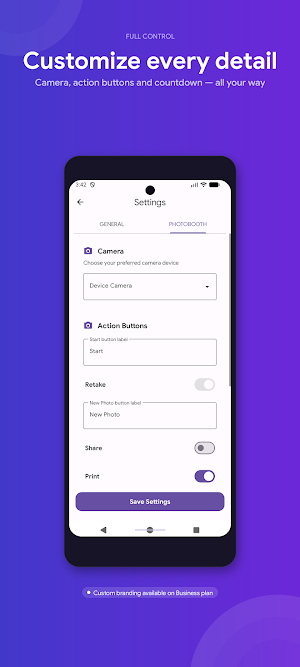
• Customisable action buttons (Retake, Share, Print)
• Kiosk mode: fullscreen, screen-always-on, Home button locked to booth
• Event management: group photos by event session
• Custom branding: add your own logo to every photo (Business tier)
• White-label mode: remove all default branding (Business tier)
── PRICING ──
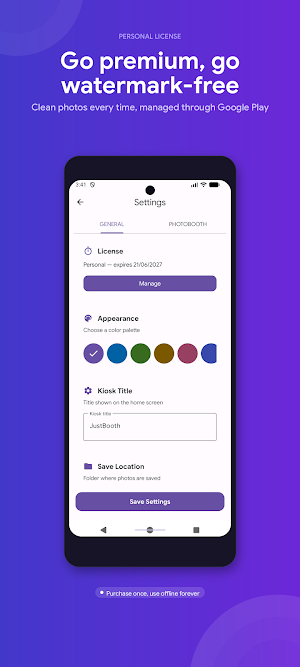
Free: Try every feature. Photos include a watermark.
Personal: Remove the watermark — ideal for private events.
Business: Custom branding and white-label mode for professionals.
No account required. Works fully offline at your event. Subscriptions managed through Google Play.
── YOUR DIY PHOTO BOOTH ──
JustBooth works with the built-in camera on any Android device. It also supports Olympus mirrorless cameras over Wi-Fi via OM Image Share, giving you professional-quality photos without a dedicated photo booth machine.
Set up a countdown timer, take the shot, and instantly see the result on screen. Perfect for weddings, birthday parties, corporate events, and any gathering where you want a fun photo station.
── PRINT, SHARE, OR STORE ──
Have a printer? JustBooth works with any printing app on your device — Bluetooth, Wi-Fi, or USB. Tap the Print button and photos go straight to your chosen printer app.
No printer? No problem. Share photos on the spot via any app on your device, or store them locally and send them to your guests later. All photos are saved to your gallery — your event, your files.
── KEEP GUESTS IN THE BOOTH ──
Set JustBooth as your default Home app and guests will always stay inside the photo experience. Press Home anywhere and you're back at the kiosk screen. System navigation is hidden in fullscreen mode, and the screen stays on throughout the event.
Need to access settings mid-event? A secure PIN or biometric lock keeps admin controls out of guests' hands while you stay fully in control.
── WHAT'S INCLUDED ──
• Works with built-in device camera
• Olympus camera support over Wi-Fi (OM Image Share)
• Configurable countdown timer (3, 5, 7, or 10 seconds)
• Customisable action buttons (Retake, Share, Print)
• Kiosk mode: fullscreen, screen-always-on, Home button locked to booth
• Event management: group photos by event session
• Custom branding: add your own logo to every photo (Business tier)
• White-label mode: remove all default branding (Business tier)
── PRICING ──
Free: Try every feature. Photos include a watermark.
Personal: Remove the watermark — ideal for private events.
Business: Custom branding and white-label mode for professionals.
No account required. Works fully offline at your event. Subscriptions managed through Google Play.
What’s new
Version 1.7.1 · Updated September 22, 2026
We've streamlined the app for a cleaner experience. Minor fixes and improvements.
User reviews

If you're getting married and want to smoothly take and print pictures of the wedding, then you MUST get this app

App della Madonna!!!! 5 Stelle meritate!
Alternatives to JustBooth – DIY Photo Booth
Looking for apps like JustBooth – DIY Photo Booth? Here are 6 similar Android apps on Google Play. The highest rated is Ink Cards (4.8/5), and all 6 are free to download.
-
Farmers Insurance Inc. 4.7
-
Ink Cards 4.8
-
Shutterfly: Prints Cards Gifts 4.6
-
Optimalprint: Photo Gifts 4.4
-
Photobook: Photo Books & Gifts 4.0
-
PhotoSpot: For Travel Planning 4.7
| App | Rating | Price | Installs | Last updated | Compare |
|---|---|---|---|---|---|
| JustBooth – DIY Photo Booth | – | Free | 100+ | Sep 22, 2026 | |
| Farmers Insurance Inc. | 4.7 / 5 | Free | 1,000,000+ | Oct 9, 2026 | Compare |
| Ink Cards | 4.8 / 5 | Free | 1,000,000+ | Oct 9, 2026 | Compare |
| Shutterfly: Prints Cards Gifts | 4.6 / 5 | Free | 10,000,000+ | Oct 21, 2026 | Compare |
| Optimalprint: Photo Gifts | 4.4 / 5 | Free | 500,000+ | Oct 27, 2026 | Compare |
| Photobook: Photo Books & Gifts | 4.0 / 5 | Free | 1,000,000+ | Oct 14, 2026 | Compare |
| PhotoSpot: For Travel Planning | 4.7 / 5 | Free | 5,000+ | Jun 10, 2026 | Compare |