
Limited Launcher
aCore Personalization
Application (native or web) launcher in kiosk mode
- Downloads
- 1K+
- on Google Play
- Price
- Free
- No in-app purchases
- Updated
- Jun 14
- 2017 · v1.1
Screenshots
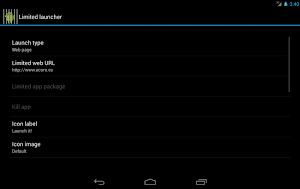


About Limited Launcher
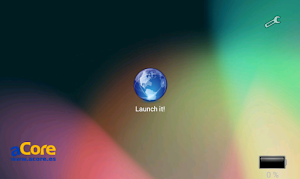
Limited Launcher is a launcher (or Android desktop) focued on executing applications or web pages in kiosk mode, that is, in full screen and without giving the user the chance to exit the app
This launcher makes all it can do for executing the application in full screen without the necessity of beeing root. Nevertheless, it is impossible to drop out the Android notification bar without beeing root. If you need to to this, there are some available options in Google Play Store, some of which are free (full!screen, StatusBar in FullScreen, Hide Bottom Bar, ...).
It's typical aplication is in information stands, restaurant menus, guided tour apps...
Please, have in mind that because of the nature of the application, you should use it carefully. It is possible that if you don't read thoroughly the options that you select, you don't know how to return your device to a normal state. We suggest that you do not select LimitedLauncher as the default launcher until you have get used to its features.
Features:
This launcher makes all it can do for executing the application in full screen without the necessity of beeing root. Nevertheless, it is impossible to drop out the Android notification bar without beeing root. If you need to to this, there are some available options in Google Play Store, some of which are free (full!screen, StatusBar in FullScreen, Hide Bottom Bar, ...).
It's typical aplication is in information stands, restaurant menus, guided tour apps...
Please, have in mind that because of the nature of the application, you should use it carefully. It is possible that if you don't read thoroughly the options that you select, you don't know how to return your device to a normal state. We suggest that you do not select LimitedLauncher as the default launcher until you have get used to its features.
Features:
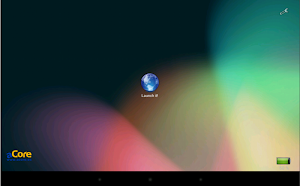
- A single icon is showed in the center of the screen
- The icon is customizable, any image in the gallery can be used
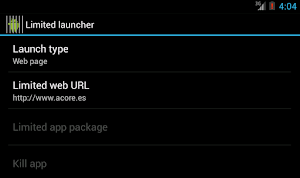
- From the icon can be launched a web page in full screen and without navigation butons or another native android app
- Web page is not reloaded if there is no an available conection
- Settings icon can be hidded to prevent the users to access it
- Settings screen protected by password
- Battery status showed in the screen when its level is low
- At any time, battery status can be shown touching three times in the bottom right corner of the screen
- Included a mechanism to prevent certain android performance problems in some versions
- Hidden mechanism to reload the web page (tapping three times in the top right corner)
- Mechanism to kill the native application
What’s new
Version 1.1 · Updated June 14, 2017
* Adapted to android 5 and 6 due to permission changes. * New option to select screen orientation (landscape, portrait or auto).
User reviews

I like it
This is an interesting Launcher because it provides a simple way for you to have security on your phone. Nobody will be able to get into your phone if they find it. (easily) Thanks for the great free app.

Exactly what i needed!! is a way to show notify bar too??
Alternatives to Limited Launcher
Looking for apps like Limited Launcher? Here are 6 similar Android apps on Google Play. The highest rated is Goodday Quotes : Motivation Da (5.0/5), and all 6 are free to download.
-
Karol G Wallpapers HD 4K
-
WAStickers 2023
-
Office HD Wallpapers
-
Goodday Quotes : Motivation Da 5.0
-
Fluid Live Wallpaper
-
MOD ROBOTS FOR MCPE
| App | Rating | Price | Installs | Last updated | Compare |
|---|---|---|---|---|---|
| Limited Launcher | – | Free | 1,000+ | Jun 14, 2017 | |
| Karol G Wallpapers HD 4K | – | Free | 10+ | Nov 8, 2023 | Compare |
| WAStickers 2023 | – | Free | 5,000+ | Nov 14, 2023 | Compare |
| Office HD Wallpapers | – | Free | 100+ | Jan 10, 2023 | Compare |
| Goodday Quotes : Motivation Da | 5.0 / 5 | Free | 500+ | Jan 24, 2019 | Compare |
| Fluid Live Wallpaper | – | Free | 1,000+ | Nov 14, 2023 | Compare |
| MOD ROBOTS FOR MCPE | – | Free | 100+ | Oct 30, 2023 | Compare |
Compare Limited Launcher with the top alternatives: ratings, updates, ASO score and keyword gaps →
Similar apps on Google Play
- Karol G Wallpapers HD 4K
- WAStickers 2023
- Office HD Wallpapers
- Goodday Quotes : Motivation Da
- Fluid Live Wallpaper
- MOD ROBOTS FOR MCPE
- 20x Zoom Camera Full HD
- iPhone 15 Launcher and Themes
- Fallout Pip-Boy Watch Face
- Fire Letter A Live Wallpaper
- Wild Animal Wallpapers Offline
- Herobrine 2 Mod Minecraft
- Girly Wallpaper
- Ethiopic HD Wallpapers
- memoji stickers - Cartoon
- Digital Material You 3
- Templar Pro S
- Winter Wallpapers 4K
- Samsung Galaxy Fit-e Advice
- GT3 Max Smartwatch instruction
- Bellingham Wallpaper HD 4K
- Black Cat Live Wallpaper
- اسماء بنات حديثة وجميلة 2023
- SKIN N7PLAYER FUTURA HOLO
- Find my phone by clap & flash