
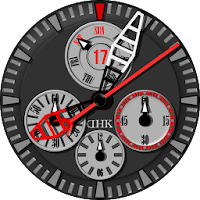
DKH 12hour Red for WM
DKH Watchface Personalization
Simple watchface with stopwatch.
- Price
- $0.99
- No in-app purchases
- Updated
- Sep 26
- 2018 · v1.1
Screenshots
Save to Pinterest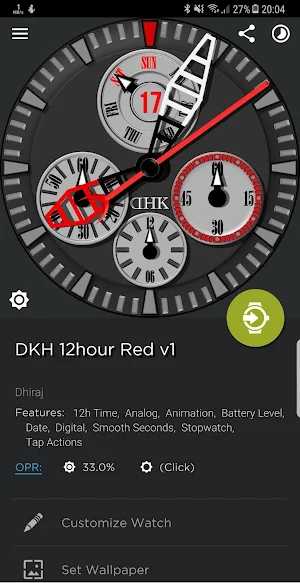
About DKH 12hour Red for WM
💡NOTE: To use this app you must install watchmaker premium app (using the link: https://goo.gl/RAoULK).
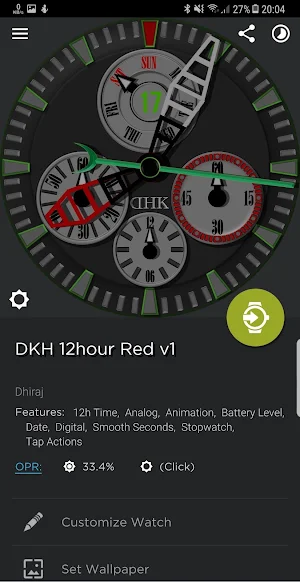
DKH 12hour Red for WM is a analog watchface that can be used with smartwatches that use android wear with round dial. The watchface application comes with battery information in dim mode and stopwatch (analog).
💡Note: I have tested the application on huawei watch. So, if you face any problem please let me know.
Features v1.0
1. Tap left second's dial of stopwatch to start/stop stopwatch.
2. tap stopwatch minute hand to reset.
3. also, day and date information.
How to install:
1. Please install "Watchmaker Premium" using the link: https://goo.gl/RAoULK.
2. Please install "DKH 12hour Red for WM" app from playstore.
3. Open the "Watchmaker Premium" app and tap on tab "My Watches".
4. There you will find the watchface and tap on that.
5. Tap on "Set watchface" and enjoy.
Watch Face - Once you have installed the application from google play store, the watchface will appear in the watchmaker application - my watch section. Open the watchface from there and apply as watchface.
Widget - If you have installed watchmaker live wallpaper, you can use the watchface as widget.
If you face any issue, please send me an email before leaving a negative review. I will do my best to fix the issue as soon as possible.
💡NOTE: This watchface has been tested and working on: Huawei Watch.
DKH 12hour Red for WM is a analog watchface that can be used with smartwatches that use android wear with round dial. The watchface application comes with battery information in dim mode and stopwatch (analog).
💡Note: I have tested the application on huawei watch. So, if you face any problem please let me know.
Features v1.0
1. Tap left second's dial of stopwatch to start/stop stopwatch.
2. tap stopwatch minute hand to reset.
3. also, day and date information.
How to install:
1. Please install "Watchmaker Premium" using the link: https://goo.gl/RAoULK.
2. Please install "DKH 12hour Red for WM" app from playstore.
3. Open the "Watchmaker Premium" app and tap on tab "My Watches".
4. There you will find the watchface and tap on that.
5. Tap on "Set watchface" and enjoy.
Watch Face - Once you have installed the application from google play store, the watchface will appear in the watchmaker application - my watch section. Open the watchface from there and apply as watchface.
Widget - If you have installed watchmaker live wallpaper, you can use the watchface as widget.
If you face any issue, please send me an email before leaving a negative review. I will do my best to fix the issue as soon as possible.
💡NOTE: This watchface has been tested and working on: Huawei Watch.
What’s new
Version 1.1 · Updated September 26, 2018
minor update
Alternatives to DKH 12hour Red for WM
Looking for apps like DKH 12hour Red for WM? Here are 6 similar Android apps on Google Play.
-
DKH Analog WWS001 for WM
-
DKH Concentric Rings Red for W
-
DKH Silver for Watchmaker
-
DKH Orange Sword for Watchmake
-
DKH CAC2WF2 for Watchmaker
-
DKH 24H Red 2.0 for Watchmaker
| App | Rating | Price | Installs | Last updated | Compare |
|---|---|---|---|---|---|
| DKH 12hour Red for WM | – | $0.99 | 0+ | Sep 26, 2018 | |
| DKH Analog WWS001 for WM | – | 0.99 USD | 0+ | Feb 27, 2018 | Compare |
| DKH Concentric Rings Red for W | – | 0.99 USD | 0+ | Nov 19, 2017 | Compare |
| DKH Silver for Watchmaker | – | 0.99 USD | 1+ | Nov 19, 2017 | Compare |
| DKH Orange Sword for Watchmake | – | 0.99 USD | 1+ | Jul 10, 2017 | Compare |
| DKH CAC2WF2 for Watchmaker | – | 0.99 USD | 1+ | Apr 29, 2017 | Compare |
| DKH 24H Red 2.0 for Watchmaker | – | 0.99 USD | 1+ | Nov 4, 2017 | Compare |
Similar apps on Google Play
- DKH Analog WWS001 for WM
- DKH Concentric Rings Red for W
- DKH Silver for Watchmaker
- DKH Orange Sword for Watchmake
- DKH CAC2WF2 for Watchmaker
- DKH 24H Red 2.0 for Watchmaker
- Blue Marble Premium 2.0 for WM
- Blue Marble free 2.0 for WM
- DKH MLBB2TZ Analog 2.0 for WM
- DKH Classic 2.0 for Watchmaker
- DKH CAC1WF4 2.0 for Watchmaker
- DKH Analog 2.0 for Watchmaker