
GlassOut
FlyingArt Entertainment
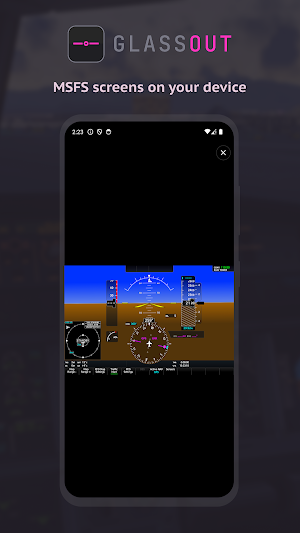
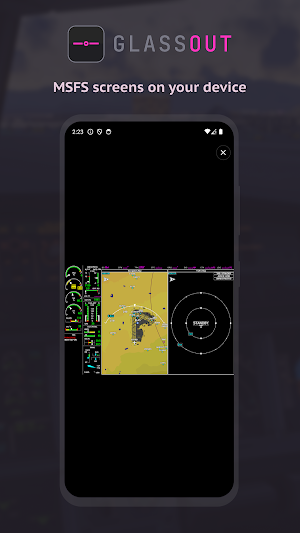
MSFS screens on your device
- Downloads
- 2.9K+
- on Google Play
- Price
- Free
- No in-app purchases
- Updated
- Sep 9
- 2026 · v1.15.3
Screenshots

About GlassOut
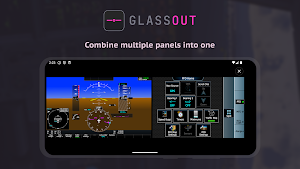
GlassOut turns your phone or tablet into an external instrument display for Microsoft Flight Simulator 2024 and 2020.
Pair the app with the GlassOut Engine running on your flight sim PC, and any panel — PFD, MFD, EICAS, FMC, radio stack, standby instruments — streams straight to your device over your local Wi-Fi. No capture cards, no screen-mirroring lag, no manual pop-outs.
GlassOut pulls panels directly from the simulator's rendering pipeline, so what you see on your device matches the sim pixel-for-pixel.
Perfect for:
- Home cockpit builders who want a dedicated tablet for each instrument
- Virtual pilots who run out of monitor space during IFR approaches
- Anyone who'd rather see their PFD on the external display
HOW IT WORKS
1. Install the GlassOut desktop app on your flight sim PC (glassout.flyingart.dev).
2. Launch Microsoft Flight Simulator and start a flight.
3. Open GlassOut on your phone or tablet while on the same Wi-Fi network. The app auto-discovers your PC, lists every available panels, and renders the one you pick full-screen.
FEATURES
- Auto-discovery of the GlassOut Engine on your local network (Bonjour / mDNS)
- Manual IP entry as a fallback
- Full-screen, locked panel viewer — no accidental swipes during flight
- Screen stays awake while a panel is active, sleeps normally in menus
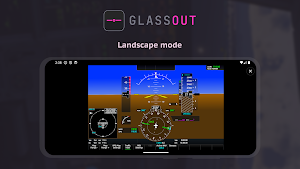
- Works in landscape and portrait, phone and tablet
REQUIREMENTS
- A Windows PC running Microsoft Flight Simulator 2024 or 2020
- The GlassOut Engine installed on that PC
- Your phone/tablet and PC on the same Wi-Fi network
GlassOut is made by a flight-sim enthusiast for flight-sim enthusiasts. Questions, bug reports, or feature requests: [email protected]
Pair the app with the GlassOut Engine running on your flight sim PC, and any panel — PFD, MFD, EICAS, FMC, radio stack, standby instruments — streams straight to your device over your local Wi-Fi. No capture cards, no screen-mirroring lag, no manual pop-outs.
GlassOut pulls panels directly from the simulator's rendering pipeline, so what you see on your device matches the sim pixel-for-pixel.
Perfect for:
- Home cockpit builders who want a dedicated tablet for each instrument
- Virtual pilots who run out of monitor space during IFR approaches
- Anyone who'd rather see their PFD on the external display
HOW IT WORKS
1. Install the GlassOut desktop app on your flight sim PC (glassout.flyingart.dev).
2. Launch Microsoft Flight Simulator and start a flight.
3. Open GlassOut on your phone or tablet while on the same Wi-Fi network. The app auto-discovers your PC, lists every available panels, and renders the one you pick full-screen.
FEATURES
- Auto-discovery of the GlassOut Engine on your local network (Bonjour / mDNS)
- Manual IP entry as a fallback
- Full-screen, locked panel viewer — no accidental swipes during flight
- Screen stays awake while a panel is active, sleeps normally in menus
- Works in landscape and portrait, phone and tablet
REQUIREMENTS
- A Windows PC running Microsoft Flight Simulator 2024 or 2020
- The GlassOut Engine installed on that PC
- Your phone/tablet and PC on the same Wi-Fi network
GlassOut is made by a flight-sim enthusiast for flight-sim enthusiasts. Questions, bug reports, or feature requests: [email protected]
What’s new
Version 1.15.3 · Updated September 9, 2026
- Improved connection handling on networks without internet access. - Clearer guidance when no panels appear, so you know what to check next.
User reviews

Downloaded the demo to see how it was going to work on my pc with msfs2024 and immediately ponied up the money for the full version. I've got two panels (PFD and MFD) running on an extra monitor on the pc and can move the EFB to either my tablet or phone. And I haven't noticed any additional frame drop or stuttering...
Alternatives to GlassOut
Looking for apps like GlassOut? Here are 6 similar Android apps on Google Play. All of them are free to download.
-
La Mega 98 FM
-
VUDU: Movies & TV
-
Bast: Tarot Reading & Learn
-
DreamCove - AI Creative Maker
-
Denny Caknan: Full Album Mp3
-
Cube Solver
| App | Rating | Price | Installs | Last updated | Compare |
|---|---|---|---|---|---|
| GlassOut | – | Free | 1,000+ | Sep 9, 2026 | |
| La Mega 98 FM | – | Free | 500+ | Jul 12, 2026 | Compare |
| VUDU: Movies & TV | – | Free | 5,000+ | Jul 2, 2026 | Compare |
| Bast: Tarot Reading & Learn | – | Free | 1,000+ | – | Compare |
| DreamCove - AI Creative Maker | – | Free | 100,000+ | Jul 24, 2026 | Compare |
| Denny Caknan: Full Album Mp3 | – | Free | 100+ | Apr 2, 2026 | Compare |
| Cube Solver | – | Free | 100+ | Oct 29, 2026 | Compare |
Compare GlassOut with the top alternatives: ratings, updates, ASO score and keyword gaps →
Similar apps on Google Play
- La Mega 98 FM
- VUDU: Movies & TV
- Bast: Tarot Reading & Learn
- DreamCove - AI Creative Maker
- Denny Caknan: Full Album Mp3
- Cube Solver
- Redbean: Character & Roleplay
- دراما تركية ـ مسلسلات تركية
- Emoji Kitchen: Mixer & Merge
- CLUE - Interactive AI Story
- Dancr: AI Dance & Motion
- Real Face: Symmetry & Celeb AI
- مسلسلات تركية حصرية
- Lovy: Roleplay AI Chat
- Televisi Indonesia Langsung
- Calc - Desktop Mate Widgets
- Life Motivation Quotes
- MultiConnect
- Mischief: AI Prank Photo/Video
- Ceresio Peaks Treasures
- Shop&Luck
- Renderly
- Abidjan Tontine
- Dragons mod for Minecraft PE
- New Flow Live