
Media File Explorer
XIDA GmbH Tools In-app purchases Contains ads
Powerful, customizable file explorer app
- Downloads
- 657+
- on Google Play
- Price
- Free
- In-app purchases
- Updated
- Oct 31
- 2026 · v1.1.6
Screenshots


About Media File Explorer
If you manage a lot of photos, videos, or audio files on your Android device, you know how quickly file management can become slow, cluttered, and frustrating.
Finding a specific file takes too long.
Folders grow out of control.
Simple tasks like selecting, editing, or moving files break your flow.
Media File Explorer is built for users who want **fast, reliable, and complete control** over their files — without complexity.
---
Why Media File Explorer
File management should not get in your way.
When browsing thousands of files feels sluggish, when search results are incomplete, or when basic actions require too many steps, productivity drops and frustration grows.
Media File Explorer removes this friction by combining speed, clarity, and powerful tools in one focused app.
---
What You Gain
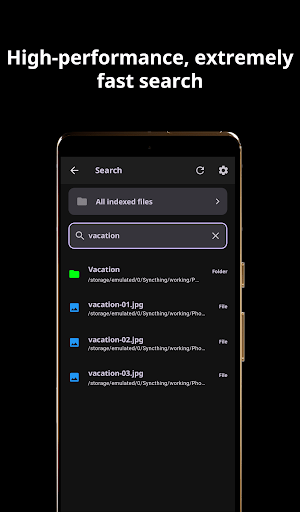
* Find files instantly with an extremely fast search, including history and autocomplete
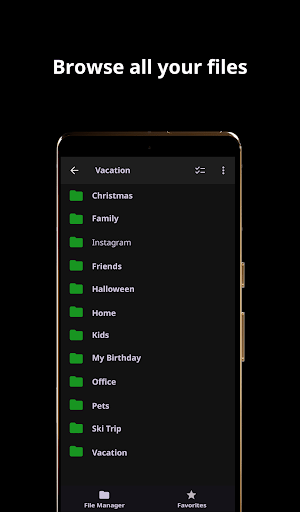
* Browse your entire file system with a clear, intuitive folder view
* Stay organized with favorites, filters, and smart selection tools
* Edit images directly without switching apps
* Handle large batches of files efficiently and safely
Everything works together to keep you focused and in control.
---
Features
Smart File Management
* Browse your full file system
* Create, rename, move, copy, share, or delete files and folders
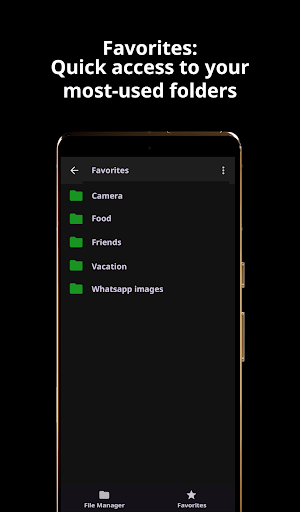
* Add favorite folders for instant access
* Use smart selection filters like “Select all from the same day”
Fast & Precise Search
* Search across storage instantly
* Search history and autocomplete
* Include or exclude specific folders
Powerful Image Editing
* Built-in editor: draw, add text, crop, rotate, apply filters and stickers
* Adjust brightness, contrast, hue, and more
* Save edits as new files or overwrite originals
Media Viewing
* Smooth photo and video playback
* Swipe navigation and pinch-to-zoom
* Quick sharing and detailed file information
Audio Support
* Play and manage audio files
* Supports many formats.
* Seamless playback
Batch Operations
* Select many files quickly
* Move, copy, share, or delete large groups
* Undo supported
Favorites & Customization
* Create, rename, reorder, import, and export favorites
* Light and dark themes
* List or grid view with multiple thumbnail sizes
* Font, icon color, hidden files, and performance settings
---
Privacy & Permissions
Media File Explorer requires **All Files Access** to function as a full file manager.
This allows viewing, opening, moving, copying, renaming, and deleting files across all folders — including outside standard media directories.
The permission is used **exclusively for file management**.
No data is collected, tracked, or shared.
---
Perfect For
* Photographers and creatives with large collections
* Music lovers with extensive audio libraries
* Users who want fast access, deep control, and customization
---
Download
Media File Explorer is optimized for all Android devices and performs smoothly even with thousands of files.
Download it now!
Finding a specific file takes too long.
Folders grow out of control.
Simple tasks like selecting, editing, or moving files break your flow.
Media File Explorer is built for users who want **fast, reliable, and complete control** over their files — without complexity.
---
Why Media File Explorer
File management should not get in your way.
When browsing thousands of files feels sluggish, when search results are incomplete, or when basic actions require too many steps, productivity drops and frustration grows.
Media File Explorer removes this friction by combining speed, clarity, and powerful tools in one focused app.
---
What You Gain
* Find files instantly with an extremely fast search, including history and autocomplete
* Browse your entire file system with a clear, intuitive folder view
* Stay organized with favorites, filters, and smart selection tools
* Edit images directly without switching apps
* Handle large batches of files efficiently and safely
Everything works together to keep you focused and in control.
---
Features
Smart File Management
* Browse your full file system
* Create, rename, move, copy, share, or delete files and folders
* Add favorite folders for instant access
* Use smart selection filters like “Select all from the same day”
Fast & Precise Search
* Search across storage instantly
* Search history and autocomplete
* Include or exclude specific folders
Powerful Image Editing
* Built-in editor: draw, add text, crop, rotate, apply filters and stickers
* Adjust brightness, contrast, hue, and more
* Save edits as new files or overwrite originals
Media Viewing
* Smooth photo and video playback
* Swipe navigation and pinch-to-zoom
* Quick sharing and detailed file information
Audio Support
* Play and manage audio files
* Supports many formats.
* Seamless playback
Batch Operations
* Select many files quickly
* Move, copy, share, or delete large groups
* Undo supported
Favorites & Customization
* Create, rename, reorder, import, and export favorites
* Light and dark themes
* List or grid view with multiple thumbnail sizes
* Font, icon color, hidden files, and performance settings
---
Privacy & Permissions
Media File Explorer requires **All Files Access** to function as a full file manager.
This allows viewing, opening, moving, copying, renaming, and deleting files across all folders — including outside standard media directories.
The permission is used **exclusively for file management**.
No data is collected, tracked, or shared.
---
Perfect For
* Photographers and creatives with large collections
* Music lovers with extensive audio libraries
* Users who want fast access, deep control, and customization
---
Download
Media File Explorer is optimized for all Android devices and performs smoothly even with thousands of files.
Download it now!
What’s new
Version 1.1.6 · Updated October 31, 2026
Improved: Transfer progress now shows your position in multi-file batches, remote folders refresh more reliably, and browser tabs keep their pages alive. Fixed: FTP disconnects are handled gracefully, and recoverable errors show Retry and Back options instead of a blank screen.
Alternatives to Media File Explorer
Looking for apps like Media File Explorer? Here are 4 similar Android apps on Google Play. All of them are free to download.



| App | Rating | Price | Installs | Last updated | Compare |
|---|---|---|---|---|---|
| Media File Explorer | – | Free | 500+ | Oct 31, 2026 | |
| SUMMERA AI | – | Free | 10+ | Sep 29, 2026 | Compare |
| Uttenreuth App | – | Free | 500+ | Dec 8, 2025 | Compare |
| Pizzeria bei Giovanni | – | Free | 500+ | – | Compare |
| Counter Deluxe | – | Free | 100+ | Apr 30, 2019 | Compare |