
Timesheet — Work Hours Tracker
Productivity In-app purchases Contains ads
Time clock for your own work hours — track overtime, log shifts, offline.
- Downloads
- 1.2K+
- on Google Play
- Price
- Free
- In-app purchases
- Updated
- Sep 16
- 2026 · v1.3.12
Screenshots


About Timesheet — Work Hours Tracker
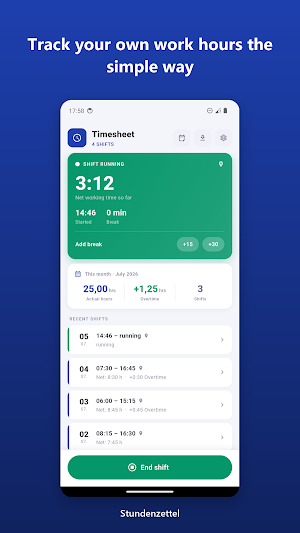
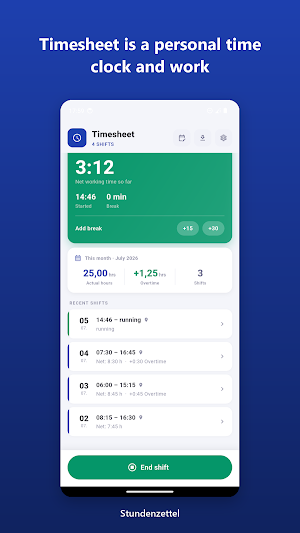
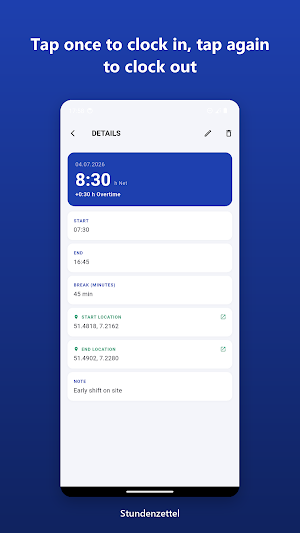
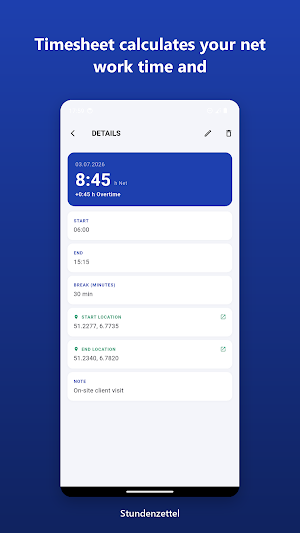
Tap once to clock in, tap again to clock out. Timesheet calculates your net work time and overtime against your personal daily target, so you always know where you stand. No team setup, no manager dashboard, no account — just your hours, on your phone.
⏱️ Tap to clock in and clock out for each shift
➕ Automatic net work time after breaks are deducted
📊 Overtime calculated against your own daily target
🗓️ Log breaks and add or edit past shifts manually
📄 Monthly summary plus a PDF work-time report for any month
📍 Optional GPS location stamp when you clock in or out — foreground only, no background tracking
🔒 100% offline, no account, no cloud — all your data stays on your device
WHY A PERSONAL RECORD
Keeping your own work hours log gives you a clear, contemporaneous record of the time you actually worked. Whether you are an hourly employee, a freelancer billing by the hour, or a mobile worker moving between jobsites, Timesheet helps you document shifts and overtime for your own files. In the US, accurate personal records are useful context around hourly pay and FLSA overtime. Timesheet documents your hours — it does not provide legal advice.
PRIVATE AND OFFLINE
Timesheet works 100% offline. There is no account, no cloud and no sign-up. All your data stays on your device. The optional GPS stamp runs only in the foreground while you clock in or out — there is no background tracking and no geofencing. Your location is never shared.
NO SUBSCRIPTION
Track as many shifts as you want with no limit. A one-time Premium unlock — not a subscription — adds monthly PDF export and removes ads. Pay once, keep it forever.
WHO IT IS FOR
— Hourly and shift workers tracking real hours
— Freelancers logging billable time
— Field and mobile workers recording jobsite hours
— Anyone who wants a private overtime tracker and work hours log
Simple, private, and built for one person — you. Download Timesheet and start tracking your work hours and overtime today.
What’s new
Version 1.3.12 · Updated September 16, 2026
New since the last version: • Working hours: choose working days, hours per day, spread weekly hours across the days • Hours account from a start date with opening balance; overtime in plus and minus, “Today so far” separate • Vacation, sick and public holiday as categories – count as target met • PDF preview with filters by period and category • New entries take the times from your settings • Everything readable with large text • Various technical adjustments and optimizations
Alternatives to Timesheet — Work Hours Tracker
Looking for apps like Timesheet — Work Hours Tracker? Here are 6 similar Android apps on Google Play. All of them are free to download.
-
UVV-Safe: Safety Inspections
-
Oldtimer-07er — Trip Logbook
-
Rehab Application Diary
-
Disability Log: Documentation
-
DU-Beamte: Service Fitness
-
BK-Log: Work Exposure
| App | Rating | Price | Installs | Last updated | Compare |
|---|---|---|---|---|---|
| Timesheet — Work Hours Tracker | – | Free | 1,000+ | Sep 16, 2026 | |
| UVV-Safe: Safety Inspections | – | Free | 1+ | – | Compare |
| Oldtimer-07er — Trip Logbook | – | Free | 10+ | Sep 15, 2026 | Compare |
| Rehab Application Diary | – | Free | 1+ | – | Compare |
| Disability Log: Documentation | – | Free | 10+ | Sep 2, 2026 | Compare |
| DU-Beamte: Service Fitness | – | Free | 0+ | Jul 23, 2026 | Compare |
| BK-Log: Work Exposure | – | Free | 0+ | Sep 23, 2026 | Compare |