

Affine 2D-Transformations
carolus7490 Education
The programme offers the graphical representation of affine transformations.
- Downloads
- 57+
- on Google Play
- Price
- Free
- No in-app purchases
- Updated
- Jan 4
- 2024 · v1.0
Screenshots
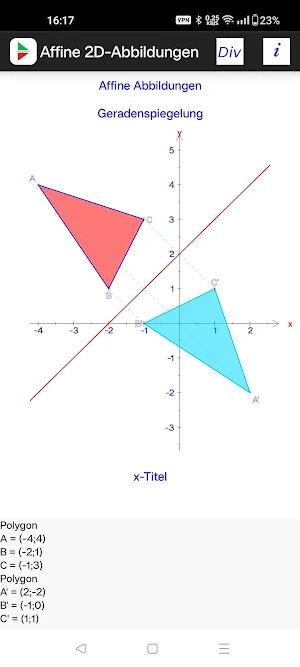
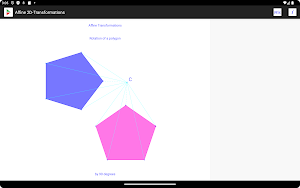
About Affine 2D-Transformations
The programme „Affine 2D-Transformations“ for Android offers the graphical representation of the affine transformations with points, vectors and polygons.
The following transformations (maps) are available:
1) Translation
2) Rotation
3) Reflection with respect to a line
4) Reflection with respect to a point
5) Scaling
6) Shear
7) General affine transformation
At first you create a point or a polygon using the main menu. Then you select a transformation from the list in the main menu, which leads you to an input dialog, where you specify the necessary data. In the case of point related transformations, the point will be created in the scene. The same holds for line related transformations, where the straight line will be created in the scene.
To map a polygon you tap on the surrounding line segments, which brings up a local menu. In this menu you select „Map by“. This shows a submenu with all transformations previously defined. After the selection the programme calculates the image and adds the corresponding polygon to the graphic.
Every inverse image can be moved in the coordinate system and all images will be adapted to the new situation.
You can show the location of the vertices in the text area by using the local object‘s menu.
There are 4 lines available, where you can place describing text. This may be helpful, if you intend to export the graphic as png-file on a SD-card using the corresponding entry in the main menu.
The whole graphic can also be saved in the programme‘s local memory in order to load it later.
The following transformations (maps) are available:
1) Translation
2) Rotation
3) Reflection with respect to a line
4) Reflection with respect to a point
5) Scaling
6) Shear
7) General affine transformation
At first you create a point or a polygon using the main menu. Then you select a transformation from the list in the main menu, which leads you to an input dialog, where you specify the necessary data. In the case of point related transformations, the point will be created in the scene. The same holds for line related transformations, where the straight line will be created in the scene.
To map a polygon you tap on the surrounding line segments, which brings up a local menu. In this menu you select „Map by“. This shows a submenu with all transformations previously defined. After the selection the programme calculates the image and adds the corresponding polygon to the graphic.
Every inverse image can be moved in the coordinate system and all images will be adapted to the new situation.
You can show the location of the vertices in the text area by using the local object‘s menu.
There are 4 lines available, where you can place describing text. This may be helpful, if you intend to export the graphic as png-file on a SD-card using the corresponding entry in the main menu.
The whole graphic can also be saved in the programme‘s local memory in order to load it later.
What’s new
Version 1.0 · Updated January 4, 2024
This is the first release.
Alternatives to Affine 2D-Transformations
Looking for apps like Affine 2D-Transformations? Here are 5 similar Android apps on Google Play. The highest rated is Alternating Current With RLC (3.6/5), and all 5 are free to download.


| App | Rating | Price | Installs | Last updated | Compare |
|---|---|---|---|---|---|
| Affine 2D-Transformations | – | Free | 50+ | Jan 4, 2024 | |
| Triangles | – | Free | 50+ | – | Compare |
| Alternating Current With RLC | 3.6 / 5 | Free | 10,000+ | Dec 16, 2023 | Compare |
| 2D-Graphs | – | Free | 100+ | Dec 16, 2023 | Compare |
| Analytic Geometry | – | Free | 1,000+ | Dec 29, 2023 | Compare |
| SOS-Stochastics | – | Free | 100+ | Dec 16, 2023 | Compare |