iNELS Home Control – Promo
iHC allows you to easily control iNELS intelligent electro-installation.
About iNELS Home Control – Promo
The application iNELS Home Control (iHC) provides you with an easy way to control the home & building automation iNELS using the smartphone or tablet. The application can be used to control the system from the internal network or remotely at any time via the Internet.
Use the Promo application to connect online to our showrooms in Prague, Holešov (Czech Republic) and Nitra (Slovakia).
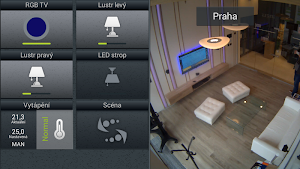
You can try out the following icons in the Prague showroom:
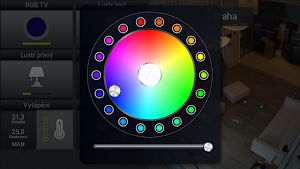
- RGB TV – short presses of the icon are used to switch the RGB LED strip behind the TV, RGB icon also includes the option of a long press, which brings up the dialog window for setting the color of the RGB LED strip
- Left chandelier, Right chandelier – short presses of the icon are used to switch the light sources on and off, long press of the icon will open the dialog window for setting the required intensity
- Heating - use short presses to switch between heating modes, and when setting a temperature higher than the current temperature, the icon will be illuminated
- Chandeliers on, Chandeliers off – scenarios by one click
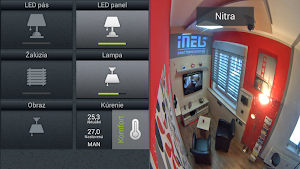
Functionality in the Nitra showroom:
- LED strip - short presses of the icon are used to switch the LED strip on and off in the ceiling
- LED panel, Lamp, Wall light - as opposed to switched circuits, the method of controlling dimmable icons also includes the option of a long press, which brings up the dialog window for setting the required brightness of the light source
- Shutters - use the icon to control the shutters in the window, the logic of control is very simple - use short presses to alternate between statuses up/stop/down/stop
- Heating
Functionality in the Holešov showroom:
- RGB TV
- LED panel
- Shutters
- Heating
- Scene 1 – use short press to switch TV and amplifier on and to adjust lighting atmosphere (it’s possible to use the scene icons once per 10s)
- Scene 2 – use short press to switch TV and amplifier off and to adjust lighting atmosphere (it’s possible to use the scene icons once per 10s)
Try controlling the application iNELS Home Control for yourself, and ask us anything you like about it at [email protected].
Similar Apps

iNELS
An addition to the family of mobile applications for controlling iNELS devices...

iNELS Home RF Control - Cloud
iNELS Home RF Control - Cloud (iHC) makes it easy to completely...
iNELS Home NFC Setter
Everyone already has a smart phone and therefore we have adapted the...

LARA Dio
The LARA Dio application is designed to control a LARA device which...
iNELS Home Control IR Mobile
Application iHC-MAIR universal controller for all Audio Video appliances (and air-conditioners /...
LARA NAS App
The application LARA NAS APP is an accessory to the intelligent electrical...
