
Status Saver – Save & Cleaner
ZS ProApps Tools In-app purchases Contains ads
Save status photos & videos and clean unwanted media with ease.
- Downloads
- 100+
- on Google Play
- Price
- Free
- In-app purchases
- Updated
- Sep 11
- 2026 · v1.0.7
Screenshots


About Status Saver – Save & Cleaner
Status Saver – Save & Cleaner by ZS ProApps combines status media saving with practical tools for managing and cleaning media on your device.
Save available status photos and videos, preview them in the app, share saved media, find duplicate files, review large media, and clean supported unwanted files — all from one simple app.
📥 STATUS SAVER
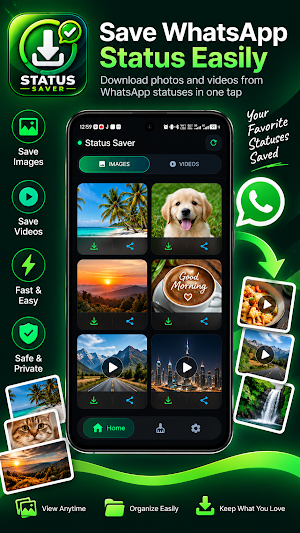
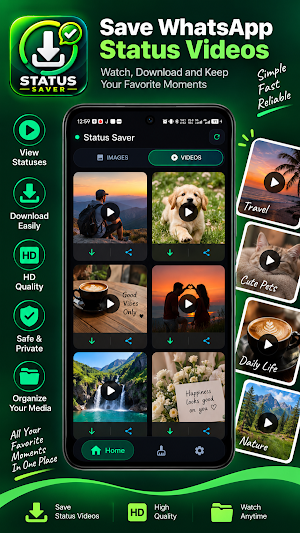
Save available status photos and videos to your device and keep the media you want to access later.
👀 VIEW & PREVIEW STATUS MEDIA
Browse available status photos and videos inside the app before saving them. Select the media you want and save it to your device.
📤 SHARE SAVED MEDIA
Share saved photos and videos with friends, family, or other supported apps directly from your device.
💾 ACCESS SAVED MEDIA
Once media has been saved to your device, you can view and manage it later without depending on the original status.
🧹 MEDIA CLEANER
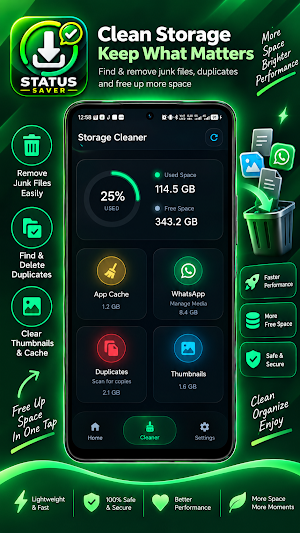
Review media that may be taking up unnecessary storage space. Depending on the files available on your device, the Cleaner can help you find:
• Unwanted images
• Unwanted videos
• Large media files
• Duplicate photos and videos
• Thumbnails and supported cache files
• Supported messaging-app media
• Other supported files
Review detected files before deleting them so you can decide what to keep and what to remove.
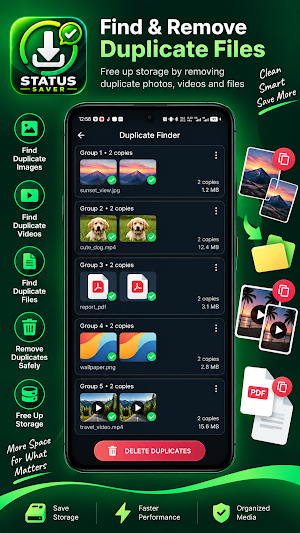
🔁 DUPLICATE FINDER
Find groups of duplicate or repeated images, videos, and supported files. Review the detected copies and select the files you want to remove.
📦 LARGE MEDIA
Identify large photos and videos that use significant storage space, then review them before deciding whether to remove them.
💬 MESSAGING-APP MEDIA
Manage supported media from messaging apps, including supported WhatsApp-related media. Review available images, videos, voice notes, audio, documents, stickers, and other supported files where available on your device.
⚙️ SIMPLE SETTINGS
Customize your experience with available app settings, including theme options, notifications, and the floating status saver bubble.
🔐 PRIVACY
Status media and files are processed on your device according to the permissions you provide.
The app does not intentionally upload your personal photos or videos to ZS ProApps servers as part of its core status-saving and cleaning functionality.
No account is required for the core functionality of the app.
For complete information about data handling, please review our Privacy Policy.
📱 HOW TO SAVE STATUS MEDIA
1. Open your messaging app and view the status you want to save.
2. Open Status Saver – Save & Cleaner.
3. Browse the available status photos and videos.
4. Preview the media you want to save.
5. Save the selected media to your device.
6. View or share the saved media whenever you want.
🧹 HOW TO CLEAN MEDIA
1. Open the Cleaner section.
2. Choose the type of media you want to review.
3. Allow the app to scan supported media.
4. Review the detected files.
5. Select the files you no longer need.
6. Delete the selected files.
⚠️ DISCLAIMER
Status Saver – Save & Cleaner is an independent application developed by ZS ProApps.
This app is not affiliated with, sponsored by, endorsed by, or officially associated with WhatsApp or Meta Platforms, Inc.
WhatsApp and its related names, trademarks, and logos belong to their respective owners.
The availability of media and files depends on your device, Android version, permissions, and the supported storage locations available to the app.
Users are responsible for ensuring that they have the necessary rights or permission before saving, using, reproducing, or sharing content.
Please respect the privacy, copyright, and intellectual property rights of content creators and other users.
Status Saver – Save & Cleaner
by ZS ProApps
Save available status photos and videos, preview them in the app, share saved media, find duplicate files, review large media, and clean supported unwanted files — all from one simple app.
📥 STATUS SAVER
Save available status photos and videos to your device and keep the media you want to access later.
👀 VIEW & PREVIEW STATUS MEDIA
Browse available status photos and videos inside the app before saving them. Select the media you want and save it to your device.
📤 SHARE SAVED MEDIA
Share saved photos and videos with friends, family, or other supported apps directly from your device.
💾 ACCESS SAVED MEDIA
Once media has been saved to your device, you can view and manage it later without depending on the original status.
🧹 MEDIA CLEANER
Review media that may be taking up unnecessary storage space. Depending on the files available on your device, the Cleaner can help you find:
• Unwanted images
• Unwanted videos
• Large media files
• Duplicate photos and videos
• Thumbnails and supported cache files
• Supported messaging-app media
• Other supported files
Review detected files before deleting them so you can decide what to keep and what to remove.
🔁 DUPLICATE FINDER
Find groups of duplicate or repeated images, videos, and supported files. Review the detected copies and select the files you want to remove.
📦 LARGE MEDIA
Identify large photos and videos that use significant storage space, then review them before deciding whether to remove them.
💬 MESSAGING-APP MEDIA
Manage supported media from messaging apps, including supported WhatsApp-related media. Review available images, videos, voice notes, audio, documents, stickers, and other supported files where available on your device.
⚙️ SIMPLE SETTINGS
Customize your experience with available app settings, including theme options, notifications, and the floating status saver bubble.
🔐 PRIVACY
Status media and files are processed on your device according to the permissions you provide.
The app does not intentionally upload your personal photos or videos to ZS ProApps servers as part of its core status-saving and cleaning functionality.
No account is required for the core functionality of the app.
For complete information about data handling, please review our Privacy Policy.
📱 HOW TO SAVE STATUS MEDIA
1. Open your messaging app and view the status you want to save.
2. Open Status Saver – Save & Cleaner.
3. Browse the available status photos and videos.
4. Preview the media you want to save.
5. Save the selected media to your device.
6. View or share the saved media whenever you want.
🧹 HOW TO CLEAN MEDIA
1. Open the Cleaner section.
2. Choose the type of media you want to review.
3. Allow the app to scan supported media.
4. Review the detected files.
5. Select the files you no longer need.
6. Delete the selected files.
⚠️ DISCLAIMER
Status Saver – Save & Cleaner is an independent application developed by ZS ProApps.
This app is not affiliated with, sponsored by, endorsed by, or officially associated with WhatsApp or Meta Platforms, Inc.
WhatsApp and its related names, trademarks, and logos belong to their respective owners.
The availability of media and files depends on your device, Android version, permissions, and the supported storage locations available to the app.
Users are responsible for ensuring that they have the necessary rights or permission before saving, using, reproducing, or sharing content.
Please respect the privacy, copyright, and intellectual property rights of content creators and other users.
Status Saver – Save & Cleaner
by ZS ProApps
What’s new
Version 1.0.7 · Updated September 11, 2026
• UI and performance improvements • Fixed bugs and improved app stability • Improved Cleaner scanning and file handling • Improved duplicate detection and cleanup reliability • Improved storage access and permission handling
User reviews

good for saving status. best app

best status saving app

Best for status saving
Alternatives to Status Saver – Save & Cleaner
Looking for apps like Status Saver – Save & Cleaner? Here are 6 similar Android apps on Google Play. All of them are free to download.
-
AdScope – AdMob Analytics
-
BuildMate Construction Calc
-
CleanSpace: Smart Cleaner
-
PDF Tools – Scan & Convert
-
Cashflow+ Secure Money Manager
-
Aura Wallpapers – HD & 4K
| App | Rating | Price | Installs | Last updated | Compare |
|---|---|---|---|---|---|
| Status Saver – Save & Cleaner | – | Free | 100+ | Sep 11, 2026 | |
| AdScope – AdMob Analytics | – | Free | 10+ | – | Compare |
| BuildMate Construction Calc | – | Free | 10+ | Jan 29, 2026 | Compare |
| CleanSpace: Smart Cleaner | – | Free | 100+ | – | Compare |
| PDF Tools – Scan & Convert | – | Free | 10+ | Feb 8, 2026 | Compare |
| Cashflow+ Secure Money Manager | – | Free | 10+ | Feb 27, 2026 | Compare |
| Aura Wallpapers – HD & 4K | – | Free | 100+ | – | Compare |