
Driver assistant - Oil Filters
zoujapps Auto & Vehicles Contains ads
Track car maintenance: oil & filters, smart reminders, auto odometer updates.
- Downloads
- 335+
- on Google Play
- Price
- Free
- No in-app purchases
- Updated
- Aug 14
- 2026 · v1.1.1
Screenshots


About Driver assistant - Oil Filters
Driver Assistant – Smart Vehicle Maintenance Tracker
A simple yet powerful app to keep your car, motorcycle, bus, or truck in top condition. Never miss an oil change or filter replacement again.
Key Features
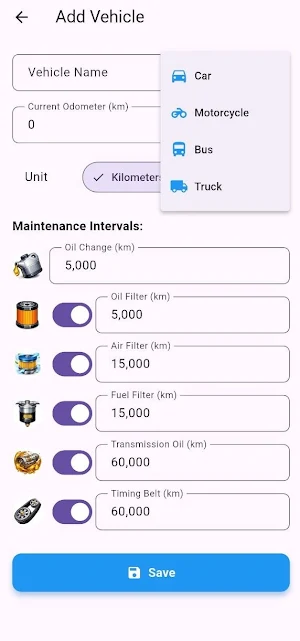
Multiple Vehicles – Add unlimited vehicles, choose custom icons (car, motorcycle, bus, truck), and manage each one separately.
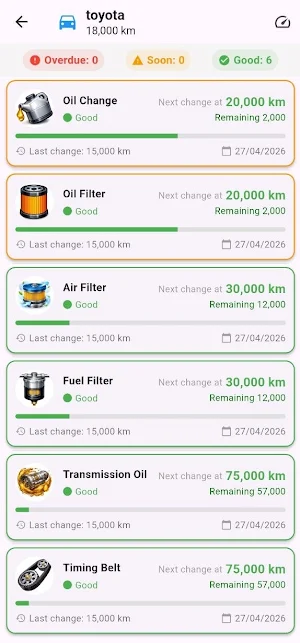
Maintenance Intervals – Set manufacturer-recommended intervals for oil change, oil filter, air filter, fuel filter, transmission oil, and timing belt. Disable items you don’t need.
Odometer Updates – Enter the current odometer manually, or set your daily average distance. The app will automatically add the daily mileage every day, even when closed.
Smart Reminders – Get a notification when any maintenance item is within 500 km (or miles). Reminders repeat every 48 hours until you record the service.
One‑Tap Service Recording – Tap any maintenance item, enter the new odometer reading, and instantly update the record.
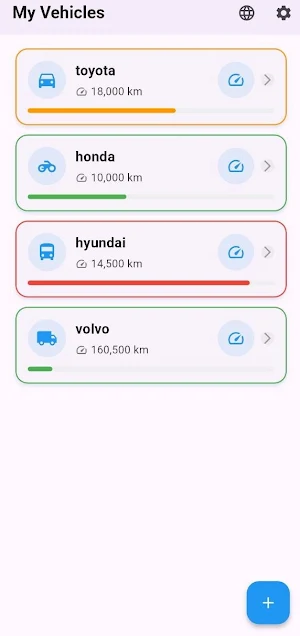
Visual Status – See at a glance whether each item is Good, Approaching, or Overdue with a colored progress bar.
Built‑in User Guide – Detailed instructions and tips inside the app to help you get started.
Modern Interface – Clean design, colorful icons, easy navigation, and support for multiple languages.
Background Intelligence
The app runs daily background updates (using your daily average) even when you don’t open it.
Notifications are reliable, thanks to integration with Android’s WorkManager.
All data stays on your device only – no cloud uploads, no privacy concerns.
Perfect for
Car and motorcycle owners
Fleet managers
Anyone who wants to prevent costly engine repairs through preventive maintenance
How to Use
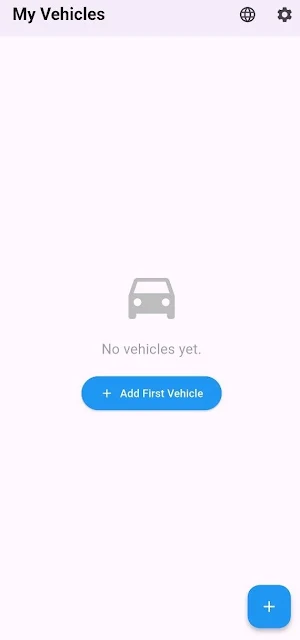
Tap the + button to add your first vehicle.
Enter the vehicle name, current odometer reading, and choose your preferred distance unit (km or mi).
Set the maintenance intervals (defaults are typical manufacturer recommendations; you can adjust them).
Provide your average daily distance – the app will then automatically advance the odometer every day.
View the maintenance dashboard for each vehicle. When you perform a service, tap the item, enter the new odometer reading, and confirm.
Why You’ll Love It
Never forget when to change your oil or replace a filter.
Extend your vehicle’s life through timely maintenance.
Save money by avoiding breakdowns and major repairs.
Contact
For support or questions, please email: [email protected]
Download Driver Assistant today and take control of your vehicle’s health.
A simple yet powerful app to keep your car, motorcycle, bus, or truck in top condition. Never miss an oil change or filter replacement again.
Key Features
Multiple Vehicles – Add unlimited vehicles, choose custom icons (car, motorcycle, bus, truck), and manage each one separately.
Maintenance Intervals – Set manufacturer-recommended intervals for oil change, oil filter, air filter, fuel filter, transmission oil, and timing belt. Disable items you don’t need.
Odometer Updates – Enter the current odometer manually, or set your daily average distance. The app will automatically add the daily mileage every day, even when closed.
Smart Reminders – Get a notification when any maintenance item is within 500 km (or miles). Reminders repeat every 48 hours until you record the service.
One‑Tap Service Recording – Tap any maintenance item, enter the new odometer reading, and instantly update the record.
Visual Status – See at a glance whether each item is Good, Approaching, or Overdue with a colored progress bar.
Built‑in User Guide – Detailed instructions and tips inside the app to help you get started.
Modern Interface – Clean design, colorful icons, easy navigation, and support for multiple languages.
Background Intelligence
The app runs daily background updates (using your daily average) even when you don’t open it.
Notifications are reliable, thanks to integration with Android’s WorkManager.
All data stays on your device only – no cloud uploads, no privacy concerns.
Perfect for
Car and motorcycle owners
Fleet managers
Anyone who wants to prevent costly engine repairs through preventive maintenance
How to Use
Tap the + button to add your first vehicle.
Enter the vehicle name, current odometer reading, and choose your preferred distance unit (km or mi).
Set the maintenance intervals (defaults are typical manufacturer recommendations; you can adjust them).
Provide your average daily distance – the app will then automatically advance the odometer every day.
View the maintenance dashboard for each vehicle. When you perform a service, tap the item, enter the new odometer reading, and confirm.
Why You’ll Love It
Never forget when to change your oil or replace a filter.
Extend your vehicle’s life through timely maintenance.
Save money by avoiding breakdowns and major repairs.
Contact
For support or questions, please email: [email protected]
Download Driver Assistant today and take control of your vehicle’s health.
What’s new
Version 1.1.1 · Updated August 14, 2026
• Enhanced ad loading performance and stability across all screens • Fixed rare crashes related to ad display and device orientation • Updated core dependencies for better security and Android 14+ compatibility • Optimized background tasks (reminders & backups) to save battery • Minor UI refinements for a smoother user experience
Alternatives to Driver assistant - Oil Filters
Looking for apps like Driver assistant - Oil Filters? Here are 6 similar Android apps on Google Play. All of them are free to download.




| App | Rating | Price | Installs | Last updated | Compare |
|---|---|---|---|---|---|
| Driver assistant - Oil Filters | – | Free | 100+ | Aug 14, 2026 | |
| Zlink Carplay aa | – | Free | 1,000+ | Apr 23, 2026 | Compare |
| mit - mobil | – | Free | 50+ | Nov 11, 2025 | Compare |
| GOST SPECTER AI | – | Free | 100+ | Feb 17, 2026 | Compare |
| Auto-era - katalog samochodów | – | Free | 50+ | Aug 24, 2026 | Compare |
| ASISTA | – | Free | 500+ | Aug 27, 2026 | Compare |
| ARC RIDE | – | Free | 5,000+ | – | Compare |
Similar apps on Google Play
- Zlink Carplay aa
- mit - mobil
- GOST SPECTER AI
- Auto-era - katalog samochodów
- ASISTA
- ARC RIDE
- HatidGo
- AmurMotors
- PlunkEV
- PlayRoad
- Geokontrol
- benzin.jetzt - Preisvergleich
- Cardrop - Parking Sharing
- Infiniti GPS
- JTECH TPMS NFC
- لنك للتوصيل السريع
- SuperAuto Rastreamento
- DKV InstantFuel
- mxCarz - Vehicle Management
- Arista Power
- FuelTech Vision
- Street Specs
- CAFlash N54
- RIKO Parts
- Stryi Public Transport