
Zonar OTAir for Cummins Engines
Zonar Systems, Inc. Auto & Vehicles
Zonar app to ensure Cummins engines perform optimally, send updates over-the-air
- Rating
- 4.9
- 12 ratings
- Downloads
- 1K+
- on Google Play
- Price
- Free
- No in-app purchases
- Updated
- Dec 7
- 2019 · v1.0.2
Screenshots
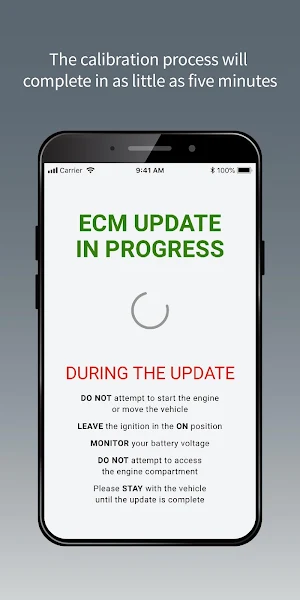

About Zonar OTAir for Cummins Engines
Reduce downtime and service center visits due to costly engine control module (ECM) updates with a convenient mobile app solution for fleet maintenance personnel and drivers. Zonar OTAir™ simplifies the calibration process for Cummins engines, reducing service downtime from up to three days to as little as five minutes.
Key features:
• Simple interface with clear instructions
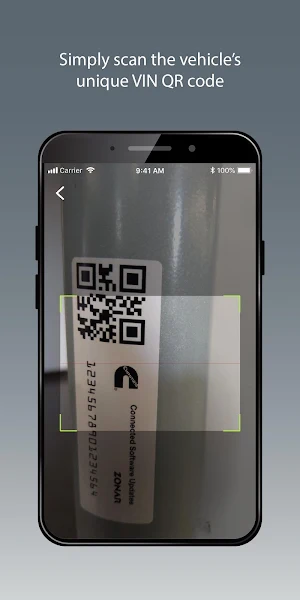
• In-app QR code scanner for VIN validation
• Software rollback feature if deployment issues occur
• Status updates display on the app during the calibration process
How it works:
Firmware updates available on your vehicle’s engines are automatically downloaded through the Zonar V4™ telematics box to the Cummins ECM. When it’s safe for the vehicle to be stationary, the driver:
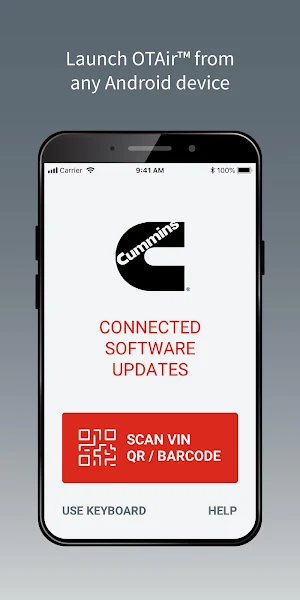
1. launches the Zonar OTAir mobile app
2. scans the vehicle’s unique VIN QR code (or enters it manually)
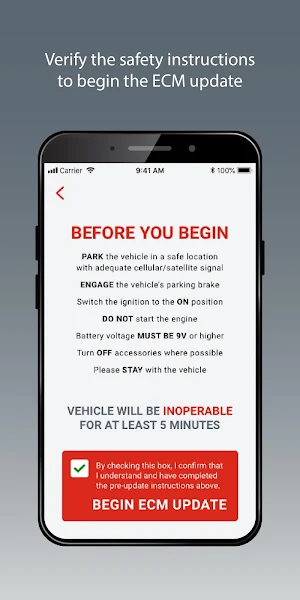
3. approves the calibration to begin the update
That’s it. Your Cummins-powered vehicle will be back on the road in minutes.
Requirements:
• Zonar V3™ or V4™ telematics unit installed on the vehicle.
• Subscription to Cummins Connected Software Updates. Contact Zonar at [email protected].
• 2017 or newer Cummins engine. See Cummins website for specific engine eligibility.
• Unique VIN QR code or barcode affixed to the vehicle (contact Zonar if you vehicle needs one).
Key features:
• Simple interface with clear instructions
• In-app QR code scanner for VIN validation
• Software rollback feature if deployment issues occur
• Status updates display on the app during the calibration process
How it works:
Firmware updates available on your vehicle’s engines are automatically downloaded through the Zonar V4™ telematics box to the Cummins ECM. When it’s safe for the vehicle to be stationary, the driver:
1. launches the Zonar OTAir mobile app
2. scans the vehicle’s unique VIN QR code (or enters it manually)
3. approves the calibration to begin the update
That’s it. Your Cummins-powered vehicle will be back on the road in minutes.
Requirements:
• Zonar V3™ or V4™ telematics unit installed on the vehicle.
• Subscription to Cummins Connected Software Updates. Contact Zonar at [email protected].
• 2017 or newer Cummins engine. See Cummins website for specific engine eligibility.
• Unique VIN QR code or barcode affixed to the vehicle (contact Zonar if you vehicle needs one).
What’s new
Version 1.0.2 · Updated December 7, 2019
Terms of Use: https://support.zonarsystems.net/hc/en-us/articles/360035387432-Zonar-OTAir-Mobile-App-Terms-of-Use Privacy Policy: https://support.zonarsystems.net/hc/en-us/articles/360035545412-Zonar-OTAir-Privacy-Policy
User reviews

OTAir works every time! It is so easy to use. I can update my engine anytime, anywhere. Love it!

Great

Great support and great piece of new technology!

Amazingly easy to use. Saves time and money!!!

This is one of the easiest apps I’ve ever used. Zero training and I updated my first engine in minutes. Great product!

Reliable app
Alternatives to Zonar OTAir for Cummins Engines
Looking for apps like Zonar OTAir for Cummins Engines? Here are 3 similar Android apps on Google Play. The highest rated is ThinkDriver (3.8/5), and all 3 are free to download.


| App | Rating | Price | Installs | Last updated | Compare |
|---|---|---|---|---|---|
| Zonar OTAir for Cummins Engines | 4.9 / 5 | Free | 1,000+ | Dec 7, 2019 | |
| MUCAR | 3.7 / 5 | Free | 100,000+ | Mar 9, 2026 | Compare |
| ThinkDriver | 3.8 / 5 | Free | 1,000+ | May 27, 2020 | Compare |
| Vehicle Maintenance Tracker | – | Free | 10,000+ | Sep 28, 2026 | Compare |