

LineAnimator: 2D Animation App
R7ia4917 Art & Design Contains ads
LineAnimator offers smooth, reliable 2D animation tools for mobile creators.
- Downloads
- 4.5K+
- on Google Play
- Price
- Free
- No in-app purchases
- Updated
- Jun 27
- 2026 · v1.3.0
Screenshots
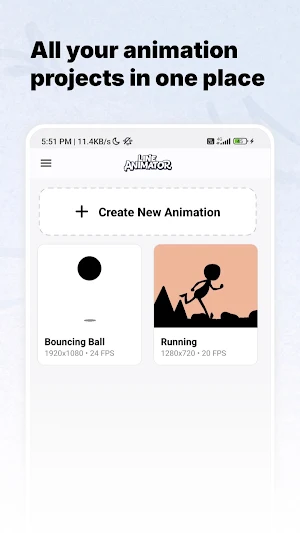
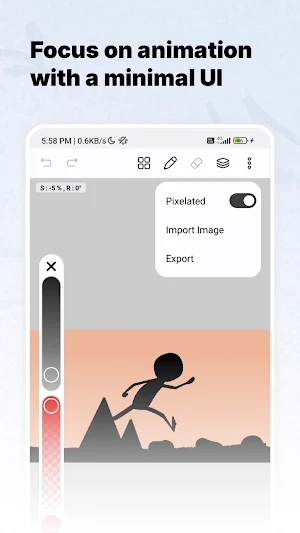
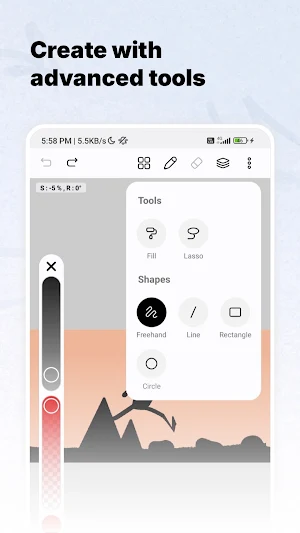
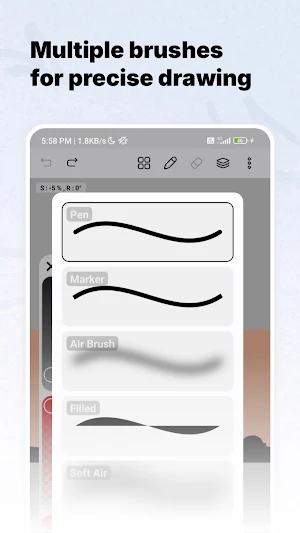

About LineAnimator: 2D Animation App
🎬 LineAnimator: 2D Animation Creator
LineAnimator is a lightweight yet powerful 2D animation app designed to help you create smooth, frame-by-frame animations with precision and ease. Built with a focus on performance, simplicity, and reliability, it provides essential tools that make animation accessible for beginners while still useful for experienced creators.
Whether you're an artist, student, or hobbyist, LineAnimator allows you to bring your ideas to life directly on your mobile device—anytime, anywhere.
✨ Key Features
🎞️ Frame-by-Frame Animation Timeline
Create detailed animations using an intuitive and responsive timeline. Easily add, duplicate, and manage frames for smooth motion and better control over your animation flow.
👁️ Onion Skin Support
Improve accuracy by viewing previous and next frames while drawing. This helps maintain consistent motion and smoother transitions between frames.
🧩 Layer-Based Workflow (Up to 3 Layers)
Organize your animation with a simple multi-layer system. Separate elements like characters, backgrounds, and effects for better control and editing.
🎨 Drawing Tools
• Multiple brush options for sketching, outlining, and detailing
• Lasso tool for selecting and editing specific areas
• Fill bucket for quick and efficient coloring
• Shape tools for creating clean geometric designs
🎯 Advanced Color Control
• HSVA color picker for precise color adjustments
• Eyedropper tool for accurate color selection from canvas
🖼️ Image Import Support
Import images directly into your project for reference, tracing, or animation overlays.
📤 Export Options
• Export your animations in MP4 format
• Full HD (1080p) resolution support
• Smooth playback at 30 FPS for professional-looking results
⚡ Performance & Design
• Lightweight and optimized for fast performance
• Works fully offline — no internet required
• Clean, minimal, and distraction-free interface
• Designed for smooth and consistent workflow
🎯 Use Cases
LineAnimator is perfect for:
• Learning and practicing animation fundamentals
• Creating flipbook-style animations
• Making short animated clips and sketches
• Rapidly prototyping animation ideas
• Experimenting with motion and storytelling
Start your animation journey today with LineAnimator — simple, fast, and built for creativity.
LineAnimator is a lightweight yet powerful 2D animation app designed to help you create smooth, frame-by-frame animations with precision and ease. Built with a focus on performance, simplicity, and reliability, it provides essential tools that make animation accessible for beginners while still useful for experienced creators.
Whether you're an artist, student, or hobbyist, LineAnimator allows you to bring your ideas to life directly on your mobile device—anytime, anywhere.
✨ Key Features
🎞️ Frame-by-Frame Animation Timeline
Create detailed animations using an intuitive and responsive timeline. Easily add, duplicate, and manage frames for smooth motion and better control over your animation flow.
👁️ Onion Skin Support
Improve accuracy by viewing previous and next frames while drawing. This helps maintain consistent motion and smoother transitions between frames.
🧩 Layer-Based Workflow (Up to 3 Layers)
Organize your animation with a simple multi-layer system. Separate elements like characters, backgrounds, and effects for better control and editing.
🎨 Drawing Tools
• Multiple brush options for sketching, outlining, and detailing
• Lasso tool for selecting and editing specific areas
• Fill bucket for quick and efficient coloring
• Shape tools for creating clean geometric designs
🎯 Advanced Color Control
• HSVA color picker for precise color adjustments
• Eyedropper tool for accurate color selection from canvas
🖼️ Image Import Support
Import images directly into your project for reference, tracing, or animation overlays.
📤 Export Options
• Export your animations in MP4 format
• Full HD (1080p) resolution support
• Smooth playback at 30 FPS for professional-looking results
⚡ Performance & Design
• Lightweight and optimized for fast performance
• Works fully offline — no internet required
• Clean, minimal, and distraction-free interface
• Designed for smooth and consistent workflow
🎯 Use Cases
LineAnimator is perfect for:
• Learning and practicing animation fundamentals
• Creating flipbook-style animations
• Making short animated clips and sketches
• Rapidly prototyping animation ideas
• Experimenting with motion and storytelling
Start your animation journey today with LineAnimator — simple, fast, and built for creativity.
What’s new
Version 1.3.0 · Updated June 27, 2026
- Faster export with optimized encoders - Beginner demo project - Improved UI & visual consistency - Added in-between frame insertion - Recent colors - New 9 handle image manipulation - Performance improvements - Bug fixes & stability improvements
Alternatives to LineAnimator: 2D Animation App
Looking for apps like LineAnimator: 2D Animation App? Here are 6 similar Android apps on Google Play. The highest rated is HiPaint: Sketch, Draw & Paint (4.3/5), and all 6 are free to download.
-
Brother Artspira 4.1
-
Hyph: Create With Real Music 4.3
-
GOGH: Animated Drawings
-
Logo Maker Design AI Generator 4.0
-
GenZArt: Fast AI Art Generator 4.2
-
HiPaint: Sketch, Draw & Paint 4.3
| App | Rating | Price | Installs | Last updated | Compare |
|---|---|---|---|---|---|
| LineAnimator: 2D Animation App | – | Free | 1,000+ | Jun 27, 2026 | |
| Brother Artspira | 4.1 / 5 | Free | 500,000+ | Oct 8, 2026 | Compare |
| Hyph: Create With Real Music | 4.3 / 5 | Free | 500,000+ | Nov 6, 2026 | Compare |
| GOGH: Animated Drawings | – | Free | 10,000+ | Oct 23, 2025 | Compare |
| Logo Maker Design AI Generator | 4.0 / 5 | Free | 500,000+ | Oct 21, 2026 | Compare |
| GenZArt: Fast AI Art Generator | 4.2 / 5 | Free | 100+ | Mar 23, 2023 | Compare |
| HiPaint: Sketch, Draw & Paint | 4.3 / 5 | Free | 5,000,000+ | Oct 13, 2026 | Compare |
Similar apps on Google Play
- Brother Artspira
- Hyph: Create With Real Music
- GOGH: Animated Drawings
- Logo Maker Design AI Generator
- GenZArt: Fast AI Art Generator
- HiPaint: Sketch, Draw & Paint
- Gencraft - AI Art Generator
- Fliki - AI Video Editor
- Stop Motion Studio
- Video AI -AI Video Creator
- Blend: AI Videos Logos Try On
- WOMBO Elections: AI Memes
- Photo Editor by BeFunky
- ArtFlow: Paint Draw Sketchbook
- Easy Draw Animals
- Eklipse: AI Gaming Clip Maker
- Dawn AI - Avatar Generator
- PixelFlow: Intro Video maker
- MediBang Paint:Draw Art, Comic
- ClayLab
- AI Video Generator: Voiser AI
- Sketchar AR Drawing Sketchpad
- WOMBO Dream - AI Art Generator
- Likcut
- invideo AI: AI Video Generator
- Sketch Pro: Draw & Create Art
- OctoStudio: Create-Code-Learn
- Drawing Desk: Learn to Draw
- Clony: AI Voice & Face Cloning
- Splice - Video Editor & Maker
- Camtronome - Pro Metronome
- Sora, by OverDrive Education
- Storyboard GO
- MagicLight:AI Long Video Maker
- Stop Motion Studio Pro
- AI Video Maker - Renderforest
- Avatarify: AI Face Animator
- BeatSync: Photo & Music Videos
- Picsart Animator: GIF & Video
- Node Video
- LightCut -AI Auto Video Editor
- ActionDirector - Video Editing
- Videoleap: AI Video Editor
- Promeo - Story & Reels Maker
- Spring - Video Editor & Maker
- FilmoraHD - AI Video Creator
- Fable - Kids' Story Creator
- PixKid AI for Kids & Education
- TF STUDIO
- ibis Paint
- AI Attractiveness Test-Facewow
- PicLumen
- Ardent Money Ninja Training
- Zendora: Hybrid Learning App
- Infinite Painter
- Raven AI: Create, Enhance, Ask
- MOVA - AI Video Generator
- AI Logo Maker, AI Design: Hexa
- Video Converter Pro
- Dopple.AI
- Make It - Create & play games
- Offtop Rap Studio & Song Maker