
錬金クエスト
GeekSalon Role Playing
A turn-based RPG game where you make weapons, defeat enemies, and collect materials.
- Downloads
- 10+
- on Google Play
- Price
- Free
- No in-app purchases
- Updated
- Jun 20
- 2022 · v0.1
Screenshots
About 錬金クエスト
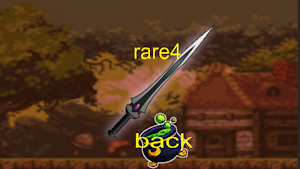
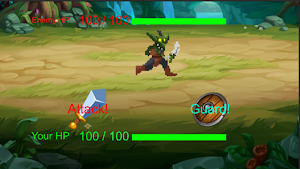
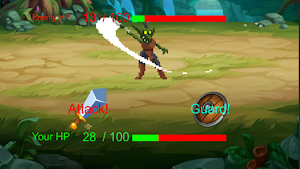
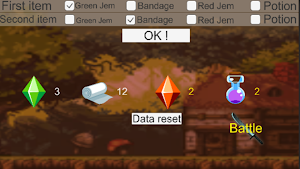
First, select the material you want to use from the two fields above and press the "OK!" Button. By doing so, you will be able to acquire weapons and move on to the combat part. In the battle part, the player attacks first. The attack power is derived from the weapon made by the player and reflects the attack power of the strongest weapon you have. Enemies rarely make very strong attacks. If you set the enemy's HP to 0 first, you win. If you win the battle, drop the item. If you lose, you just drop nothing and there is no particular penalty. It is impossible to select items that you do not have in the alchemy part. Also, the item on the right makes it easier to make a weapon with a high degree of rare. The "Data reset" button resets all the items and weapon elements you have.
Play today's Sudoku puzzle
A quick 6×6 Sudoku every day; levels grow to the classic 9×9. A free daily puzzle from Fiplay, same board for everyone. It plays right here, no download.
Alternatives to 錬金クエスト
Looking for apps like 錬金クエスト? Here are 6 similar Android apps on Google Play. All of them are free to download.





| App | Rating | Price | Installs | Last updated | Compare |
|---|---|---|---|---|---|
| 錬金クエスト | – | Free | 10+ | Jun 20, 2022 | |
| LongNeck | – | Free | 1+ | Sep 20, 2023 | Compare |
| ペンギンの冒険 | – | Free | 1+ | Sep 14, 2023 | Compare |
| dream | – | Free | 10+ | Jun 19, 2023 | Compare |
| Switch Your Hairstyle! | – | Free | 5+ | Mar 19, 2023 | Compare |
| EscapeFromYokosuku | – | Free | 5+ | – | Compare |
| Salmon Run | – | Free | 50+ | Dec 28, 2022 | Compare |
Compare 錬金クエスト with the top alternatives: ratings, updates, ASO score and keyword gaps →
Similar apps on Google Play
- LongNeck
- ペンギンの冒険
- dream
- Switch Your Hairstyle!
- EscapeFromYokosuku
- Salmon Run
- Montower
- 葉っぱさん
- Horror Avoid Game
- GameLabo
- 爆テリアンズ!
- Extermination of rats
- Black Window
- Project I
- おさかな天国
- World Conquest
- EtoileShooter(エトワールシューター)
- 避けてとる
- Escape from monsters
- SLYME ADVENTURE
- 心内治療
- The Lost Age
- Robotiksu -N-02AKR-
- your type?
- Bird Party
- City Rider
- Grab a dream
- 奥州街道珍道中
- Flying Raptor?
- Evil Hero
- Harapeko Dash
- No 毛!の人生
- Go for the Goal!
- bird mystery
- ことりのいたずらんど
- CAn'T SLEEP
- 少年から逃げのびろ!
- ZUMI RIDER
- Escape From the Pitchy Forest
- 現代社会戦士
- FHG ~Funny Horror Game~
- Tap de おそうじ
- Balloon Up
- DAIPAN
- My earth
- PointGet
- TureetGame
- Shooting Demon
- Outdoor Panic
- Common Wars
- 雨の女王
- エイリアンアタック
- SNOW! 雪山大滑走!!
- サッカRUN
- nomouze!
- Nicotine
- ダンシング政見放送
- UniHo
- ミカタヲタスケロ
- BIKE RUN
- 未来永劫魔法少女回帰
- yxf
- 手
- Bactertial Adventure
- パン犬-Panken-
- Let's T@lk
- Hit from the old man
- Black Christmas
- Scalar Tactics
- TeaTime
- 竜より速いヒナなんて...
- MomoMonga
- マインスイーパー 楽しい!手軽に遊べる!頭脳派ミニゲーム
- かわいく射的!動物たちと遊ぼう!