
זמן איכות
LionRocketGames Productivity Contains ads
Disconnect from the screens, block out distractions, and be present in the moment with the people who really matter to you.
- Downloads
- 10+
- on Google Play
- Price
- Free
- No in-app purchases
- Updated
- Sep 24
- 2026 · v0.1.192
Screenshots
About זמן איכות
In a world full of digital distractions, Quality Time is the perfect tool to help you be present in the moment with the people who really matter to you. Whether you’re playing with the kids, having a family dinner, or just need a moment of quiet, the app helps you put your phone away and build healthier digital habits.
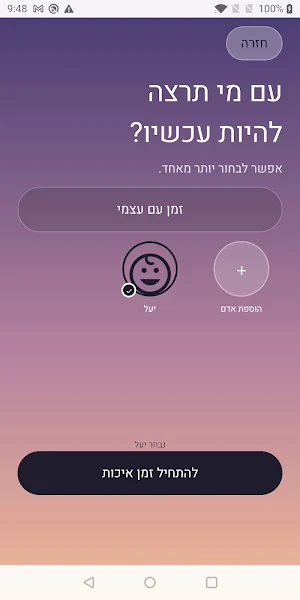
Instead of rigid blocking that frustrates, Quality Time uses a “conscious friction” approach. Choose who you spend time with, block the apps that distract you the most, and track your real, continuous time.
Key features:
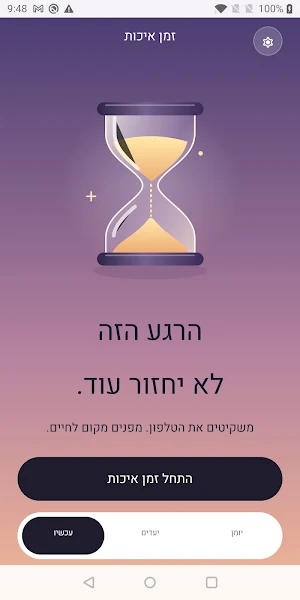
• Smart app blocking: Block access to distracting apps (like social media or games) while your session is on.
• Green and yellow mode: Choose “green mode” for 100% deep focus, or “yellow mode” for times when you’re babysitting and need to be partially available.
• Smart Lock Screen Notifications: Keep your phone locked in your pocket. A permanent, elegant notification on your lock screen reminds you that you’re in the middle of a session, without having to unlock your device and be tempted by distractions.
• No-Fraud “Net Time”: Need to log in to Instagram despite being blocked? No problem, but the timer will automatically stop until you return. The app only counts your actual time together.
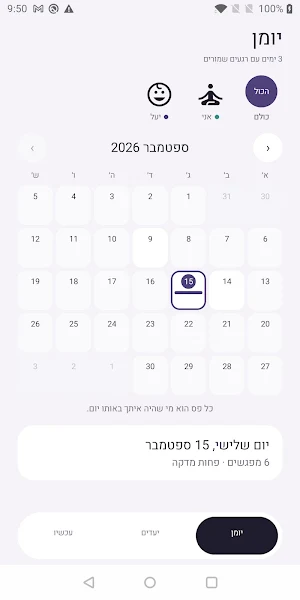
• Goals and Statistics: Set weekly time goals for each person in your life and track your progress with clean, minimalist progress rings.
• Privacy Above All: All your data, goals, and session history are stored locally and securely on your device only.
AccessibilityService Usage. Quality Time uses the Android AccessibilityService API solely to detect which app is currently in the foreground, so that during a self-started focus session it can display a block screen above the apps you’ve chosen to block. The service does not read, record, or transmit screen content, keyboard keystrokes, notifications, or any other information displayed on the screen, nor does it change settings or act on your behalf with other apps. The service only works when a focus session you started is active, and can be turned off at any time via Android Settings -> Accessibility.
Instead of rigid blocking that frustrates, Quality Time uses a “conscious friction” approach. Choose who you spend time with, block the apps that distract you the most, and track your real, continuous time.
Key features:
• Smart app blocking: Block access to distracting apps (like social media or games) while your session is on.
• Green and yellow mode: Choose “green mode” for 100% deep focus, or “yellow mode” for times when you’re babysitting and need to be partially available.
• Smart Lock Screen Notifications: Keep your phone locked in your pocket. A permanent, elegant notification on your lock screen reminds you that you’re in the middle of a session, without having to unlock your device and be tempted by distractions.
• No-Fraud “Net Time”: Need to log in to Instagram despite being blocked? No problem, but the timer will automatically stop until you return. The app only counts your actual time together.
• Goals and Statistics: Set weekly time goals for each person in your life and track your progress with clean, minimalist progress rings.
• Privacy Above All: All your data, goals, and session history are stored locally and securely on your device only.
AccessibilityService Usage. Quality Time uses the Android AccessibilityService API solely to detect which app is currently in the foreground, so that during a self-started focus session it can display a block screen above the apps you’ve chosen to block. The service does not read, record, or transmit screen content, keyboard keystrokes, notifications, or any other information displayed on the screen, nor does it change settings or act on your behalf with other apps. The service only works when a focus session you started is active, and can be turned off at any time via Android Settings -> Accessibility.
User reviews

אפליקציה מדהימה! איך עד היום לא היה משהו כזה? כיף להיות עם הילדים בלי הסחות דעת, בלי גלילה מיותרת פתאום אתה שם לב כמה פעמים אתה פותח את הטלפון סתם ככה, תודה !!
Alternatives to זמן איכות
Looking for apps like זמן איכות? Here are 6 similar Android apps on Google Play. All of them are free to download.





| App | Rating | Price | Installs | Last updated | Compare |
|---|---|---|---|---|---|
| זמן איכות | – | Free | 10+ | Sep 24, 2026 | |
| סלט מילים | – | Free | 1+ | – | Compare |
| Intuition | – | Free | 100+ | Apr 5, 2026 | Compare |
| Traffic Mind | – | Free | 1,000+ | Mar 20, 2026 | Compare |
| נחש אותה | – | Free | 100+ | Feb 12, 2026 | Compare |
| PictureThatSong - Music Trivia | – | Free | 100+ | Feb 15, 2026 | Compare |
| שיר בתמונה | – | Free | 10,000+ | Mar 28, 2026 | Compare |
Compare זמן איכות with the top alternatives: ratings, updates, ASO score and keyword gaps →